Monday, November 18, 2013

Oscilloscope watch

The watch for the electronic geek. All the features of a watch combined with an oscilloscope and a waveform generator. I've signed up to fund the Kickstarter project which has reached it's goal - happy days!


Features:

  • Mixed Signal Oscilloscope: Simultaneous sampling of analog and digital signals.
  • Advanced Trigger: Normal / Single / Auto, with rising or falling edge and adjustable trigger level.
  • Meter Mode: Average, Peak to peak and Frequency readout.
  • XY Mode (Plot Lissajous patterns or see the phase difference between two waveforms).
  • Spectrum Analyzer with different windowing options and selectable vertical log.
  • Horizontal and Vertical Cursors with automatic waveform measurements.
  • Arbitrary Waveform Generator with Sweep on all parameters.
  • Display options: Persistence, Different grid options, and more.
  • Curve tracer function
I'm signed up as an International Beta Tester. The Beta Testers will receive a prototype as early as December, and a production unit with all accessories in May. Beta Testers will be expected to be involved with the design and report bugs along the way. Apparently this prototype will initially not work, but will start to work as firmware is developed. The prototype hardware may need changes so you might need to do some soldering. The case will be 3D printed with the current prototype design. Come May 2014 the production units will be available and so I intend to do some video blogging as soon as I receive the prototype and keep with it all the way through to the final version.

Thursday, October 31, 2013

Too busy to blog!

I'm snowed under; long days helping a big facility to move premises. I've tried to take half term off too spend time with Sarah and James (the only boy left at home since his brothers went to Uni last month) but have wound up working two days so far this week - ho hum.

So; here are just a few technical things I had to get off my chest.
  • If you use a Blackmagic Ultrastudio Express (I do - it's a a great way of playing out HD/SDi for demo'ing equipment, calibrating monitors and displaying training material) then be aware that the current version of the app/driver (v. 9.8 currently) is very unstable on OS-X 10.9 Mavericks - use the previous version 9.7.8 instead - all here.
  • Do you ever need to demo/test DolbyE encoded material - this is the clip I use (from my pals at National Geographic)
  • Do you ever need to do audio shuffling within an HD/SDi signal - shuffle, adjust levels, correct phase reversals, delay (up to 2,400mS), maybe apply dynamics? The most effective way I've ever found of doing this is with an AJA HD10AM, a Yamaha 0196V and the MY8AE option card; £2.5k for full control of two audio groups within an SDi stream; You couldn't do that with anything from Bel, Snell & Wilcox, TC Electronic or any other manufacturer of audio processors.
  • Hard drives - "MTBF= 30k hrs"; inter-quartile range is where >50% of HD fails occur. A few last 100k hrs, some only 2hrs as I discovered when the replacement cloned hard drive in my media computer failed after a couple of hours of use. Thankfully I'd cloned it twice! Don't trust spinning hard drives. A motto for our age should be "Friends don't let friends use RAID5"!
That's it, Christmas can't come soon enough!

Sunday, October 06, 2013

Windows remote desktop for Raspberry Pi

It's not very open-source/Linux but the best remote desktop I've found so far for the Pi is the venerable Windows RDP (Citrix Winframe or whatever else you want to call it). I know you should be able to run an X-server and all would be well but I haven't been able to find a nice combo that works across all my Windows, Mac and Linux boxes; RDP is the only lingua franca.

So - to set it up on the Pi;

  1. Start up your Pi to the terminal prompt. 
  2. Type the following command "sudo apt-get install xrdp"
  3. If promoted enter your password (the default is "raspberry")
  4. Type "Y" and press enter.
  5. This is now installing xrdp onto your Pi which is the software we are going to use for the remote desktop connection.  Wait for it to complete.
  6. Restart your Pi.  We are going to check that xrdp is going to start up automatically.
  7. When your Pi has booted to the command prompt look for [ ok ] Starting Remote Desktop Protocol server : xrdp sesman.  This shows you that xrdp is installed and automatically starting up on start up of your Pi
It takes best part of half an hour to extract and install but once running it's the most responsive experience - far better than VNC and even better than Apple remote desktop. Not quite as good as sitting at the machine (or over an Amulet/Teradici network connection) but excellent none the less. 

If you want to get to it via your router or firewall open one port - TCP; 3389.
Client for OS-X, Client for most Linux versions.

An alternative guide from May 2016;
http://www.circuitbasics.com/access-raspberry-pi-desktop-remote-connection/

Thursday, September 12, 2013

Avid, KVM systems and the cry of "...not fit for purpose"!

There are several things that happen when you plug a monitor into a graphics card. I'm assuming DVI (this is the 21st century!) and all other displays standards; HDMI, DisplayPort and Thunderbolt all follow a similar principle.
  1. Pin 16 on the DVI connector on the graphics card is refereed to as the "hot plug detect" pin and is held logic-high (at +5v) through a very high value resistor. When you attach a monitor the pin is momentarily taken low to alert the graphics card to the fact that a monitor has been connected. 
  2. The graphics card generates an interrupt on the PCI-e bus
  3. Windows sees this and uses it to generate an EDID exchange request
  4. The monitor responds with it's EDID profile
  5. If the EDID profile is the same as last time the graphics card driver does nothing; it's the same monitor after all
  6. If the EDID is different the driver re-sets the system resolution - this is particularly important if it's either a lower resolution or frame rate than it was running at before; if it didn't do this you'd get black screens. Nobody wants that.
Now then, Avid Media Composer does something different! It listens for the interrupt and when it sees it it halts operation and displays an error message saying it needs to re-start. Even if all that has happened is that your monitor cable has fallen out of the back of the computer and you've reconnected it - go figure.

The upshot of this is that when you're using a KVM routing solution of any kind and you assign a new pair of monitors to the Avid it insists on re-starting. I've been aware of this for a while and I let people know about it when demo'ing or presenting at trade shows; but it's just the way of things. There is nothing you can do whilst Avid does the wrong thing. Amulet - my favorite KVM-over-IP system does exactly the right thing; it holds off asserting pin-16 (and triggering the chain of events above) only when absolutely necessary. A media operator can be switching around four Media Composers and each workstation is unaware that the operator is being promiscuous. Amulet only asserts pin-16 when there really is no other option; when a new desk-end "zero client" takes control of a machine it hasn't yet seen. The only place I've seen this to be a problem so far is when an editor starts a layback to videotape, presses disconnect on his desk-end zero-client and calls his operator saying "...I've started the layback, I'm off home; can you watch it through to the end?". Then, the operator tries to acquire that Avid and by necessity the Amulet has to alert the computer to a new pair of monitors and Media Composer halts (ruining the layback).

This was the issue at ITV Salford and I home-brewed a little gadget to stop the Avid being able to tell when new monitors where attached; I essentially neutered it's ability to detect pin-16. 
So, I think Amulet does exactly the right thing, if it didn't you'd loose the ability for workstations to detect what monitors were attached and pretty soon you'd have rooms where you had black screens; nobody wants that. The bogeymen here are;
  • Avid - why on earth doesn't it do what Windows does?
  • Editors who don't watch their own laybacks!
We are now in an argument with a customer who I explained this all to when I was demo'ing Amulet, but we didn't win the SI quote, but we still supplied the KVM. The SI who is installing is shouting blue-murder about "...not fit for purpose" and we're having to brew up 150 adaptors to keep everyone sweet. My feeling is this will cause more trouble further down the line just for the ability to not close an Avid project for those occasions when you need to hand a machine off to someone else. What kind of workflow needs that?!

Thursday, September 05, 2013

Technologies that made the difference in Television

Will Strauss (writing for Broadcast Magazine) asked me for a couple of ideas for an article he was putting together; you can read it here. My Engineer's Bench collaborator Hugh Waters got in with SMPTE timecode.


The original ideas I sent to him were;

  1. The Mostek MK4096 Dynamic RAM chip (and subsequent MK4196 16k DRAM) was the enabling technology that allowed construction of all early digital video devices in the seventies; TBCs, Framestore Synchronisers and Digital Video Effects (ADO, Quantel 5000, Squeeze-Zoom etc) - being dynamic memory these chips required constant refreshing but the nature of video is that the store is constantly being read to make the next line or frame of video. The chips were fast enough that once multiplexed in banks of (typically eight) video pixels at around 75nS clock could be stored. Without DRAM there would have been no picture-in-picture, no timebase correction, no standards conversion, no digital video effects and no digiscan telecines.
  2. The Discrete Cosine Transform - as a mathematical technique for transforming pixels into frequency distributions the DCT doesn't actually provide any reduction in data for digital TV signals but it does then allow all manner of compression to take place. MPEG2 in the nineties allowed DVD, Transmission servers and DVB-T and DVB-S powering the first wave of standard-definition digital television. In the noughties MPEG4 and later variants (H.264, AVC etc) allowed HD pictures to be compressed to data rates unthought-of previously. Most contemporary video compression starts with the DCT.
  3. Pixel and even frame-free video(!) - this will be the enabling technology of the next decade that will usher in ultra-high-definition TV. Prof Phil Willis of Bath University is pioneering work that will make video a descriptive object technology rather than pixels, lines and frames. Once divorced from set resolutions and framerates it will be up to the display device to render the vectors, contours and shaders at whatever resolution and framerate the device supports.

Sunday, September 01, 2013

Using a DD-WRT router to NAT between two wireless segments

I've mentioned DD-WRT firmware in the past - it's an open-source replacement firmware for lots of cheap domestic internet routers. If the stock firmware on your router isn't doing it for you or you just want to see what all the fuss is about it is a superb way to make your £50 beige plastic router really sing; enterprise level network control for not much effort. It can terminate VPNs, do QOS and lots of the things you'd normally expect from a Cisco business class device.
Not all routers can take a different firmware image, but if yours is based on the Broadcom 54G chipset (an awful lot are) then you're away to the races; otherwise it's £15 on eBay!

Now then, my two eldest boys are away to university this month and it turns out that one of them is going to live in a student house that only has WiFi - I intended that they would both take DD-WRT routers with them to isolate their little dorm-room networks from IT ne'er do wells (NAT - Network Address Translation, the kind you get with a router, is an excellent defense against port-scanners). BUT, without a wired connection to place on the WAN side of the router how do you isolate and provide both wired and wireless connections behind the router's firewall? My first thought was to buy one of those "connect your Sky+ box Ethernet to your WiFi" adapters. It would turn the insecure WiFi into a wired connection that would sit on the WAN side of the router. 
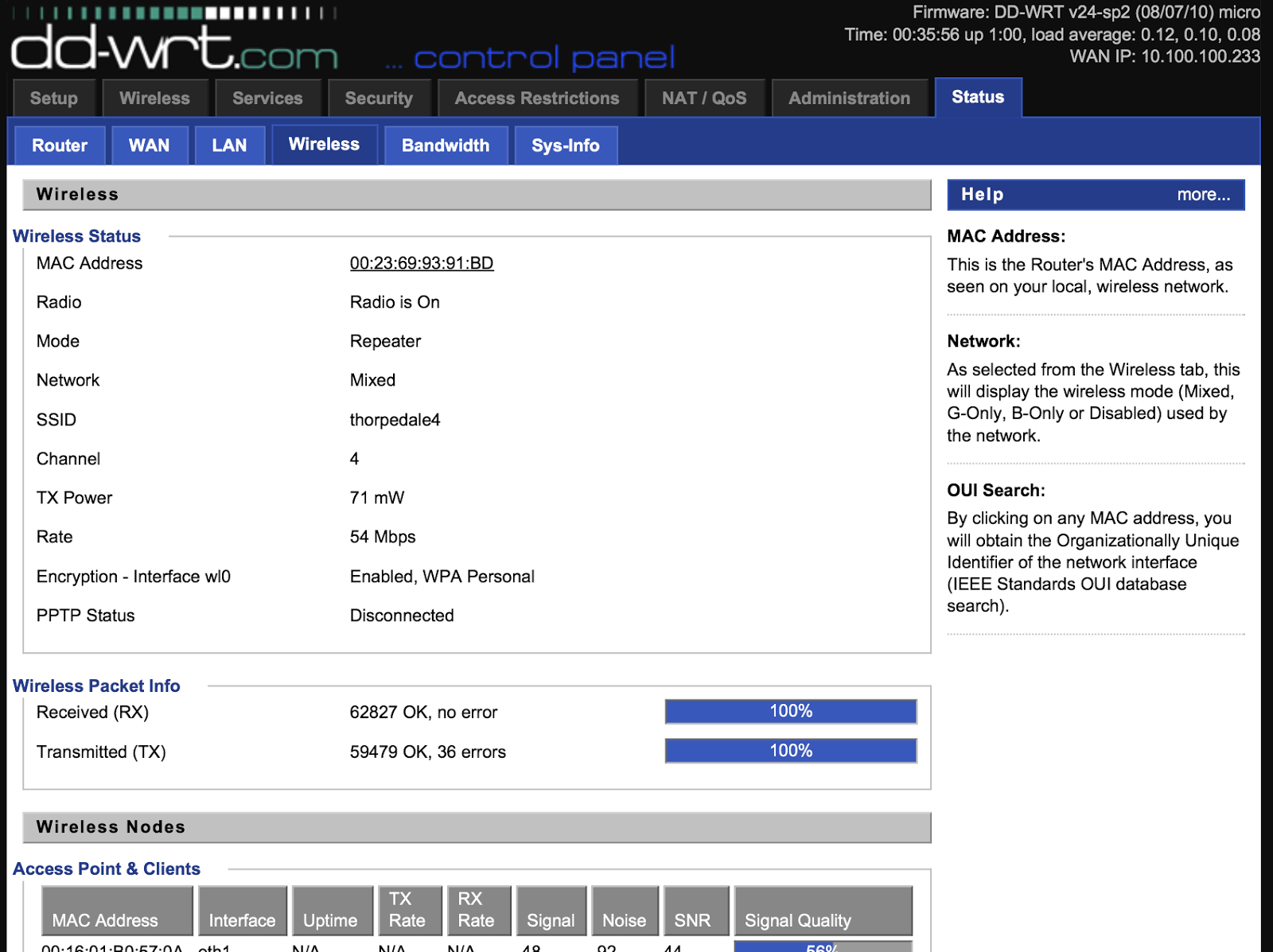
BUT, it's one more thing to go wrong and I was sure that DD-WRT could do it with a bit of tinkering. I looked at a few of the guides online and they were very convoluted with warnings about obscure settings causing trouble and so I decided to figure it out from scratch. It went surprisingly well and now I have a Linksys router that can attach to an existing WiFi access point and then NAT that connection through to another WiFi segment as well as the wired RJ45 links.
So, couple of things to point out.
  • My home WiFi's SSID is thorpedale4 and the IP range is 10.100.100.x (.8 is the router)
  • I wanted all the hosts on the other side of the Linksys to be on a 192.168.1.x network
First up - I set the Linksys to not be an Access Point but to be a client wireless device (taking baby steps; I just wanted to make sure I could attach it to the house WiFi)


This is done under wireless>basic settings>wireless mode and is set to client and then go to wireless security and make sure you've entered the necessary settings (WPA key etc)
Reboot the router and check it is connecting to the external WiFi - see above. After this make sure you can get out to the internet from a wired connection on the Linksys. At this point the Linksys will be passing back all protocols to the main router and so you'll find the laptop is on the same IP range as the main network and there is no link-isolation (no firewall between the two networks) - we're not there yet!

Next, set the wireless>basic settings>wireless mode to repeater and add in a second virtual wireless interface (this will be your new wireless segment);


Then set up the security - again, the first is for the wireless you're attaching to;


BUT, the second is for the new network you're creating. As the router is now in repeater mode the new wireless segment is on a separate IP subnet (found in the setup>basic settings tab) and by default on the 192.168.1.x segment. The same applies to the wired connections on the Linksys - job done!

Attaching to the new network is as you'd expect;


and looking at the network details shows we're not on the house's 10.100.100.x network;

In fact, trying to reach the new network from the "outer" network;


As far as I can tell there is only one downside to this method - speed; the 54G wireless is now only running around 22Mbits/sec on both segments and that's no surprise as the Linksys is having to hold up two 802.11 links (different frequencies) using only one radio.
BUT, I have a router than can happily attach to a potentially insecure wireless network and produce a new wireless segment as well as wired Ethernet with the SPI (state-full packet inspection) firewall in the way. I paid around a tenner for the router!

Thursday, August 01, 2013

PSE detection, interlaced video and VidChecker

I've been preparing some training notes on PSE (hence last week's podcast) but noticed that VidChecker's analysis of a recent BBC recording suggested there were more flash events than were apparent to the eye. Have a look at this Off air MPEG2 from BBC News, 22nd July and pay attention to the timecodes as shown in the analysis in the second screen-grab. 

It looks like I've discovered a bug in VidChecker! The mixes to and from white that seem to provoke the PSE violation are at field rate (as you'd expect from any studio vision mixer) but VidChecker, by necessity, does a frame analysis and so the magic "...no more than 20 Cd/m2" prohibition on frame-frame luminance changes (as measured on a displayed calibrated at 200 Cd/m2 for peak white) are twice as likely to be triggered.

I mentioned this to the guys at VidCheck and this was the response;

Phil

You are right that the first 3 below are fades to white and back again and should not really be picked up as flashing.  

Scott has taken a look at the file, and it appears that the problem is in the interlacing artefacts during the fades where alternate lines are lighter and darker.  He has put in a fix for the next release.

Thanks again for the file and for finding this!  Attached some docs. You may already have them

Regards

Simon

The helpful document they sent was ITU rec 1702 which has a few more pointers than the OFCOM spec I used in the podcast.

Tuesday, July 30, 2013

Engineer's Bench Podcast - Photosensitive Epilepsy

Phil goes over OFCOM, DPP, Harding and other aspects of PSE.

Find it on iTunes, vanilla RSS, YouTube or the show notes website.

Friday, July 12, 2013

Some notes on monitor calibration software

Last week I was at a customer's site calibrating monitors and because it was before midday the colourist wasn't there. So - knowing that in the past I'd set the white point on their displays to 80Cd/m2 and 6504k (as per BBC spec!) I balanced them thus.
Later in the day I got a very heated message from the production manager; the colourist wasn't happy and he wanted me back in there to match the Sony BVM to his 55" plasma "...which looks a lot better - much closer to correct". I asked him what standard he wanted the Sony set to and of course he had no idea.
Also - I've had a few people getting very excited about VirtualForge by SpectraCal; it's a test signal generator for a Mac with SDi o/p. The trick is that it talks over the network to their other product CalMan which can talk to the various USB-attached photometers (the XRite etc). They make great play of the fact that this in now a closed-loop where the test patterns can be changed automatically by the probe software. Presumably it still has to tell you what adjustments to make to the display and so how that is any better than you looking at the measurement and make the changes is beyond me.
It makes sense if you have a Sony probe attached to a Sony monitor - the monitor cycles though the various test patterns and reads the probe; it then tweaks the monitor's settings and you hopefully wind up with a properly calibrated displays. Having to have two computers and two bits of software (as well as a network) seems convoluted.
I'll stick with my trustee PM5639s (I have LCD and CRT probes for them) and the occasional hire of a PhotoResearch PR655 when I really need a spectralradiometer over a photometer.

  • Test signals for monitor calibration aren't hard - 10% gray, 50% grey, 100% peak white, various saturated colour fields, 100% bars and PLUGE allow you to do anything to a monitor that doesn't need the covers taking off and you getting down to component level.
  • Cheap USB photometers that claim to cover different display technologies are plain wrong; LCDs, CRTs, Plasma and OLED all have different metamerisms - a spectralradiometer is the only gadget that is display-technology agnostic.
  • Computer monitors and TVs are not grading displays - the MacBook Pro that I'm typing this on is calibrated using Apple's colour tool to D65 but when I point the PM5639 at it the colour temperature is 7340k at 220Cd/m2 (how wrong can it be for grading work?!)
  • LUTs can only decrease the dynamic range of a display device - never improve it. The best thing is to get the display calibrated before you start applying LUTs (and then only to simulate the look of a film stock etc).

Colour calibration isn't hard, but it requires understanding the nature of colour and vision and not just spending $395 on a bit of software.
Oh - BTW I carry all my test signals around on a little BlackMagic Hyperdeck. It's battery powered, fits in my rucksack and does proper 709 colour space between it's HD/SDi and HDMI outputs.

Tuesday, June 25, 2013

RaspberryPi - OpenElec media centre, MPEG2 playback and iPlayer

A new version of OpenElec is out - it's reckoned to be the best build of XMBC for the Pi (very stable and lightweight). The two reasons I'd like to use the Pi (well, aside from it being a cheap AirPlay replacement) is that it can playback my MPEG2 off-air recordings and be a very competent BBC iPlayer.
Licenseing for MPEG2 playback - it's a very modest couple of quid to enable hardware MPEG2 decoding (MPEG4 and H.264 is there already);

the root p/w for it is openelec

With that done it's trivial to grab the iPlayer app and install it - so far it's played very nicely!

The other VOD apps you might like are;
  • 4OD
  • TWiT
  • Blip.tv (feat. The Engineer's Bench podcast!)
  • Youtube
These are all available from the Programs->Install AddOns menu.

Sunday, June 23, 2013

Engineer's Bench "Ultra High Definition - 4k & 8k Television" next podcast

Hugh and Phil go into the emerging standards for Ultra High Definition television.

Find it on iTunes, vanilla RSS, YouTube or the show notes website. My notes for this episode (with relevant URLs)

Friday, June 21, 2013

After 'Beyond HD Masters 2013' - some notes, pixel-free and even frame-free video!

This video was shown in one of the sessions; the speaker was Professor Philip Willis of The University of Bath's Computer Science department.


It shows various pieces of video that have been converted to a contour/vector representation where instead of using pixels in a raster to represent video they use contours (which also have shading associated with them) and vectors (which dictate how the contours are moving). This is not an effort to compress the data load; although Prof. Willis was at pains to point out that they have not made any efforts to optimise or do any bit-rate reduction calculations on the data, rather it is a way of representing high resolution video in a pixel-free manner. This might provide a useful transport/mezzanine format for moving 4k and 8k television around, rendering the pictures at the resolution of the target display device. 
The upshot of this is that rendering at a higher resolution than the material was shot at shows none of the aliasing that you'd expect from pixel-based video. Although you can't get more detail than was there originally the codec fails gracefully such that the images are not unpleasant to look at (unlike the low-res YouTube clip above!).
Prof. Willis gave a tantalizing little extra in the Q&A sessions - he implied that they are looking to give the contours/vectors a time-based element so that they move not only in X-Y space, but along the t-axis such that the pixel-free video now becomes frame free! You can render the resulting data as easily at 1920x1080 @60FPS as you could 720x576 @59.98 fields without any aliasing in the spacial dimensions OR temporally; say goodbye to standards conversion!

The original paper is a bit heavyweight but if your happy with vector maths it is understandable.

Sunday, June 16, 2013

After 'Beyond HD Masters 2013' - some notes, cable interfaces and frame-rates.

Today you can buy equipment that works at the TV "4k" resolution which is also referred to as "quad-HD" because it has twice the number of pixels horizontally and twice the number of active lines; 3,980 x 2,160. Blackmagic have already implemented what they call 6G SDi - i.e. 4 x 1.5Gbit/sec 1920x1080 @30FPS (max) with 4:2:2 colour sampling. If you want 50 or 60P at 4:2:2 you'd need 12G and should you want to go to 4:4:4 RGB at 12bit then you're looking at >20G! 
Whilst a coax interface still (just!) works at 6G (and I'd point you towards some research I did in 2009) it seems like single-mode fibre is the only sensible interface that we'll have for synchronous video as 4K starts to be used for live production.
Richard Salmon from the BBC showed that with the huge amount of resolution that 4k brings the human brain recoils if there isn't enough temporal resolution to make moving images look as good as static images. Imagine a rapid pan across the crowd at a football stadium. At sub 100 frames per sec you don't see enough detail in the picture (each pixel is smeared so as to make it look like a much lower resolution image) but when the camera stops the pan you suddenly notice the huge amount of detail. That difference in static and dynamic resolution can, in extreme cases, cause nausea.  With this in mind it seems that the standard for live TV will be 4:2:2 colour encoding at 120 FPS! Anyone for 24Gbit/sec video?! v1.4 HDMI currently only supports sub-8 Gigabits/sec. So - it seems like we're going to have to wait for cable standards to catch up and when it does it'll probably be 9/125µ fibre.
Take this to 8k (which is the second half of the proposed UHD TV standard) then we're looking at 96Gbits/sec! Even current standard fibre struggles with that! So - the other interesting technology that may well form the mezzanine format for moving over cables and networks is pixel-free video; but that's for another blog post!

Wednesday, June 12, 2013

After 'Beyond HD Masters 2013' - some notes, 4k TV colourimetry

I had a day at BAFTA listening to various speakers from the industry talking about 4K (quad-HD, UltraHD, etc etc) and the surrounding standards.
ITU Rec.2020 is the document that covers 4k TV (in fact it defines two resolutions - 3840 × 2160 and 7680 × 4320 - which I'll refer to as 4k and 8k television, but these aren't the same as the 4096 pixels and 8192 wide resolutions used in digital film).

  • The colour space is monstrous! The 2020 triangle is even bigger than the P3 colour space (as defined by the DCI) - take that Mr. Dolby! It'll be a while before ANY displace device can faithfully reproduce that gamut. Thankfully we stay with D65 for white (well, 6504k to be strictly correct - Planck's was re-calculated in the 70s) and the primaries are;
  • red: 0.708, 0.292
  • green: 0.170, 0.797
  • blue: 0.131, 0.046
  • white: 0.3127, 0.3290
  • The new luma transfer function is: Y'= 0.2627 R = 0.6780 G + 0.0593 B and for the first time ever in television an allowance for constant luminance has been allowed. There is an almost philosophical argument by Charles Poynton and others that constant luminance is the way to go. Essentially the gamma response should be applied only to the derived luminance rather than the three colour components. I suppose your feeling on that comes down on whether you think gamma is correcting for the camera response (that's what I was always taught at the Beeb in analogue SD days) OR if gamma is a tool to give better dynamic range in the dark areas of the picture. I expect that constant luminance (proper Y as opposed to Y' / "luma") should best be constant in the case of 12-bit video (where you have so much more dynamic range anyway) but remain pre-corrected RGB in the case of 10 and 8 bit 4k.
  • Frame rates are defined up to 120FPS with no interlaced framerates - unfortunately non-integer (23.98, 29.97, 59.94) are still hanging around like bad smell! The Beeb's Richard Salmon showed a very convincing argument for >100FPS for sports footage. Essentially as you have more resolution the difference between detail in static pictures and moving scenes become objectionable. The problem is that currently HDMI 1.4 only supports a maximum of 30 FPS at 4k and so we're waiting for HDMI 2.0.

Monday, June 10, 2013

Amulet with the Linux Wacom driver under sub v3.8 kernel

Amulet are a great company - I believe their KVM-over-IP extender to be MUCH better than Avocent, AdderLink and ThinkLogical's offerings, but like everyone else, once you packetise up DVI and USB and send it over a network you are going to have to deal with funny effects of devices and drivers that play fast & lose with the specifications. This is from their engineering team;

Wacom tablet and Red Hat Linux has been traced to a bug in the Red Hat Linux Wacom driver. The driver has a very obvious bug in it whereby outward data is declared as inward. The Wacom tablet simply ignores this when it is connected directly, although this works it is actually because the tablet USB stack is sloppy. The rack card however cannot ignore anything else we wouldn’t be able to operate at all so it believes what the Red Hat driver is saying and waits for an event which then never happens.

As detailed below in our analysis of the Red Hat and main Linux code drivers this issue has been resolved in the latest Linux build, with the fix implementing exactly what we would expect to see. This however has not yet found its way in to Red Hat, although may do so later this year, again as per the details below.

To enable use of the Wacom tablet on the current version of Red Hat (5.3) you are using we have added a work around to the rack card firmware. It appears to work but will require testing in the lab  over the next couple of next week before we can release. The workaround has to circumvent many checks in the code that are designed to catch driver bugs just like this. As a result the workaround is very specific to Wacom devices and this exact bug so we can’t guarantee it will work if anything changes.

Red Hat 6.3 (Amulet Hotkey test version)
  • Red Hat version - Red Hat 6.3 (Santiago)
  • Kernel version - 2.6.32-279.el6.x86_64
  • RPM package - 2.6.32-279.el6.x86_64
  • Wacom driver source - wacom_sys.c
  • Driver bug - Incorrect bitmask causing incorrect data direction expectation in USB driver.
Code copied below shows the addition of the correct bit mask command (in red) in the latest Linux driver
  • Code in current driver - USB_REQ_GET_REPORT, USB_TYPE_CLASS | USB_RECIP_INTERFACE
  • Code in latest Linux v3.3 driver - USB_REQ_GET_REPORT, USB_DIR_IN, USB_TYPE_CLASS | USB_RECIP_INTERFACE

Red Hat 5.3 (Client version)

Although versions numbers differ to Amulet Hotkey test version the Wacom driver is the same and has the same bug present
  • Latest Red Hat release (6.4)
  • RPM package - kernel-2.6.32-358.el6
  • Wacom driver source - wacom_sys.c
  • Driver bug - Still present as per RPM package 2.6.32-279.el6.x86_64

Main Linux code base
  • Version - v3.2.45
  • Driver bug - Present
  • Version - v3.3
  • Driver bug - Resolved
Future Red Hat 

  • Wikipedia gives the time frame for the next major RHL release (7.x) as Q3/4 2013
  • We can't be sure whether this would incorporate the fix to the Wacom driver however Wikipedia states "Red Hat Enterprise Linux 7 (?), 2013-6+ Will be based on Fedora 18,[17] which as of March 2013 uses Linux kernel 3.8.[18]". This would indicate that the upcoming release of Red Hat 7 will fix the issue, as it will use a newer kernel, v3.8

Friday, June 07, 2013

Timecode Toolbox - iPhone app review

I do occasional reviews for Sarah Lane's show iFive for the iPhone on the TWiT network - here's a recent one.

Tuesday, June 04, 2013

Fixing Macbook & MacbookPro computers

Pretty much every portable Apple computer I've owned has had a hard drive fail and the optical drives all go (normally a week outside of a year old!) - although they aren't hard to fix it does pay to have a walk through and this is where iFixit come in - they have guides for most machines and they carry the parts.
Before you start pulling current gen Mac laptops apart make sure you have the necessary drivers. Mine required the following (all in watchmaker sizes); pozi-drive, pentelobe, Torx and Trilobe.

Monday, May 27, 2013

New Engineer's Bench Podcast "Traditional Video QC with Tektronix"

Hugh and Phil go through some of the principles of traditional video QC using the Tektronix WFM and WVR series test sets. Find it on iTunes, vanilla RSS, YouTube or the show notes website.

Saturday, May 25, 2013

Failure of the BBC's "Digital Media Initiative" and other large IT projects

I still describe myself as a Broadcast Engineer rather than a project manager - and in fairness I do spend more time looking at cable-schedules and schematics than Gantt charts. However; I am often responsible for other people's money in achieving what they want in TV and data facilities. Compared to the BBC DMI project the largest project I've had overall financial responsibility for came to a bit more than 1% of the size of that gig so I am in no means an expert. However - I have worked for dozens of large and small broadcasters and I think I've seen some of the best and worst aspects of other people's project management styles.
I feel sorry for John Linwood - the BBC's CTO who has been suspended over the whole debacle. It's telling that the Beeb now have a CTO rather than a Chief Engineer as that latter term implies that you've had a career in broadcast engineering - you've calibrated monitors, fixed studio cameras (and then racked them in live productions), installed Media Composer (and supported the editors), replaced the head-drums in VTRs as well as the myriad other bits of experience that the top technical job at the world's most prestigious broadcaster would imply. John is a similar age to me and so I'd expect him to remember mk.2 telecines, tubed cameras and 1" VTRs but he's a software guy; ex-Yahoo, ex-Microsoft and it's there you'll find both the justification for him being the Beeb's top technical guy and the reasons for the pickle he's now in. The DMI was a software project BUT software projects have a huge propensity to fail. Around 30% of software projects in commercial industry fail - but that's OK; you have to take risks and great things don't come if there wasn't a danger of failure (that's why it's a risk!). However - in government IT projects the risk of failure is an awful lot higher - typically 70% for publicly-funded IT projects. You'd expect project manager who are being paid with tax-dollars to be more risk-averse but the opposite seems true. Clearly this has been the case at the BBC with the DMI. 
Ross Anderson has written extensively about this kind of thing; he did an interview with Stephen Fry on Radio 4 a couple of years ago which makes a lot of these points; as an aside his brilliant book "Security Engineering" is now in the public domain.

Here are a few thoughts on big-organisation technical projects;
  • The danger of "not invented here" - when I was at the BBC most custom projects (i.e. equipment and solutions not bought in from external manufacturers) were often specified and implemented by Research Department. In fact too many projects were as there was an attitude of "nobody understands what we do except us" and so consequently too many things were done by people who might be doing it for the first or second time (chief engineers of facilities will have designed/built maybe two or three machines rooms in their twenty year career - I've done it dozens of times in the last decade!). 
  • "Gold plating" everything - In the late eighties/early nineties there was a guy in BBC Research Department who liked the DEC MicroVax 3100-series running VMS (at the time it was a £35k industrial computer) and so whenever a project needed an external computer we'd see a MicroVax appear in the machine room. Automated upload of new weather symbols to the Quantel Paintbox - throw a MicroVax at it. Download realtime financial data from Reuters to make the Aston strap for the breakfast news financial segment; control the caption generator with a MicroVax! However - when it fell on the maintenance department to make something work they typically used a BBC Micro (we all had them at home and new how to program/homebrew them) - the ASTED project to control external logo generators and make them work with the Aston caption machine for news programmes was all done via a £350 BBC Micro, not a £35k MicroVax.
  • In a similair vein I had a friend who was working on the NHS unified records system for EDS - he spent eighteen months working on a new secure-VPN protocol; that's not a problem that needs solving! That one is already done with a choice of closed and open-software solutions.
  • Don't despise project management methodologies. Lots of engineers have a distrust of Prince2 and it's ilk and for sub-£1m projects the overheads are too onerous, but there are so many valuable lessons that proper project managers bring. In a recent discussion with a colleague about how one project had turned quite painful we realised that the PM101 principle of fully involving the users had been almost totally missed by the customer and it was proving hard to get the poor editors and assistants to buy-into the new system once they saw the implementation.
  • "Good, Fast, Cheap - choose only two" - this is the warning PMs often give and it's regarded as customers as a prohibition rather than a good principle to run a project by. The tension of having to hold those three ideas and adjust the sliders as necessary means you don't push them all to the max and expect the best outcome. If they had regarded this principle there is no way they would have let the thing drag on for five years. Timely projects are the best kind.
  • Specify, specify, specify - the more you leave to fortune or to the contractors' discretion means you have too many undefined problems.
  • Don't disregard experience - the engineer who taught me all I really know about broadcast SI - Chris Clegg - had one thing he used to say about designing facilities; "...given a crew of qualified operators they should be able to run this studio/OB truck/machine room with only fifteen minutes instruction from the usual operator". You can't do that without intimately understanding how TV workflows interact with facilities and how operators and assistants operate. The point is that the best broadcast project managers have years of experience in those areas. Professional project managers (who aren't experienced engineers) don't have those insights.
One thing I can't understand is why Siemens were initially given the project; are they renowned for any of the things that were trying to be achieved? - big database, large video storage, transcoding, version management and the underlying filesystem to make it all hang together? Given that it also has to work with your editing, transmission, and VOD platforms why on Earth not get Avid, Isilon, Google etc involved; OneFS for the backend and GFS for the database sound like they were designed for this (and they also run most of the big Internet media sites).

It'll be interesting to see if the BBC takes on an experienced engineer as their next CTO.