Showing posts with label colourimetry. Show all posts

Tuesday, November 08, 2022

The EIZO CG2700X UHD colour accurate monitor

I took delivery of my demo CG2700X Eizo monitor over the weekend and ran it through its paces; suffice to say I am pretty impressed.  

It’s a 27” IPS (so modern LCD) 3820x2160 res panel (so not full-4K) but good for TV, and notably smaller than the 31” FSIs and EIZOs so might fit on a QC desk better than the big guys.


So, first thing is to make a matching profile for the Klein K10A tri-stim probe; I've often written before how a photometer is only as good as the profile you make for it with a spectroradiometer - a CR250 in my case.


Interestingly the spectral power distribution is different from the engineering sample I had half a day with over the summer - Eizo tell me they changed the polariser for production units.
So, for calibration I profiled the display in it's native state (so no gamut imposed by the monitor, all colours as saturated as it will make them).


From that (which is 17^3 - around five thousand colours) I made a rec.709 LUT - 100Cd/m2


Rather splendidly, even though this is a brand new model, ColourSpace was able to talk to the patch generator inside.


It is a single-panel LCD so will not have the dark, inky-blacks you’re used to from a Sony HX-310 or Eizo Prominence (but you could buy a dozen of these displays for the price of one of those!).

In terms of wide-colour-gamut/HDR it has decent emulation for HLG and DolbyVision, topping out at about 550Cd/m2 (unlike the full 1,000Cd/m2 you expect from an Eizo Prominence or Sony HX-310). So could be used for edit/QC/ingest etc. for those standards, but probably not for final grade/mastering.


first column is 10-bit values, second column is light levels

Cages - still important for broadcast QC types; It has three sets of markers; they can be independently sized and positioned. It has presets for all the common aspect ratios and action/graphics safe areas, but you can set them as you want. You can set all line widths from one to six pixels and choose the colours independently.
I’m not sure if it could be any more flexible?! Aside from circular cages, that is!


My demo unit is safely in a flight case and you guys were on the list for offering it to for assessment; you’re welcome to have it for a few days and I will arrive with it to demo some footage.

Thursday, December 30, 2021

ASUS ProArt PA32UCX monitor - LUTs etc.

My, my; it's been eighteen months since I paid any attention to this blog. Possibly the longest quiet period since I started writing it in 2003! Anyway - it's mostly down to work (I started Media Engineers at the start of 2020; a few weeks before the pandemic started).

Back in 2019 I was approached by ASUS to point a probe at their new PA32U (the first of their 32" monitors to carry the ProArt product name). It had a lot of issues and I wrote up my findings here. I also made a video showing my LightSpace profiling. 

In fairness ASUS issued a firmware update that took in my recommendations about DolbyVision and HLG. Also, in fairness they made their API available to the guys at LightIllusion which is just the thing - monitor manufacturers (almost) universally seem unable to make decent calibration software. 

SO, spin forward to the autumn on 2021 and an old pal sent me his new ProArt PA32UCX monitor and asked me to set it up for two SDR profiles and two HDR profiles;
  1. Rec.709 with a gamma of 2.2
  2. Rec.709 with a gamma of 2.4
  3. HLG - Rec.2020 colourspace with HLG 1.2
  4. DolbyVision - ST.2084 curve
At this point it's worth noting that I didn't have high hopes for the monitor for the following reasons;
  1. It's a single-layer IPS (LCD) display with an LED backlight,
  2. It's a FALD (so zone'd backlight) - like the Apple XDR it's an effort to make an LCD have a higher dynamic range. A typical 10-bit LCD panel (like an Eizo CG319X) can achieve about 1,000:1 but with a zone'd backlight that can be in excess of 1,000,000:1 but with the downside of halation around edges and transitions. Compared to dual IPS (think Eizo CG3146 or Sony HX-310) or OLED (typ. Sony X300) it's poor-man's HDR.
  3. They sell it on the strength of it having "quantum dots"(!) yet it can achieve about the same percentage of DCI-P3 colour space as a modern non-quantum LCD or OLED.  If QD actually exists then surely it should approach laser-projector like primary colours and so get close to Rec.2020 colour primaries? Non-intuitively you need monochromatic primaries to be able to get the largest colour-triangle and that's the promise of Quantum Dots - but since this panel does not have monochromatic primaries where are the quantum effects?!
So - my first thought was that rather than using the hunt & peck four-way controller I'd like to control the monitor from it's software. So, off to download ProArt Calibration 2.0 - first on my Windows 10 calibration laptop and then my other work laptop (15" MacBook Pro 2015 model) and finally my ancient workshop Windows 7 machine - none of them could communicate with the monitor.


I tried several different USB-C cables and eventually I had to resort to a powered hub to get Windows to recognise the device. However, at no point could I get the ASUS software to talk to the display (across three machines, three OSes). Thankfully ColourSpace was able to address the monitor and drive the internal patch generator (more about that later!) - but, first job was to use my CR250 (spectroradiometer) to make a matching profile for my K10A photometer. The reason for this is that the spectro is ultimately accurate but very slow and not good near black whereas the tri-stim K10A is great near black, fast (typ. sub 1 sec per read) but is bedeviled by Specral Power Distribution issues (the K10A is an RGB probe). BUT, with a profile made with the CR250 on the display concerned you can impose spectro accuracy on the photometer.
So, here's the matching profile - for my K10A on this PA32UCX


So, the next job is to profile the monitor so we can make the various calibration LUTs. For a 17-point 3D LUT you need to measure around 5,000 colours (17x17x17) and so even with the fast Klein probe you're looking at two hours. So - I set ColourSpace to drive the internal test signal generator on the monitor and went to make a coffee. When I looked in an hour later I realised something was very wrong; essentially the internal TSG does not seem to generate any blue?!


So, I had to break out my FSI BoxIO which I normally use for patch generation and start again. Two hours later I had a profile and could use ColourSpace to generate LUTs that corrected the monitor to the two rec.709 USER slots.  I saved out the various profiles as Builder Colour Space files (.bcs) and along with the LUTs I made you can grab there at https://tinyurl.com/yej2cs5j


Now to the HDR settings and I discovered that you have to toggle the HDR-flag in the HDMI stream to get the monitor to switch into HDR mode which is plainly stupid for something that isn't a TV! No matter; break out the AJA Hi5-4K+ and use that to switch the monitor into both HDR modes.


Repeat the profile in ColourSpace and then generate the DolbyVision and HLG LUTs and use CS to upload them to the monitor. The results are not bad; here's a photo of the Eizo's luma scale in DolbyVision mode (so display-referred) and it shows around 650 Cd/m2 (not the >1,000 as their website suggests) once calibrated. In RAW/uncalibrated mode it can hit more than one thousand.


Last thoughts;

  1. If you put it into HDR mode, then switch the i/p to an SDR signal, disconnect/re-connect (which you have to do) it will then let you recall one of the SDR USER settings (so 1 for 2.4 gamma, 2 for 2.2 gamma) BUT it never takes the backlight back down to SDR levels - so you get rec709 with 500Cd/m2 white. You have to manually wind the "Brightness" figure back from 100 to 10
  2. "Brightness" is mislabelled - it should be "Backlight" or somesuch
  3. Brightness is actually called "Black Level"
  4. Their software proved useless - without ColourSpace I would have been left high and dry. 
  5. All this fiddling about took days (whilst I was doing other things) - I would not want to have been faced with this at a client's site. I won't be taking bookings to calibrate these monitors.
It's like a computer monitor they've hit hard with a hammer to kinda behave like a broadcast display but they haven't listened to everything the broadcast guy told them - I would not buy this monitor - for Rec.709 I'd use an Eizo CG-series and for HDR I'd use an LG or Panasonic OLED TV.

Wednesday, August 05, 2020

JVC DLA-Z1 4k projector; terrible calibration software!

I was recently asked to calibrate two JVC projectors for rec.709 and DCI-P3. These projectors have a modest amount of colour adjustment in their remote interface, but none of the factory presets are particularly accurate. For calibration JVC have their own software which is terrible! Why people don't integrate with LightSpace (particularly since Steve and his team are very keen to help manufacturers) I'll never know.
Anyway, before detailing two days of frustration in a couple of grading rooms it's worth reminding ourselves about the difference between Spectroradiometers (AKA "spectro) and Colourimeters (AKA "tri-stim probes")
  • Spectroradiometers measure wide band light energy - everything from 380nm (or lower) - very deep blue through to 740 (or higher) - very deep red. They are slow to make a reading (many seconds) and do not cope well with low light levels. 
  • Colourimeters measure just three wavelengths (just like your eyes) - which we'll typically refer to as Red, Green and Blue (but really are X, Y, Z colour matching functions) and so are vulnerable to metameristic failure (a mismatch between the primary colours generated by the display device and the filters used in the colourimeter) BUT they are fast (my Klein K10A can make a read in less than a second) and they are accurate all the way down to near-black.
So, best practise is to use your spectro to make measurements of primary colours (and peak white to be sure) and use that to calibrate the tri-stim. After that you have the speed and black performance you need with the accuracy of the spectro imposed. I tend to do this every time I encounter a new display even though the K10A comes with a lot of factory profiles and the trick the Klein uses is that their filters are very close to average human vision and so any metameristic mismatch between the probe and the display is close to perception which is all important.


Now, onto the JVC software, the first thing they neglect to tell you is to not run the network setting in DHCP mode if you want to do calibration; the projector tries to renew the DHCP lease every hour and so it's likely you'll loose connection and have to restart the process...


Next you have only two choices of low-end probe - the "DTP special" - the Spyder, and the only slightly better Xrite i1Pro2 spectro (I happen to have one of those) but bear in mind all the things we said about spectro earlier.
The Xrite needs to calibrate itself to it's supplied white reference tile every time you use it BUT the JVC software has not implemented that functionality - so, you have to load up some other software (I use Sony's monitor colour balance software), but LightSpace, ColourSpace or several others would do - connect to the probe, trigger a calibration and then disconnect.


Now you have to position the probe to collect enough light to make measurements - most projector calibrating gets done from the operator's position and probes like the K10A have aiming lights to show you where they are pointing at the screen. BUT, after two days of experimentation I found I had to have to i1Pro2 as close to the screen as possible whilst avoiding it's own shadow. It's marginally improved by offsetting it horizontally (so the long edge of the probe is parallel to the screen) as the shadow is not as significant;


These projectors have a setting for the LD power - you can drive the lasers at three different power levels. At the highest the image is too bright for grading work; around 120Cd/m2 at peak white which would be fine for a 31" grading monitor, but not a projector. At the mid-LD setting you around 60Cd/m2 at peak white which although still bright is OK. Again, what the documentation doesn't tell you is that it take around half an hour for the power to ramp up or down between LD levels. 


Finally, there is one other setting that can really kill you ability to get decent reads with the Xrite i1Pro2 probe and that's limited/full-range video on the input settings - yes! They have sited the internal patch generator before the video range decoder! So, with all this in mind if you don't;
  1. Have the probe as close to the screen as possible,
  2. Have the projector in High LD power mode for at least half an hour,
  3. Have the video input set for full-range video,
Then you will not be able to read a decent way up the 2.4 gamma curve for rec.709 (and the red channel is particularly affected). Have a look at the light levels as they are read;


This results in some terrible response in the resulting profile with the red channel in a terrible state, incorrect low end response and clipping close to black. 


However, if you get those three things right (above) then you get decent reads close to black and a proper response for the range;


How much easier this would have all been if you could use a tri-stim probe like the Klein but by limiting the software to using a Spectro you are bedevilled by low-light issues. Having to do your calibration at High LD and then switch the projector back to mid-LD when your done is silly. 
I suppose the reason it's like this is that these projectors are aimed at high-end domestic/board-room/lecture-theatre applications and not film & TV. The fact the software defaults all SDR gammas to 2.2 seems to indicate this and not having LightSpace support (when LightIllusion have offered to do all the API donkey-work) is unforgivable in the professional display device.

Sunday, October 06, 2019

Experiments with white light (it's complicated!)

I've often run a day's training course for broadcast engineers who want to get up to speed with calibrating monitors and projectors; typically to rec.709 but increasingly to P3 as HDR and 4K/UHD are becoming a thing.  One of the principles I've always struggled to get over is Metamerism; that inability to see/measure colours correctly if your measurement device (camera, eye) is tristimulus and your source of illumination does not have a daylight-like spectrum (so LED lights, typically).

A few month's ago I got one of Chris Wesley's excellent home-brew spectroradiometer kits; from now on referred to as the ghetto-spectro.  Read Chris's excellent documentation about how you can make really quite accurate spectrum measurements with modest parts so long as you can accurately calibrate the thing - and this is where the spectrum of Mercury comes in useful. Mercury has two peaks in the visible spectrum at 546nm and 436nm and you can guarantee that a compact fluorescent bulb will have a decent amount of mercy in it.

the ghetto-spectro pointed at the mercury containing CFL bulb on my workshop bench

the measured output showing the various peaks of different elements

the image from the diffraction grating in the iPhos

So, watch Chris's video which tells you how to calibrate to the two Hg-peaks, and pay special attention between 540 and 550nm as Terbium lurks very closely to the 546nm peak (green) of Mercury.
Terbium is at 543nm, very close to Mercury at 546nm

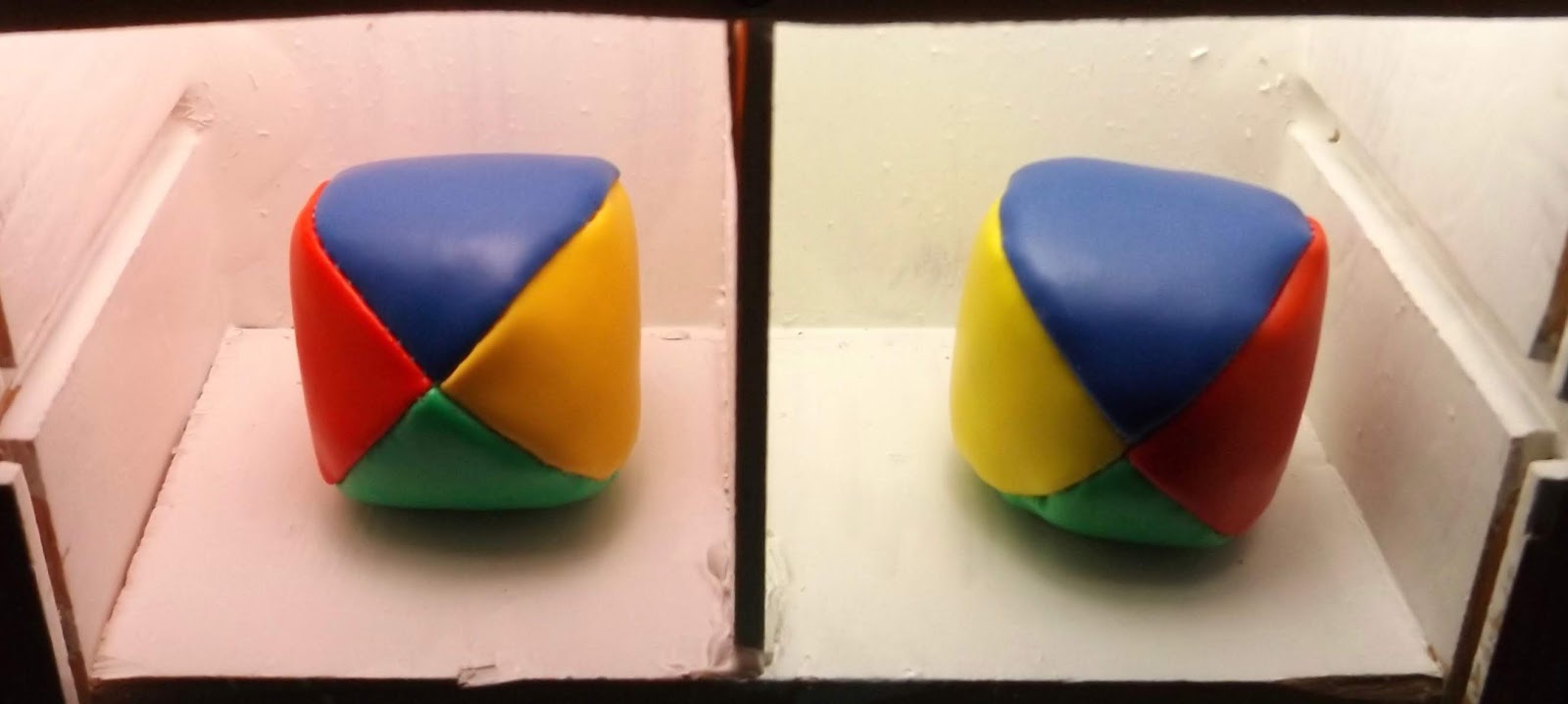
OK, now I have a calibrated spectro I can turn my attention to experiments with white light and perception. I build a box with two isolated sections, painted inside with a very reflective white primer paint. In the left-hand cavity is one of those RGB-mixer bulbs based on LED technology (and controllable from an app; very 2019!) and in the right-hand section is a broad-spectrum white light. 


Thus equipped I can now mix the RGB values in the left-hand side to produce a white light that matches the right-hand side from my perception. As you can see; the camera in my iPhone does not agree! BUT, I promise you, to my eyes the two white are a really good match. I have spent may years "racking" studio cameras (matching their colourimetry for live TV shows so that the lighting director doesn't shout at you!) and eye-matching displays (typically a good domestic TV to a grade-1 broadcast monitor) - I have a better eye for colour than most.

So, at this point I should show the spectro output for the two light sources;


the right-hand broadband white light; reasonably continuous spectrum


the RGB-mixer bulb; three clear peaks


So; I took photos using three different cameras; an iPhone 8 using the native Apple photo app, a low-end Android tablet using the Google photo app and a 2015-vintage Fuji Finepix 5600 bridge camera. All three rendered the RGB-white differently (remember , that to my eyes it's the same white as the broadband white bulb) and they also minimized the differences in the colours of the juggling thuds I used as colour references in the two box sections.

From the iPhone 8


from the Android tablet


from the Fuji Finepix


Finally I should make a note of how my perception of the colours varied;

I need to think about this a bit more to relate the spectra of the two bulbs to the likely sensitivities of the cameras; but, it does show that observer metameristic failure is a things!

Saturday, August 03, 2019

Calibrating the Calibrator - Colour management with Eizo CG319X

I've spent a lot of time demo'ing these monitors recently and the thing that tickles customers the most is correlating the internal sensor to an external probe.

https://youtu.be/LB6HFOBJU2c


Saturday, January 12, 2019

Is there an HDR mastering display that costs less than £20k? Not yet.

I was asked to take a look at the ASUS PA32U monitor - a 32" display that (when I first saw it last year) was initially an sRGB, Adobe RGB, HDR10 high-end graphics/gaming monitor. It comes in at sub £2k and so is expensive for home or office use but almost free from a film/TV perspective. Most interetsingly it could hit >1,000Cdm-2 peak white and unlike OLED displays (typ. Sony BVM-X300) it doesn't suffer ABL as more than a small percentage of the display hits peak white.

I gave the manufacturer a few pointers - essentially if it is going to have any application in film and TV it should at least support HLG and DolbyPQ. So, just before christmas a new itteration of the monitor arrived and here is a little video.

A few things to note;

  1. Terrible "blooming" near black; if it was a CRT it would be akin to bad internal reflection within the tube.
  2. The blue primary is not as good as it should be - it can't even hit 100% of rec.709
  3. Ironically, however, it does manage 84% of rec.2020 - just shows you can't get too hung up on very saturated colours,
  4. There is some sort of noise-coring going on; you should be able to disable that in the menues.
LightSpace reports; http://www.engineersbench.com/phil/docs/ASUS_PA32U/
https://youtu.be/hYCJh9ujhxw

Wednesday, May 16, 2018

Why I wouldn't buy a Sony BVM-X300 in 2018 (if it was my money)

For a couple of years the Sony BVM-X300 has been the 4k/HDR monitor of choice for Soho edit and grading suites. It is an OLED monitor and can (with some limits) hit 1,000 Cd/m2 peak white in it's HDR modes (which include HLG, Dolby PQ and SLog3 camera gamma).

It was the first monitor to be widely regarded as good enough for Dolby Vision mastering (and by extension Netflix deliverables). It was around the £20k mark when it launched, but by last year the price had crept up to mid-twenties and with the v2 of the monitor (which brought a second quad-SDi input and an HDMI input) which launched a year ago it now lists at £32k; but we all know nobody ever pays list for Sony...!

In recent months I've really taken to the Eizo CG3145 which (although an IPS/LCD monitor) is broadly similar in spec to the Sony, but; bear in mind the X300 suffers the following;
  1. Noise in the blacks; when I calibrate them I have to do blacks at 5% grey to get a clean reading (and my probe goes down to 0.01 Cd/m2) – the Eizo will read cleanly at 2% grey. Watch this video (hosted on my Twitter feed) - it's an X300 around 3 Cd/m2
  2. Max. 8% peak white before the orange PSU-fault LED comes on and the display starts to dim/de-saturate in HDR modes; at the recent Jigsaw24 I showed the "OLED killer" which you can get here.
  3. Two years in and several Soho X300s are now showing burn-in (particularly where the 3840-pixel UHD and 4096 pixel-4k rasters differ) 


£10k less list price and available now (the X300 is in such short supply that you can't get one in London currently) also add to the Eizo’s advantages. Integration with LightSpaceCMS (pretty much the industry standard for colour management) is very tight whereas the X300 only talks to Sony’s very clunky colour software (no LUT management, six-point calibration only). 

The Eizo easily allows LUT upload; this SLog3 (in slot 8) was imported via LightSpace.
 
ColorEdge PROMINENCE CG3145 is the first HDR monitor in the world to have its HDR and SDR reproducibility evaluated and awarded by the German Broadcast Technology Institute.

The Eizo has recently been certified as both a Dolby Vision mastering display as well as having Netflix's blessing.


One objection I've heard is that the X300 covers 85% of rec.2020 whereas the CG3145 only covers ~83%. It's the kind of objection that someone with a poor grasp of colourimetry makes. My answer to that is "MacAdam ellipses" - look at the Wikipedia article and tell me anyone can see the (Just Noticable!) differences.


At the recent HDR Summit at Dock10 in Media City, Salford we had more than ten HDR-capable displays.