Showing posts with label dvi. Show all posts

Thursday, September 12, 2013

Avid, KVM systems and the cry of "...not fit for purpose"!

There are several things that happen when you plug a monitor into a graphics card. I'm assuming DVI (this is the 21st century!) and all other displays standards; HDMI, DisplayPort and Thunderbolt all follow a similar principle.
  1. Pin 16 on the DVI connector on the graphics card is refereed to as the "hot plug detect" pin and is held logic-high (at +5v) through a very high value resistor. When you attach a monitor the pin is momentarily taken low to alert the graphics card to the fact that a monitor has been connected. 
  2. The graphics card generates an interrupt on the PCI-e bus
  3. Windows sees this and uses it to generate an EDID exchange request
  4. The monitor responds with it's EDID profile
  5. If the EDID profile is the same as last time the graphics card driver does nothing; it's the same monitor after all
  6. If the EDID is different the driver re-sets the system resolution - this is particularly important if it's either a lower resolution or frame rate than it was running at before; if it didn't do this you'd get black screens. Nobody wants that.
Now then, Avid Media Composer does something different! It listens for the interrupt and when it sees it it halts operation and displays an error message saying it needs to re-start. Even if all that has happened is that your monitor cable has fallen out of the back of the computer and you've reconnected it - go figure.

The upshot of this is that when you're using a KVM routing solution of any kind and you assign a new pair of monitors to the Avid it insists on re-starting. I've been aware of this for a while and I let people know about it when demo'ing or presenting at trade shows; but it's just the way of things. There is nothing you can do whilst Avid does the wrong thing. Amulet - my favorite KVM-over-IP system does exactly the right thing; it holds off asserting pin-16 (and triggering the chain of events above) only when absolutely necessary. A media operator can be switching around four Media Composers and each workstation is unaware that the operator is being promiscuous. Amulet only asserts pin-16 when there really is no other option; when a new desk-end "zero client" takes control of a machine it hasn't yet seen. The only place I've seen this to be a problem so far is when an editor starts a layback to videotape, presses disconnect on his desk-end zero-client and calls his operator saying "...I've started the layback, I'm off home; can you watch it through to the end?". Then, the operator tries to acquire that Avid and by necessity the Amulet has to alert the computer to a new pair of monitors and Media Composer halts (ruining the layback).

This was the issue at ITV Salford and I home-brewed a little gadget to stop the Avid being able to tell when new monitors where attached; I essentially neutered it's ability to detect pin-16. 
So, I think Amulet does exactly the right thing, if it didn't you'd loose the ability for workstations to detect what monitors were attached and pretty soon you'd have rooms where you had black screens; nobody wants that. The bogeymen here are;
  • Avid - why on earth doesn't it do what Windows does?
  • Editors who don't watch their own laybacks!
We are now in an argument with a customer who I explained this all to when I was demo'ing Amulet, but we didn't win the SI quote, but we still supplied the KVM. The SI who is installing is shouting blue-murder about "...not fit for purpose" and we're having to brew up 150 adaptors to keep everyone sweet. My feeling is this will cause more trouble further down the line just for the ability to not close an Avid project for those occasions when you need to hand a machine off to someone else. What kind of workflow needs that?!

Tuesday, March 19, 2013

Fixed the DVI / pin-16 hotplug dilemma

As with a lot of mod'ing or (dare I say it!) bodging solutions you need to find a nice connector or pre-made cable to base your fix on. If you look back at the problem we've been having with Media Composers switched across different Amulet heads then you'll recall it wasn't an EDID issue, rather one of Windows detecting a monitor change; Amulet does the right thing, it's Avid that's the problem.

The fix is easy; you need to tie pin-16 (hot plug detect) to Vcc (+5v on pin 14) via a 1K resistor;


The best mod'able pre-made cable that is suitable is one of these from Lindy.  Now I just need to knock up a dozen for the customer!

Tuesday, January 22, 2013

EDID isn't the only thing that graphics cards look at.

Avid Media Composer insists on re-starting when it sees a change of monitor. I always assumed that it was done via Windows detecting a new EDID profile but it turns out that if you unplug and re-plug the same monitor (i.e. EXACTLY the same EDID data - even s/n) then the same happens and so something deeper is at work.
Look at pin-16; Hot Plug Detect. Basically it is held low by the graphics card but pulled high when a monitor connects - this generates an interrupt in Windows which forces the card to do an EDID refresh - request a new profile and possible re-do the HDCP handshaking if needed. The interrupt is also seen by Avid and used to force a re-start of Media Composer.

Now then, Amulet (our favorite KVM-over-IP technology) spoofs all of this; it caches the EDID profile until a new client connects and when that happens it asserts the Hot Plug Detect pin as if a monitor had been connected - essentially spoofing what happens in the real world. There are various registry tweaks to for the graphics driver to ignore pin-16 but they work variably - change driver and suddenly pin-16 is being listened to again.

When I figure out a solution I'll update this post. Meantime the customer's dream of starting off a layback or capture and then handing it off to another client is still on hold....


Sunday, June 24, 2012

Podcast - Contemporary Display Standards

Hugh and Phil take a look at display standards starting with HD/SDi and working through analogue VGA through to DisplayPort.
Hugh talks about some of the work he's been doing with Skillset certifying University TV and Media courses.
Find it on iTunes, vanilla RSS, YouTube or the show notes website.

Tuesday, May 25, 2010

DVI, HDMI and Display Port

It's been more than a month since I blogged! It's not that I've been mega-busy at work rather life has been hectic with a couple of disappointments thrown in that have kept my thoughts occupied. Still - engineering goes on!

So - a few weeks ago I went to an excellent training day with Lightware Engineering who make DVI and HDMI extenders and matrices. They really are excellent chaps who know their stuff - the link (above) is to the PDF of the presentation they gave.

Here are a few notes;

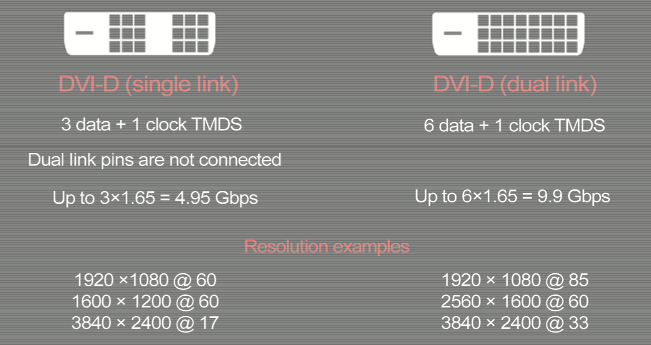
The difference between single and dual-link DVI

DVI has been around for some years now - the difference in resolution and data rates between single and dual-link is shown above. The four pins that sometimes surround the larger 'blade' pin are the R,G,B and sync signals that carry the analogue version - but this isn't supported by all graphics cards and/or monitors. Most graphics cards 'mute' the analogue pins if the DVI handshake has taken place. The difference between digital-only and analogue/digital-DVI is shown with the suffix D or I (for 'integrated').


Evolution of DVI to HDMI v1.4


Key interchange for HDCP


Display Port

I shall finish this off later!

Saturday, January 09, 2010

Two more hardware standards Apple play fast 'n' loose with - DVI and Display Port

Another example of a customer splitting an equipment order into bits and not buying the monitors we recommended (saved a full fifty quid on each unit!) has combined with Apple's very poor implementation of 1920x1200 resolution to bit us in the backside.
The newest iteration of MacPro workstations ship with a display card that has a DVI and DisplayPort (with a DP->DVI breakout adapter). Aside from the problem of non-standard blanking as implemented in OS-X's drivers (see my blog entry about Kramer DVI routers) there is a very funny (but consistent effect) if you boot one of those computers with two monitors extended over fibre - you get one display at low-res and the procedure to get two monitors running at 1920x1200 is;

1. Boot the machine with a single monitor connected to the DVI port - increase resolution in increments to 1920x1200 @60hz
2. Reboot
3. Check the resolution sticks.
4. swap the monitor to the Display Port output
5. Reboot
6. Wind up the resolution as per 1. and if OS-X detects the extra monitor turn on display mirroring
7. Reboot
8. If both monitors come back up at 1920x1200 then turn off mirroring and ensure that both monitors are still at 1920x1200
9. Reboot
10. Make sure it's all sticking!

Compare this to the procedure for bringing up a PC-based Avid (running on an HP 8400/8600 workstation, nVidia card);

1. Set both displays for 1920x1200 @60hz

It is so clear that Apple assume you have the machine under your desk and you're using two of their monitors on the pre-made cables they supply. That's not how broadcast facilities are configured and if Apple wants to see FCP used more in film & TV they need to make their implementations of signal standards more robust.

Wednesday, November 25, 2009

Beware of your DVI's blanking width!

You think you know a certain signal standard but then some nuance of interpretation jumps up and bites you on the backside! Here are excerpts from an email conversation, mine are in italics, the manufacturer's in bold.

....we have a pair of VS-66HDMIs that pass signals fine at resolutions sub 1920x1200 but when you hit that resolution the output flickers and won't lock. Taking the router out of the circuit but using the same cables allows the monitor to lock to the signal fine. The two sources are; Apple MacPro with nVidia GForce GT120 graphics card Apple G5 with ATI Radio 9600 Pro graphics card. Suffice to say we've done the usual powering down etc and tried different cables in case something is on the hairy edge of spec but with different sources that seems unlikely.

Thanks for your e-mail, the details of which I sent off to our R&D people. I have now had a response, in which they said;

"When we mention 1900x1200 we mean narrow blanking. With regular 1900x1200 blanking the bandwidth is higher than the chipset capabilities."

When I asked if the VS-66HDCP matrix (6 x 6 DVI matrix) was any different the answer came back;

"They are the same and use the same chipset. You may be able to set the PC's output to narrow blanking."

So I guess the next question is whether you can adjust the PC’s to provide narrow blanking.

OK, thanks for looking into it xxxx. I had a chat with Apple Engineering late yesterday (we’re a re-seller) and they say that no stock graphics card that has shipped with either a G5 or MacPro in the last five years supports narrow DVI blanking at 1920x1200! In the case of nVidia cards that setting is exposed in the PC driver (I checked on a couple of Windows machines and that is indeed the case – although the installed default was standard rather than narrow blanking) but there is no way to get to it with OS-X.

It seems you should change your advertising to read ‘doesn’t support Macs at hi-res’ or ‘not for use with Macs & monitors greater than 23” display’ something like that. Given that an awful lot of people in the creative industries use Apple computers this isn’t an unusual requirement of a product and if someone reads the copy “Up to UXGA, 1920x1200, 1080p.” You’d forgive them for assuming that it will work with their Apple computer running at 1920x1200.

It puts us in a spot as we now have to source another pair of switchers to sort out our customer.

So there you go - I'm pinning my hopes on the Gefen equivelent. They seem to recognise that a lot of people in the TV industry use Macs!

Friday, January 11, 2008

Tektronix vs Sony

This afternoon it was a stand-off between two giants of the broadcast hardware world - in the red corner was the test and measurement colossus Tektronix with their WVR7100 video waveform rasteriser. In the blue corner was Sony with their new LMD-2450W monster HiDef monitor.
The problem is that the XGA output of the Tek doesn't drive the XGA input of the Sony. Every other monitor was fine and every other device (well, mine and Simon's laptops) could light up the Sony at 1024x768 @60hz. After much puzzling I called Lee at Tektronix and he confessed that they didn't have a proper XGA timing device, rather than relying on some capacity on an FPGA and so consequently it runs at approximately 60hz - the Sony (it transpires) is very fussy. I spent the afternoon stripping off the syncs using a Procon processing DA and re-inserting it as separate H&V syncs, composite syncs and finally syncs-on-green but to no avail. I'd assumed it was a synchronisation issue.
Anyhow - while truffling about on the web I found this great Tektronix document on DVI test and measurement.
You'd best do a save as on that PDF - for some reason it won't open in the browser

Monday, June 18, 2007

2nd o/p of MacPro display cards

We're exhibiting at Broadcast Live! and whilst setting up the equipment I had real difficulty getting a MacPro to feed a 23" cinema display - actually because it was a 7.5m DVI cable I'd stuck a DVI DA just before the monitor (Apple displays are very fussy about long cables - much more so than Dell/HP/Acer etc. - but hey, they're design classics darling so why conform to the standards?!) and would occasionally see a flash of the OS-X logon screen but v.unreliable. I knew the DA was OK having checked it on an HP8400 workstation and it wasn't until Graham reminded me of the problem I had at The Joint back in January (link in the title of this post) that I thought to try output two of the card - all good! It turns out the DVI DA doesn't return correct DDC data and so XFree86 (as implemented in OS-X) does funny things.

Friday, March 16, 2007

Extending DVI over fibre

I've spent the last couple of weeks designing and supervising the install of Optomen Television's new editing facilities in Kentish Town, North London. I decided this time to try extending all the DVI feeds over fibre - I've done it before on more expensive projects but up until now it's been prohibitively expensive for SD-only Avid rooms. However, Lindy are now carrying extenders that look remarkably like the ones I've used in DI projector rooms before. In fact Lindy are sourcing them from the same OEM as others (Gefen for example) but selling them for sensible money. They have proved good - there are a couple of things worth noting;

  • Pay attention to the fibre allocation - you need two duplex multi-mode circuits (which we ran in loose-tube cable terminating it in dedicated wallboxes) - on the receiver the inputs are crossed-over WRT the transmitter - they presume a TX-RX cross-over (but the manual makes no mention!).

  • The nVidia FX1500 cards that ship with the Avids have both RGB (SVGA) and DVI on their 29-pin DVI-I connectors but the card detects if a monitor is connected and mutes it's other output - so you can't used these splitters as the card doesn't support simultaneous analogue and digital output - bummer!
So I'd recommend these (with the normal warning about doing the fibre properly!)

Thursday, January 18, 2007

You down with DDC (Yeah you know me)

Display Data Channel is the way both analogue (i.e. SVGA) and digital (DVI) computer monitors communicate back to their graphics cards what their abilities are - what resolutons they can run at and what refresh rates. Additionally the monitor will send it's name so that the driver can load colour correction lookups etc.
Now, Scene Double (link above) are my favorite KVM extenders - I've banged on about them before (see here) and they now have a very cute trick where the extender can back-propogate the DDC data from the monitor - very useful particularly when extending Mac monitors (where you can't force generic monitors like you can under Windows). Now, Ray Gordon - the lead engineer at Scene Double helped me through a problem today - I had a MacPro being extended over cat5 to a Dell 2407 monitor. The Graphics card (nVidia FX4500 - so no slouch!) refused to drive the monitor at anything above 1920x1080 even though the Dell's native res is 1920x1200. It transpires that OS-X has a problem that relates to the underlying X11 (Apple version of Xfree86) graphics engine which caches the DDC data from the first display on the card. If it has had a sniff of a different monitor (or the same monitor fed over DVI) it won't allow you to set a different resolution/refresh rate and have it stick through a reboot. The answer is on single monitor systems to hang the extender off the 2nd o/p - then it's all good!