Showing posts with label routers. Show all posts

Thursday, January 23, 2014

Friends don't let friends use stock firmware in their routers

Over the years the number of security flaws that come as standard with £50 plastic-box routers have been numerous. That 'free' router that came from your ISP probably suffers from one of these;
  1. UP & P enabled by default
  2. PING on the WAN side enabled
  3. Port 32764 left open
That last one is very serious as it allows a remote attacker to make a query of the router and dump out lots of diagnostic and configuration information. That may be of no consequence but it does allow a hacker to gain knowledge concerning your network and work on other attacks. The problem bedevils Linksys and Cisco models and SlashDot have a good write-up.

In a very real sense your router is the gateway between your network and the wild-west that is the public internet. If you can't even trust the little hardware device that sits in the cupboard under the stairs what can you do? Well, use an open source firmware in your router - Tomato is very user friendly and DD-WRT is very powerful. There are numerous others and since the source code is open it is regularly examined by the community that develops it and so many eyes spot any nasties (malicious or just bad programming) in the code.

I grabbed a couple of Buffalo models from eBay for when my eldest two went away to University and I wouldn't dream of letting my home network be based around a closed-source router.

Saturday, December 28, 2013

DD-WRT and open source router firmware - New Engineer's Bench podcast

Phil & Tim Taylor go over some of the features of the DD-WRT router firmware and how they can be used to secure a home network.


Find it on iTunes, vanilla RSS, YouTube or the show notes website.

Thursday, December 26, 2013

Remote access; what's the IP address?!

If, like me, you're tech support for family and friends you often have a need to take remote control of a relative's machine over the internet. There are lots of ways; the easiest being the paid-for services like GoToMyPC, TeamViewer etc which all offer NAT traversal with very  little effort required at each end to make them work. You just give the person you're helping a ticket number and a URL and before you know it (and normally by Java or some other active web content) you're controlling their screen. They have VOIP as well and it's very slick. However, I don't do enough remote support to justify keeping an account going at ten dollars a month and I quite like VNC/RDP etc.
The problem with those protocols is that you need to know the public IP address of the recipient's router and this changes by the vagaries of their ISP and DHCP etc.
So, here's my method for always knowing the public facing IP address of your Mum's computer without having to run anything clever at her end or anything as elaborate as a VPN.
  1. Make sure you've made a port-forwarding rule on their router so that when you hit them on port 5900 (for VNC) or port 3389 for Windows remote desktop it gets forwarded through to the target machine; you'll probably have to have given that computer either a fixed IP address or have set the router to always assign it the same DHCP'ed IP address.
  2. Have that machine genarate a file at boot-time that contains the correct external IP address along with any other salient data that you might find useful.

The first part requires you to know their router - it's not hard, you'll just need to look around in its web interface. Here's how I do the second part;

I stick these four files in a convenient directory - typically c:\tools\ but anywhere will do. 
wget.exe is an open-source Windows implementation of the common Linux/OS-X tool that fetches text fields from a web server.
GetIP.bat is a Windows batch file that sticks the output of wget into a text file and appends some extra stuff (IPConfig, date and time) and then initiates an FTP session with any web space you may have under your control. Finally index.html is the generated text file (makes the final URL easy to remember).

GetIP.bat
wget http://ipecho.net/plain -O - -q > index.html

ipconfig >> index.html
time /t >> index.html
date /t >> index.html

ftp -s:ftp.txt ftp.plus.net

exit
ftp.txt
ftp-username
ftp-password

cd htdocs
cd bob

send index.html

bye
Stick a shortcut to GetIP.bat in the startup folder (and for extra finesse have it run minimised so nobody sees it) and every time the machine boots you get uploaded to the webserver a very useful status page;


So long as you have a VNC or RDP server running at the remote end you're now only a moment away from being a tech support super-hero!

Saturday, December 14, 2013

A week is a long time in Blackmagic firmware!

I recently installed a 288x288 Universal VideoHub from Blackmagic - bear in mind this thing has 576 coaxial video connection and 288 RS422 ports it takes more than a day for a wireman to do a nice job of plugging it up.

here's one we did earlier!

Also bear in mind this is a modular system with space for 72 interface cards - each one has four HD/SDi ins and outs (up to 3G 1080 50/60P fact fans!) as well as a proprietary connector with four RS422 standard machine remotes.

So - once unboxed I filled up the chassis with cards, control modules and power supply cards and bolted it into the cabinet. However - the power supply units were delayed and so I got Tony the wireman to finish dressing it in before I powered it up; what a mistake!

I eventually got around to firing it up expecting to start programming it the same day but imagine my horror when I discovered 20 of the 72 modules were not showing up in the GUI. Swapping cards around showed that I did indeed seems to have twenty duff interface cards; pretty poor quality control I thought. BM UK's tech support department gave me the impression they didn't believe me and after lots more swapping of cards they agreed to take them back. 
I called them the following day only for them to tell me they couldn't find any faults with the cards we'd returned! I asked them to go over their testing methodology and the engineer started with "...I upgraded the firmware on the cards and inserted them into our test chassis"; exactly how I'd started - well, long story short, in the three days between me starting and them getting the cards to test BM had issued a new version of firmware. They'd gone from 5.0.4 to 5.0.5 without giving any indication to UK support as to what the changes were. It turns out that 5.0.4 disables some revisions of the card! How many of that version of the cards did I have? Twenty.


It seems like 5.0.4 was only out for less than two weeks...?!


Sunday, September 01, 2013

Using a DD-WRT router to NAT between two wireless segments

I've mentioned DD-WRT firmware in the past - it's an open-source replacement firmware for lots of cheap domestic internet routers. If the stock firmware on your router isn't doing it for you or you just want to see what all the fuss is about it is a superb way to make your £50 beige plastic router really sing; enterprise level network control for not much effort. It can terminate VPNs, do QOS and lots of the things you'd normally expect from a Cisco business class device.
Not all routers can take a different firmware image, but if yours is based on the Broadcom 54G chipset (an awful lot are) then you're away to the races; otherwise it's £15 on eBay!

Now then, my two eldest boys are away to university this month and it turns out that one of them is going to live in a student house that only has WiFi - I intended that they would both take DD-WRT routers with them to isolate their little dorm-room networks from IT ne'er do wells (NAT - Network Address Translation, the kind you get with a router, is an excellent defense against port-scanners). BUT, without a wired connection to place on the WAN side of the router how do you isolate and provide both wired and wireless connections behind the router's firewall? My first thought was to buy one of those "connect your Sky+ box Ethernet to your WiFi" adapters. It would turn the insecure WiFi into a wired connection that would sit on the WAN side of the router. 
BUT, it's one more thing to go wrong and I was sure that DD-WRT could do it with a bit of tinkering. I looked at a few of the guides online and they were very convoluted with warnings about obscure settings causing trouble and so I decided to figure it out from scratch. It went surprisingly well and now I have a Linksys router that can attach to an existing WiFi access point and then NAT that connection through to another WiFi segment as well as the wired RJ45 links.
So, couple of things to point out.
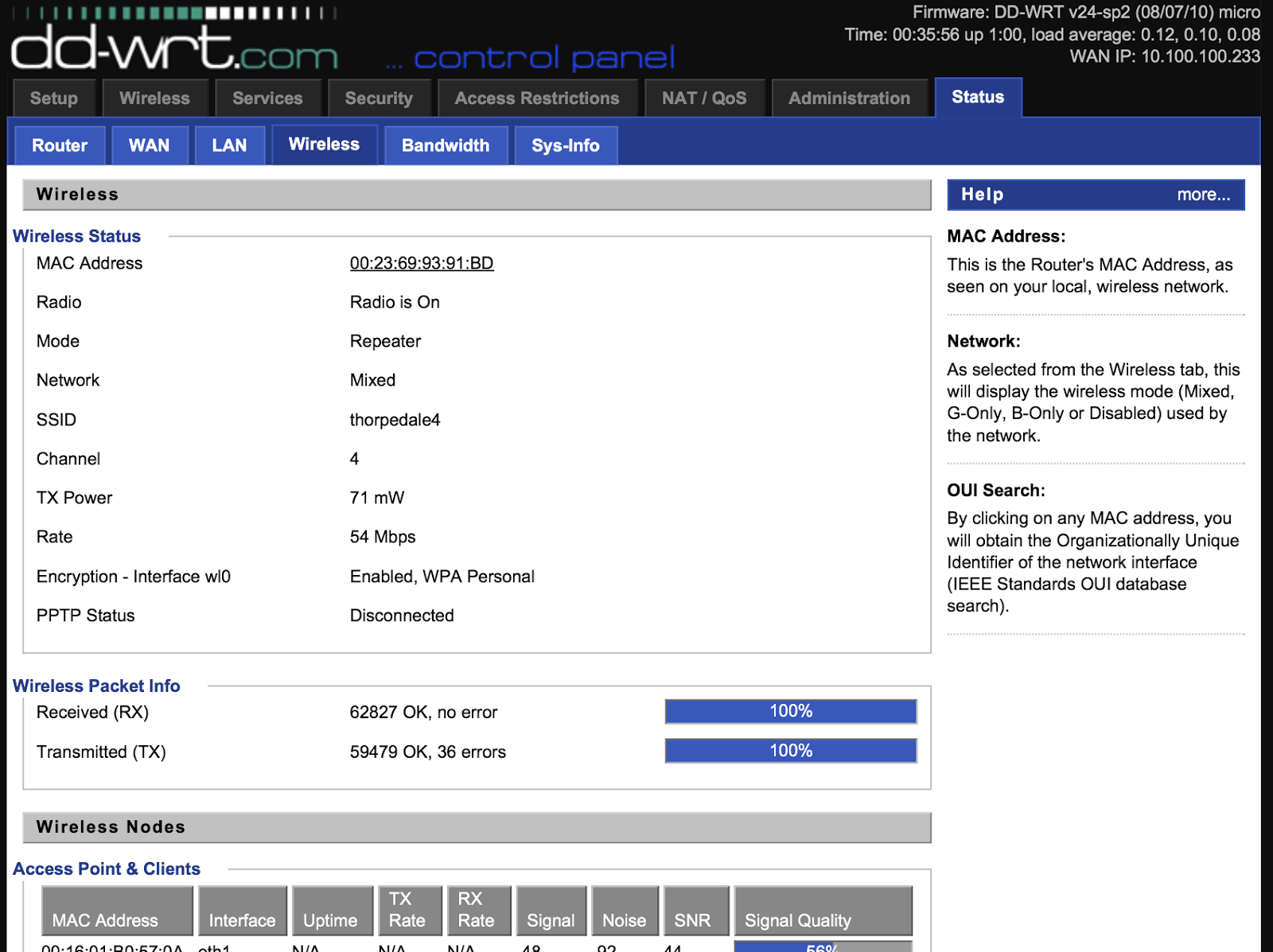
  • My home WiFi's SSID is thorpedale4 and the IP range is 10.100.100.x (.8 is the router)
  • I wanted all the hosts on the other side of the Linksys to be on a 192.168.1.x network
First up - I set the Linksys to not be an Access Point but to be a client wireless device (taking baby steps; I just wanted to make sure I could attach it to the house WiFi)


This is done under wireless>basic settings>wireless mode and is set to client and then go to wireless security and make sure you've entered the necessary settings (WPA key etc)
Reboot the router and check it is connecting to the external WiFi - see above. After this make sure you can get out to the internet from a wired connection on the Linksys. At this point the Linksys will be passing back all protocols to the main router and so you'll find the laptop is on the same IP range as the main network and there is no link-isolation (no firewall between the two networks) - we're not there yet!

Next, set the wireless>basic settings>wireless mode to repeater and add in a second virtual wireless interface (this will be your new wireless segment);


Then set up the security - again, the first is for the wireless you're attaching to;


BUT, the second is for the new network you're creating. As the router is now in repeater mode the new wireless segment is on a separate IP subnet (found in the setup>basic settings tab) and by default on the 192.168.1.x segment. The same applies to the wired connections on the Linksys - job done!

Attaching to the new network is as you'd expect;


and looking at the network details shows we're not on the house's 10.100.100.x network;

In fact, trying to reach the new network from the "outer" network;


As far as I can tell there is only one downside to this method - speed; the 54G wireless is now only running around 22Mbits/sec on both segments and that's no surprise as the Linksys is having to hold up two 802.11 links (different frequencies) using only one radio.
BUT, I have a router than can happily attach to a potentially insecure wireless network and produce a new wireless segment as well as wired Ethernet with the SPI (state-full packet inspection) firewall in the way. I paid around a tenner for the router!

Saturday, February 09, 2013

UPnP - It was always a bad idea!

UPnP is a protocol that allows a router to listen out for requests to open ports and to make other configurations changes from a client machine WITHIN the LAN. It was popularized a decade ago by Microsoft with the original XBox. If you want to have a game that you're playing with others (who are all sat behind their own NAT routers) then the game has to have a way of opening a port on the router and mapping to the games console. That's what Universal Plug & Play achieves and once it was known that you needed it for XBox gaming no router manufacturer is going to not include it and have it set on by default. For years I've told people to disable it and go to the trouble of opening the required ports manually; Here's how you do it for XBox Live! It seems like a bit of malware on your LAN could have a field day opening up dangerous ports (think Windows filesharing etc) and all the benefit of having a NAT firewall has vanished; you're exposed to the Internet and nobody wants that! 

Anyhow - it turn out that some routers have UPnP enabled on their Internet-facing port! That's right; you send the correctly formed UDP-discovery packet at the Internet side of the router and along with being able to open ports you can query the router for lots of details about itself, allowing you to better tailor your attack for other known vulnerabilities of that specific model. HD Moore (of Metasploit fame) has had a cluster of machines probing the public Internet to see how many public-facing IP addresses had UPnP enabled and it turns out around 2% of hosts respond to WAN-borne UDP discovery packets. He repeated his scan weekly for six months and those eighty-one million routers remained reasonably constant. His blog post makes great reading and is here
In case your wondering if your router is vulnerable you can find a list of effected models here, and you'd be surprised how many big-name manufacturers are there. I suppose not many people ever bother to patch their router and so a lot of this code is probably a decade old. I encourage you to get a Linux-based router and load it up with DD-WRT or one of the other many good open-source router firmwares (I use DD-WRT but have used Tomato in the past). It goes without saying they are not vulnerable and they add so much functionality that you'll kick yourself for not using them sooner. 

Steve Gibson did an excellent Security Now! podcast on the matter last week; 


Steve has also extended his Shields Up!! router test to check for the vulnerability.

Friday, December 28, 2012

Integrating a Blackmagic Universal VideoHub pt. 2

As mentioned in a previous post I'm integrating one of the big 288x288 VideoHub routers - 572 3G High Def video connections (mix of coax and single-mode optical) and 288 RS422 remote ports. The thing is not very deep (maybe 100mm) and only 18u high and therein lies the problem; how do you cable it neatly and in a state where re-configuring/maintaining it is possible? Each of the 96 interface cards has either eight BNCs or four duplex-LC optical connectors and there is a proprietary 4-way RS422 port in the centre of each card. 


In the left-hand image you can see we've taken the optical feeds up the right-hand side of the bay so they can come over the top of the patch panels where all of the facilities single-mode tielines (all run in loose-tube cable!) terminate - top of the right-hand picture. Many of the rooms are nearly 100m away from the CAR and so for reliable 3G performance SMPTE 297M is a must. Those pre-made single-mode patch cords are protected in Copex.

All the coax feeds got down the bay to CTPs in bays either side for all the incoming/outgoing jackfields. Nylon sock allows us to tame the coax and keep it neat.

The RS422 was the real challenge. As mentioned before they have a 1m pre-made cable that breaks out each card to 4 x 9-pin(D) connectors which we chopped off! These we ran into little 0.5u cat6 patch panels mounted on the intermediate rackstrip. In the LH picture they are the bundles running up the middle and in the right hand pic you can see the incoming feeds from the suites/VTRs/Avids etc.

This thing has been running reliably for a month now and I am staggered that BlackMagic can build and ship a 288x288 3G/RS422 matrix with fibre for sub £100k. You could make a real pigs ear of cabling one of these very easily which would limit it's utility. I think we've got it about as neat/maintainable as is possible.

Wednesday, September 26, 2012

How to do RS422 properly on the big Blackmagic Universal Videohub?

A job we're working on at the moment needs a big 288x288 HD/SDi and RS422 router. Budget means that the Black Magic is the only one that can be considered and it's hard to argue with sub £100k - Probel, Quartz-Everts etc would all cost four times that amount and so we're trying to figure out how to cable this one nicely.
The issue is going to be with the RS422; video will dress nicely on the cable tray down each side of the cabinet but the remotes are presented on a proprietry connector in the centre of each card. The only way of connecting to this is via a pre-made breakout cable that in only a metre long. So, after a lot of thinking and measuring we've come up with a solution.
 So far I've not been able to locate this connector - anyone have any thoughts?!
 Chopped breakout cable to see what the colour code of the cores is.


Nice 1/2u high cat7 jackfield which we'll use (need a dozen of them) to run down the intermediate rackstrip at the rear of the matrix to allow proper RS422 breakout.


The colour code we've settled on for this router when it's being cabled on cat6.


Friday, May 11, 2012

HD/SDi over fibre and SMPTE 297M (2006)

I've recently installed an NVision 8144 router at a large facility and some of the output cards are for fibre - dual LCs on each SFP with 3G video conforming to SMPTE 297M (SDi over single mode fibre). Very nice. Over the last couple of years I've put in a load of the little Black Magic fibre transceivers and although they perform admirably (only had to replace one due to it being roughly handled by an OB rigger!) but I couldn't quite bring myself to believe that the mighty Blackmagic would conform to the same spec! They really are built to budget (and excellent for it). However, I had a situation where my choice was to buy the Miranda fibre receivers (at a grand a piece) OR use the half dozen BMs I already had. To my surprise the Blackmagics worked just fine. Maybe SMPTE compliance does mean something, in the case of fibre I assumed manufacturers would juts vary too much, but I suppose SDi over copper is universal, so why not over glass as well?

Monday, April 19, 2010

Blackmagic Videohub & RS422

I've talked about BlackMagic's router range - the VideoHub before but never installed one of the larger 72x144 models.
They are very thin! Where you'd expect the cables to terminate at the back of the bay these have to be long enough to terminate at the front of the cabinet.


Here are a few notes relating to it - it's amazing that you can buy a 3G-capable HD-SDi router (with RS422) for around ten grand. To do the same with Probel et al would be north of £50k. However - there are a few things you lose with your budget router.

  • Remotes control - although in the past I've mentioned how the VideoHub can't do the TX/RX crossover that all 'proper' matrices do (i.e. they know how to handle controlled/controlling devices) they have introduced this in v.4.3 of the control software (that runs on a USB-attached Mac or PC - can can even re-share control over a network so you can run the same control applet on your Avid/FCP workstation). In v.4.2 you had to declare what a device was - either a 'deck' (a controlled device) or a 'workstation' (a controller). This falls down when you think about doing two-machine front panel editing between two VTs - the recorder becomes the controller and so you have to go into the labels menu and temporarily declare that VT a 'workstation'. The reverse is true if you want to run your Avid in VTR-emulate mode (when the timeline can be controller like a piece of video tape). We thought 4.3 was the answer to all our RS422-payers but it doesn't work that well - and when it gets it wrong you have to keep making and breaking the route in the hope that it gets it right. So - we're sticking with v.4.2 (BlackMagic s/ware archive in the title link).
  • Touchscreen - our customer wanted a touchscreen to control the software which works quite well - I'd recommend at least a 19" 1280x1024 res screen as a 17" is fiddly.
Of course - in a non-TX environment these things may not matter. It really is a very good deal!

Friday, November 02, 2007

Visit to Probel in Reading

Simon and I had a day at Probel in Reading to learn about configuring and programming the Sirius router range - we're putting in a 128x128 HD-SDi (with RS422 level as well) at Channel Five and we'll have to do the detailed config before we hand over. I am very familiar with Quartz routers (using their WinSetup tools) but Probel's Nebula tools are new to me. The current version specifically supports;
  • Support for Sirius 256 routers.
  • Dual output mode. This marries two outputs together to provide redundancy. These are in groups of eight; i.e. outputs 1 to 8 are the first output of destinations 1 to 8, outputs 9 to 16 are the second outputs of destinations 1 to 8. Outputs 17 to 24 are the first outputs of destinations 9 to 16, outputs 25 to 32 are the second outputs of destinations 9 to 16, etc.
  • A source can now be set to one of three trigger methods, 625 PAL, 525 NTSC, and HD.
  • Selection of either Field or Frame switching for each of the reference types.
  • The facility to convert Router/Freeway databases to a Nebula database is included in the Nebula Editor. The database must already be on the editor PC (it’s usually called curr_sys.fr1). The user then clicks “File”, “Convert database”, and selects the database to convert to Nebula format. This is saved with a “.ne1” file extension.

The hardware seems rock-solid but the software seems a tad old! When you programme the button panels you don't have the luxary of defining the inputs (example, VTR1 -> VTR9), the output and then just nominate a VTR button on the panel - no - you have to define a VTR button an then define every possible sequence of keypresses and what sources (and then after that destinations!) they refer to. Quartz make it a lot easier!
The Aurora distributed control system (which we haven't bought for Five) allows you to tie many panels to multiple routers and monitor the whole shooting match in a very complete way.
Having avoided Probel (really since I left the Beeb in '92) preferring Quartz for ease of setup and economy I think I'm having to re-visit my prejudices.