Thursday, March 08, 2012
What's in your rucksack?
Phil and High go over the basic set of tools and test kit that broadcast engineers on the hoof need! Find it on iTunes, vanilla RSS, YouTube or the show notes website.

Wednesday, March 07, 2012
Synchronous ain't always best!
Engineers have been trained since time immemorial that with multiple sources of video the best thing is that they are always locked together and timed to a common reference - ideally station black & burst (or TriSyncs nowadays). The reasons for this are numerous, but a couple;
- Studios cameras into a vision mixer have to be locked to achieve clean cuts between the cameras - it would look rubbish if you had a frame roll every time you cut between sources. The same is true of sources into a continuity suite etc.
- In the case of Avid for the longest time you had to make sure the VTR was locked to the same reference as the Media Composer (all the way from v.7 ABVB systems in the mid-90s to the last revision of Adrenaline in 2007!) otherwise the audio and video capture portions of the machine would free-run WRT each other and within minutes you'd be loosing frames of sync.
So - I had a coffee and chat with a pal this morning who works for a big facility that has won an archive digitising project and they are using the BlackMagic DeckLink 4K card to allow them to ingest 4 x DigiBeta tapes at once. The capture software is ToolsOnAir and they found that after the first clip was captured the second clip would be a frame out of sync, and progressively worse after that - unless you re-booted between captures! It turns out that if the four VTRs are allowed to free-run then you don't get the problem. Perhaps processing the vertical syncs places a burden on the card/software and if it happens simultaneously on all four inputs trouble ensues?!
It reminded me of a situation with a big broadcaster who was distributing their regional variations over Astra on a single multiplex. The stat-mux was very unhappy with material that was (for the most part) identical; only the ad-breaks differed. Most video cuts occurred at the same time across all six SDi feeds. The solution was to apply a two frame delay between all the sources (so o/p 6 was now 12 frames late WRT o/p 1).
Tuesday, March 06, 2012
Mains 101 - part 2 / Postscript
Hugh and Phil wrap up the previous mains safety podcast with some corrections and photos from Nigeria! Find it on iTunes, vanilla RSS, YouTube or the show notes website.
Thursday, February 23, 2012
Tuesday, February 14, 2012
I'm representin' at BVE

Thursday, January 26, 2012
Phil & Hugh's first podcast - Fibre 101; what every broadcast engineer should know
I've been bugging various industry friends to join me in an engineer's focused podcast for a few years now. Only my pal Hugh Waters (@hugh_waters on Twitter) stepped up and we have a whole series planned in this format.
Coming soon; Mains & Electrical Safety as well as TV Colourimetry.
Sunday, January 15, 2012

Saturday, January 07, 2012
Re-formatting PDFs to read nicely on Kindle
The Kindle is a great little machine (and the £89 keyboard-less version is excellent value). If you buy books or newspapers from Amazon they are perfectly formatted for the 6" screen and arrive in the proprietary file format. However, most of us have a stack of PDFs (books, work material etc) that you can drop into the /documents folder on the Kindle, but if they're formatted for A4 printing then you're either looking at very small text or trying to zoom & scroll the display.
k2PDFopt does a very good job or re-flowing the pages of a PDF (keeping diagrams in the correct place) to fit the 6" screen. I haven't yet tried the Windows or Linux versions but the Mac build is a bit fiddly (make sure you read the install instructions!) and you can't be shy of the command line!
k2PDFopt does a very good job or re-flowing the pages of a PDF (keeping diagrams in the correct place) to fit the 6" screen. I haven't yet tried the Windows or Linux versions but the Mac build is a bit fiddly (make sure you read the install instructions!) and you can't be shy of the command line!


Monday, January 02, 2012
My home AV rig
I'm often asked what I use at home for music/TV/movies - nothing fancy (haven't got a 5.1 rig yet!) because money has been tight for the last few years and I try and follow the ex-work/cheap-on-eBay way of getting things done. As a family we all listen to podcasts and music on 'phones/iPods/USB-stick-in-car and since we don't have any consistent manufacturer for anything we keep everything as MP3s and DivX AVIs or MPEG2 (for off air recordings of TV shows).
- Music - I started encoding my music in 1999 when I got my first MP3 player (the mighty Diamond Rio 500 in case you remember!) and so experimented with different encoders and data rates. At the time I concluded that the Fraunhofer MP3 encoder at 128kBits/sec was adequate if I was using ear-buds or in the car. I quickly changed my mind and have been encoding all my music at 192kBits/sec using variable bit-rate. I have blind-tested myself on good speakers and conclude that for my middle-aged hearing I can't spot the difference between uncompressed and that data rate. MP3 is the way to go as I have a mix of playback devices (iPhone for personal listening, Dell Digital Audio receiver for the living room along with various PCs & other-brand 'phones & MP3 players for the rest of the family). Consequently I always set iTunes to encode to MP3;

I often hear people banging on about FLAC and Apple Lossless but I'm not that bothered. I tend to listen to music for the lyrics and chord progressions, not that last 0.01% of perceived fidelity. I spend my life listening to proper speakers (i.e. thousands of pounds a pair) either from behind a mixing desk or in a dubbing suite so don't try impress me with what you bought in the high-street! I know what good audio sounds like. - TV recording and video playback - I'm using Windows 7 on a ten year-old workstation to make recordings off air; two £15 no-name Maplin-special USB DVB-T sticks allow multiple recordings via Windows Media Centre. I keep thinking I'll buy a DVB-T2 stick so I can make FreeviewHD recordings but I haven't yet, partly because iPlayerHD is so good. The machine that feeds the living room TV is the same machine machine that is the kitchen iTunes/radio machine - it has two soundcards and dual-display. In there kitchen there is a mini keyboard and mouse and in the living room a hand-held RF mouse. You wouldn't know it was the same computer save for when you want to fast-forward the video playback whilst someone in the kitchen is trying to find a song in iTunes and the mouse pointer jumps off your screen!
- Commercial removal/editing - I used to be a big fan of ComSkip as it is an excellent automated ad-break remover for Transport Stream video. However, I watch so little commercial television that I've found my regular MPEG editor Video Redo to be just as good;

- DVD / BluRay - I grabbed a Sony S370 on eBay for £70 and it is an excellent machine; actually better than the S380 that replaced it (Sony lost the right to several codecs). It supports several online video services.
- iPlayer - we used to use the Wii as an iPlayer machine and it is really good, but standard definition only. In fact I picked up a Wii with a faulty DVD drive for my Mum and loaded the iPlayer client onto it and she uses it as her BBC on demand machine. We now use the Sony BluRay player as it supports HD iPlayer and the pictures at 5mBits/sec are indistinguishable from off-air HD playback. Even the SD content looks better than the Wii's output.


So that's it - I'm not in a position to spend thousands of pounds but I am pleased the way I've got it all working for virtually no money.
Monday, December 05, 2011
Subtitling software and my new Bluray player
 Occasionally my PVR makes an incomplete recording of a film that Sarah and I wanted to watch. It was the case last week with the Italian film Couscous and so I didn't feel too bad snagging a copy from a torrent site. However, when we sat down to watch it I realised there were no subtitles (either burned into the video or as a separate text file). "Not a problem" I thought - straight to one of the many sites that carry subtitles for every film ever released and I grabbed a likely looking .sit file for the movie. After discovering that Microsoft have pretty much removed all subtitle support from Windows 7 (my PVR is MediaCentre) I tried watching it with that old faithful backup VLC player (an order of magnitude better than WMP12 in every respect!) - a good example of where open-source software makes the closed-source equivalent look very silly - but I discovered the subtitles in the file were a consistent twelve seconds late. I suppose the subtitler was working off a different version of the film, maybe he started his frame count with all the film and distribution company bumpers?
Again, no worries, I fired up my previous standby for manipulating subtitle files DivXLand Media Subtitler only to discover it can't slip ever sub in a file by a defined amount. In every other respect it s an excellent utility handling twenty-odd file formats and having auto-timing functionality as well as individual sub-sync features, but couldn't handle this problem easily.

So, bit of Googling revealed another free and excellent utility Subtitle Edit which offers pretty much the same toolset but with the ability to slip the sync on groups of subs. Just what I needed; it has a better preview facility as well so you can drop into various places of the video file to check the captions are consistently running to time and it will automatically pull captions a few frames either way when the audio waveform doesn't quite match with the start frame-code of the subtitle.

After this VLC played the .avi & .sit combo perfectly but not WMP12 or MediaCentre. At that point my thoughts turned to my new (2nd hand!) Bluray player; a Sony BDP-S370 which we've had for a week (£70 on the eBay) and have been mightily impressed with it's network video functionality. It's the best iPlayer machine I've found so far bar none (much better than the Wii, Virgin Media & Tivo) and it will happily play the file and display the subtitles either off a thumb-drive or via the network using DNLA.

Wednesday, November 23, 2011
RS422 / Sony P2 protocol and serial stuff!
When running P2 protocol over RS422 (i.e. Sony VTR remotes) there is no hardware handshaking so RTS and CTS (Request To Send and Clear To Send) aren’t used; a bit like the old 3-wire XModem/YModem/Kermit protocols used in RS232 (remember RS422 is just a balanced version of RS232).
We base our RS422 wiring on the Quartz remote standard (Quartz were one of the first firms to use RJ45s & cat5 for RS422 remotes):
We base our RS422 wiring on the Quartz remote standard (Quartz were one of the first firms to use RJ45s & cat5 for RS422 remotes):

However – I know for certain that Probel use a different standard and many places are wired to whatever the local standard is; remember – until ten years ago most places wired ‘422 on star-quad cable rather than cat5e/6. I don’t know if current model Evertz routers have maintained the Quartz standard – I bet they have given they bought Quartz for its router business.
Whatever wiring standard is used always make sure that pins 2 & 7 are a twisted pair and likewise 3 & 8 otherwise you lose all the advantage of common-mode noise rejection that balanced RS422 brings.
Finally you need to be certain if a place is wired for chassis earth (pin 1 on a 9-pin) or signal earth (pins 4 & 6 on 9-pin). Signal earth is best as there is always a chance of earth-hum between areas when you tie chassis earths together but hopefully properly designed kit with balanced lines have the signal earth floating WRT to power/chassis ground. BUT, you have to stick with the local standard; if the engineer has wired only chassis earths you need to continue using pin 1 or even shorting pins 1, 4 & 6 at the remote end.
Whatever wiring standard is used always make sure that pins 2 & 7 are a twisted pair and likewise 3 & 8 otherwise you lose all the advantage of common-mode noise rejection that balanced RS422 brings.
Finally you need to be certain if a place is wired for chassis earth (pin 1 on a 9-pin) or signal earth (pins 4 & 6 on 9-pin). Signal earth is best as there is always a chance of earth-hum between areas when you tie chassis earths together but hopefully properly designed kit with balanced lines have the signal earth floating WRT to power/chassis ground. BUT, you have to stick with the local standard; if the engineer has wired only chassis earths you need to continue using pin 1 or even shorting pins 1, 4 & 6 at the remote end.
Thursday, November 10, 2011
Remote control options
If (like me) you find yourself as the default tech support provider for friends and family you've no doubt wondered about remote desktop software - VNC, RDP, Apple remote desktop, or any of the paid-for managed services (Go To Assist, LogMeIn etc).
I think there are several things to bear in mind;
- NAT routers in the way? If you're merely using remote desktop to go between machines on the same LAN then this isn't an issue but if you have to take control of your Mum's laptop and you're both behind routers then you either have to have made a hole in her's or be using a protocol that supports NAT translation.
- IP address - again, the person you're trying to reach may well be on a dynamically assigned IP address.
- Bitmap vs remote GUI rendering; VNC sends a bitmap (admittedly compressed) and so maybe sluggish whereas Windows RDP or Apple remote desktop send GUI primatives which render at the remote end.
- What combination of OSes are you using? Running Windows but supporting someone on a Mac? The remote desktop client built into OS-X since Tiger falls back to VNC if the remote machine isn't a Mac - nice touch.

On the other hand my Mum has a laptop which may or may not be at her house. Since she is running Windows 7 and I can always get to a Win7 machine she Instant Messages me with a Windows RDP support request and after a bit of typing in confirming codes it works well without having to worry about IP addresses or NAT traversal.
That leaves the paid-for server-based systems like Log Me In and Go To Assist which require no software installed (it's done via a quick Java download) and take care of NAT traversal etc.
So - you pays for money, you takes your choice. I prefer VNC because it's open and works across OSes. It does require a bit of work to send it across the public internet. After that Windows RDP is fine if you have contemporary Windows boxes. I suspect at some point I'll sign up to Go To Assist and pay as it is very convenient and works entirely well across networks and OSes.
That leaves the paid-for server-based systems like Log Me In and Go To Assist which require no software installed (it's done via a quick Java download) and take care of NAT traversal etc.
So - you pays for money, you takes your choice. I prefer VNC because it's open and works across OSes. It does require a bit of work to send it across the public internet. After that Windows RDP is fine if you have contemporary Windows boxes. I suspect at some point I'll sign up to Go To Assist and pay as it is very convenient and works entirely well across networks and OSes.

VNC connected to my home Windows 7 media machine, running inside a Windows 7 virtual machine on my Macbook Pro under OS-X
Friday, November 04, 2011
TCP/IP Congestion Avoidance
TCP/IP is a jolly clever protocol that now forms the bulk of the traffic that runs across the Internet. Given that routers and gateways along a packets route are entirely at liberty to drop packets without informing either the sender or the recipient (it's up to the client/server to figure out packet sequence and if any packets were lost) there is a very clever way that the IP stack in your computer does packet collision avoidance.
So when TCP establishes a connection it goes through an IP-slow-start. In essence the stack has to "sneak-up" on a transmission speed where packets are being lost faster than they're being sent; when that occurs the stack backs off until packet failure is happening less than new packets are being sent. The initial condition is that the stack can send two packets without getting a confirmation. For every confirmed packet the stack can increase the maximum segment size by one so that two packets can become three and so on. After that there are several commonly used strategies, most commonly "TCP Reno" and "TCP Tahoe". Tahoe reduces the congestion window to one MTU ("Maximum transmission Unit" - typically a 1550 byte packet in Windows) and then go back to the IP-slow-start. Reno halves the size of the congestion window and so backs off slower than Tahoe but hopefully the link has recovered fast enough to make that a better strategy than Reno.
So when TCP establishes a connection it goes through an IP-slow-start. In essence the stack has to "sneak-up" on a transmission speed where packets are being lost faster than they're being sent; when that occurs the stack backs off until packet failure is happening less than new packets are being sent. The initial condition is that the stack can send two packets without getting a confirmation. For every confirmed packet the stack can increase the maximum segment size by one so that two packets can become three and so on. After that there are several commonly used strategies, most commonly "TCP Reno" and "TCP Tahoe". Tahoe reduces the congestion window to one MTU ("Maximum transmission Unit" - typically a 1550 byte packet in Windows) and then go back to the IP-slow-start. Reno halves the size of the congestion window and so backs off slower than Tahoe but hopefully the link has recovered fast enough to make that a better strategy than Reno.
Anyway - as ever the Wikipedia article is very comprehensive;
http://en.wikipedia.org/wiki/TCP_congestion_avoidance_algorithm
Friday, October 21, 2011
Bill Mallonee's new record
Best thing I've heard so far this year - full band/studio album from the most talented song-writer still working in the USA.
"...noisy, jangle-y, lush, passionate, Rickenbakers, hooks, '60's, '70's...cobalt blue skies;"
all songs by Bill Mallonee
released 02 October 2011
Bill Mallonee: vocals, guitars (electric, acoustic, hi-string) harmonicas
Muriah Rose: vocals, piano, organ, mellotron
Bert Shoaff: bass
Kevin Heuer: drums, percussion
"...noisy, jangle-y, lush, passionate, Rickenbakers, hooks, '60's, '70's...cobalt blue skies;"
all songs by Bill Mallonee
released 02 October 2011
Bill Mallonee: vocals, guitars (electric, acoustic, hi-string) harmonicas
Muriah Rose: vocals, piano, organ, mellotron
Bert Shoaff: bass
Kevin Heuer: drums, percussion
Wednesday, October 19, 2011
Save us from Media Studies students!
I was on the train on the way up to Manchester this morning - on the next table along were four undergraduates on the way to the BBC for a recruitment day out and clearly part of their day was to propose potential new programme formats. Well - they spoke very loudly and earnestly about their ideas for radical new television shows and all made notes in their moleskin notebooks. Their ideas were so derivative and tired it made me chuck and I made a note of some of them;
- "Darts players - wives & girlfriends" - a reality show investigating the love lives of darts players. @bendavison tells me it's been done already, sigh.
- A series of documentaries that challenge racism by featuring the apparently growing Bollywood porn industry...!
- "Strictly come prancing"- reality show for jockeys.
- "Blaggers with attitude"; documentary series following people around the festivals who manage to score free stuff; t-shirts etc.
- "Bankrupt celeb finance boot-camp"; broke Z-listers learning how to manage the money they get from Heat Magazine.
- "Boyle Baron" - singer Susan Boyle learns the ins and outs of the oil industry.
- "The Grapes of Hoff"- David Hasselhoff becomes a vintner.
- "Frankie goes to Bollywood" - ex. members of the 80s band learn Indian dance moves; they also discussed if it should be for Comic Relief(!)
- "The Yids are alright" - Pete Townsend explores Jewish culture.
- "Train of thought"- a gameshow set on the West Coast Mainline. Different stations would signal different rounds. Would suit Alan Titchmarsh?
So - BBC, stop employing media-studies graduates and instead give English/History/Classics students a shot at making some original TV.
If you see any of these formats on BBC3 in eighteen months time you read it here first!
Friday, September 30, 2011
The Monty Hall problem
This is a scenario made popular by the American game-show "Let's make a deal"; The host, the eponymous Monty shows the contestant three doors and tells them there is a car behind one of the doors and booby prizes (typically goats) behind the other two. The contestant gets to choose a door and then Monty opens one of the doors they didn't choose showing them a goat. He then offers them the chance to change their mind. Initially most people say something like "..it's fifty-fifty, so no, I won't change" - but it's not 50/50, changing your mind at this point doubles your chance of getting the car.
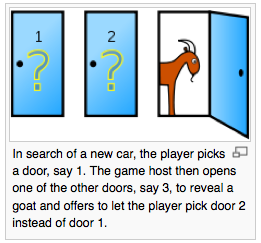
Possibly because I did a year of Game Theory on my degree the first thought I had when I initially heard this problem was "where are the odds invested?". When you pick your first door your odds are a third. However - two-thirds odds are invested behind the other two doors and when Monty shows you which of those doors has a goat you know that none of the odds are now behind the door he just showed you; the car can't be behind that door (Monty showed you the goat). Your original door still has a third of the odds and so now the final door MUST carry the two-thirds odds that you didn't choose initially. Changing your mind now doubles your odds.
It's not a straight fifty-fifty because Monty introduced some new information half-way through the game. He showed you which of the two-thirds doors don't have the car.
The Wikipedia article is very good - I nicked the picture from there.
The problem is interesting because it shows how little innate understanding of game theory (and statistics, and probability) most people have. You gotta trust the maths, not your instincts.
Thursday, September 29, 2011
Recovering corrupt flash memory cards
The good thing about paid-for photo-recovery software is that they have an easy trial-model; they show you the images and videos they can recover and you stump-up your $50 to register the software and get at your pictures. I've had varying success with a coule of paid-for apps but I came across PhotoRec yesterday (it's part of a larger suite of tools).
Now, granted, the pay apps have nice GUIs while PhotoRec runs in the UNIX shell in a text-based interface, but it requires little interaction and gets the job done. It also runs on just about any common OS platform from Mac OS X to Windows to Linux to Solaris, etc. Link in the title.
Now, granted, the pay apps have nice GUIs while PhotoRec runs in the UNIX shell in a text-based interface, but it requires little interaction and gets the job done. It also runs on just about any common OS platform from Mac OS X to Windows to Linux to Solaris, etc. Link in the title.

Friday, September 16, 2011


Wednesday, September 14, 2011
Things that peaked my interest at IBC
I spent just a couple of days over at the RAI in Amsterdam. It was splendid to catch up with some old pals and Bryant Broadcast do an excellent night out. My main observation is that 3D/stereoscopic was no where near as prominent as it was last year and as the number of network delivery solutions increases the number of 'proper' transmitter companies seems to drop.
Newtek - updates to TriCaster, new model & control panel. The new 450 is very similar to the 850 but has only four HD inputs (against eight). The other things that I think are significant;
Newtek - updates to TriCaster, new model & control panel. The new 450 is very similar to the 850 but has only four HD inputs (against eight). The other things that I think are significant;
- 3Play - their "poor man's EVS" has been improved. Running on what looks like a Tricaster 850 chassis it now has eight inputs and can run two outputs simultaneously. For sports slow-mo it is an excellent quick turn-around solution at the fraction of the cost of EVS.
- VTR-style control for the DDRs in Tricaster; might suite some people.
- Tricaster Extreme upgrade - allows for eight ISO records (can be either cameras or other internal/external sources, at different rasters and codecs than the main record).
- They fixed the AUX audio in embedded HD-SDi I'd been moaning about!
- The network sources (iVGA feeds) can now carry audio as well.
VidCheck - file-based QC is getting good! In fact this one looks like it needs serious consideration! I have a demo license on the way and will report back. Along with being able to test all the usual codecs etc it does full ITU.1770 audio loudness AND has numerous correction facilities; Tektronix AND Eyeheight, you might say.
- Containers: MPEG-2 TS, MPEG-2 PS, MXF, MP4, MOV, ASF, AVI, LXF, GXF, FLV, F4V
- Formats: Web, SD, HD, D-Cinema and many custom formats
- Video: MPEG-2, IMX, XDCAM, D10, HDV, DV25, DVCPro50, DVCPro100/HD, AVC/H.264, VC-1, ProRes, DNxHD/VC-3, MJPEG
- Audio: MPEG, PCM, WAV, AAC, stereo, 5.1 / 7.1 Dolby, multiple different language tracks
The really significant thing is the price €5k with paid options (DolbyE, ProRes etc) in the hundreds rather than thousands of pound. It also seems to handle multi-core computers much better, a single instance scaling to 28 cores.
AutoQue - they make broadcast monitors, who would have thunk it? They seem to be pitching them very much against the JVC DT-V24 series at the bottom end (a grand cheaper) and the VuTrix at the edit suite/grade-1 end (again, a lot cheaper). I have demo stock coming so I will write a bit more when I've seen them.
Other things worthy of note - Tek now have all their 3D analysis tools in the WVR/WFM-8000 series 'scopes. I had a very informative half-hour with Lee Ballinger from Tektronix going over them.
Other things worthy of note - Tek now have all their 3D analysis tools in the WVR/WFM-8000 series 'scopes. I had a very informative half-hour with Lee Ballinger from Tektronix going over them.
Friday, September 09, 2011
Security and the Diginotar debacle

You might have been following the trouble that the Dutch SSL-certificate issuing firm Diginotar have been suffering recently. It transpires that Iranian hackers have got into their system and have spent several months issuing themselves wildcard certs for well known domains, most notably *.google.com - it essentially means these ne'er-do-wells can sign certificates that look like they have come from Google and your browser would be none the wiser. In fact it's not that severe unless you've been the victim of another attack;
- Man-in-the-middle attack - you might be in a coffee shop where someone has managed to poison the ARP-table in the router and inserted themselves into your wireless comms. If they served up the fraudulent cert they could make any domain (especially there own server) look like you were securely connected to.
- DNS-poisoning attack - as highlighted by Dan Kaminsky a couple of years ago it is possible to for elderly versions of BIND and more contemporary versions of IIS to incorrectly serve up DNS look-ups. Once this is in place the fraudulent cert on the same server would have you believing you had a secure connection.
- Corporate decrypting proxies; many corporations install their own certificate on all client machines and essentially do a man-in-the-middle SSL intercept. Your traffic to Amazon.com is encrypted, but it goes via the proxy where it is momentarily decrypted for your boss to look at! If a corporate proxy was compromised dodgy SSL certificates could have you believing you had an encrypted connection to Amazon.
All of this raises issues with SSL - when I first started using an SSL browser (Netscape Navigator v.2 IIRC in '95!) there were around seven or eight trusted issuing CAs. Now there are hundreds (including the Hong Kong Post Office!) and it comes as no surprise that some of them get compromised sometimes. What I don't understand is why browsers don't keep a record of the CA associated with domains and when they see a change (particularly if a cert had time to run) inform the user? There is a plugin I use for Firefox called "Certificate Patrol" that does just that and it's easy to use and unobtrusive.
Now then - the whole Diginotar story started three months ago and they didn't spill the beans until last week; security is never served by secrecy. Also - it took Apple far to long to patch Safari. I think if you're concerned about network security then avoid Safari on OS-X.
Now then - the whole Diginotar story started three months ago and they didn't spill the beans until last week; security is never served by secrecy. Also - it took Apple far to long to patch Safari. I think if you're concerned about network security then avoid Safari on OS-X.
Subscribe to:
Posts (Atom)