Wednesday, February 19, 2014

Antrica - performance at different data rates

After my testing with the Antrica 32000AS I thought I'd better do some screen caps at different data rates; all the tests I did yesterday were at 2048kBits/sec.

32kBits/sec


256kBits/sec


512kBits/sec


1Mbits/sec


10Mbits/sec

It does seem that you don't get much benefit once you pass 2Mbits/sec - now these are only still frames and sub-500kBits you get quite a few dropped frames (I haven't figured out how to increase the buffer size at the receiver which apparently smooths this out at the expense of latency).

Finally, in an effort to get a feel for the overall degradation of HF content I grabbed a couple of frames at field-rate at each end of the encoder's range;

32kBits/sec

10MBits/sec

Tuesday, February 18, 2014

Antrica video-over-IP encoder/decoders

Every TV industry magazine is currently honor-bound to run a "video-over-IP will replace baseband this year" article at least once every three months. Despite the attraction of sending video over networks there are fundamental problems related not to the fact that it's a network (but, then again TCP/IP was never meant for synchronous, timely delivery of data) but rather the compression used. Actually, not the compression (after all MPEG4 v.10 variants; H.264, AVC etc are pretty good) but the latency; for long-GOP material 12-frames encode is not unusual.
I was pleased to get my hands on a couple of Antrica 32000-series encoder/decoder units. These are HD/SDi and HDMI i/o and you can configure each to be either an encoder or decoder. They are clearly based on a security camera chipset (all the Pan-Tilt-Zoom controls are grey'ed out!) but they have some very nice features;
  • The outputs remain live when one is being used as an encoder so you can get a feel for what the untransmitted pictures look like (it isn't just a loop-through of the input HD/SDi). 
  • They have up and down converters and so a 1080i input signal can be sent at 720P and an incoming 720P stream can be displayed at 1080i (or SD, for example).
  • They have three streaming modes; their own single-port over TCP mode that streams macro-blocks and hence gives incredibly short latency; 80mS at best but more likely 200mS. A buffer at the receiver end can be wound-out to smooth the spikiness of the data rate (with the worsening of the latency). If that isn't working the units fall back to RTSP over TCP or UDP and finally if all else fails MPEG Transport Stream over TCP.
  • They also do a software video-wall that will receive a dozen streams.

So, proof of the pudding and all that. I made a 1080i sequence of static frames with resolution gratings and so moving stuff. At only 2MBits/sec (which is allowed to spike-up to 3MBits/sec) I was impressed. Here is BBC HD Test-Card F straight into the monitor and then via the system;


The aliasing you can see on the lower gratings is from my iPhone's camera - you really can resolve them to the 15Mhz grating, so no resolution is seemingly being lost.


 These two are taken from the Belle Nuit Montage test chart which shows up all sorts of problems with resolution, colour-space and levels. The finest grating is not resolvable in 4:2:2 encoded material and so what you're seeing here is in part an artifact of the sampling structure of 1.5GBit video.

This is a screen-grab from my trusty Tektronix WFM7100 - I've parked the line-selector on that final grating and zoomed in so that we're looking at 300nS/div on the horizontal. The waveform has been faithfully reproduced with only a low-frequency (I estimate 2Mhz) harmonic. I initially thought this was a fault in the optical transfer function of the monitor but it's there on the signal.

I was playing off my laptop via a Black Magic UltraStudio Express. If you want to play with the clip I've stuck it in my useful clips folder on Google Drive (there is also so DolbyE material in there). It's also worth mentioning they have a software tool for monitoring their end-points. It's called True Manager can as well as allowing you to tweak settings etc you can also monitor in realtime the bandwidth used. This is all very encouraging as tomorrow I will stick an encoder in Root6's office and see what sort of performance I get across the public Internet. As ever with these systems they are adaptive and for still frames they settle at a very low data rate, but at scene changes the system seems to spike to around 50% bandwidth than I'd configured. BUT, the fact remains, I *seem* to be seeing very nice looking 1080i pictures over a few MBits/sec!


Friday, February 14, 2014

System Design with Excel - The Engineer's Bench Podcast


Phil and Hugh go over a few tips and tricks for using MS Excel in the design of film & TV facilities. Find it on iTunes, vanilla RSS, YouTube or the show notes website.

Friday, January 24, 2014

A lie can travel half way around the world while the truth is putting on its shoes.

Not that Mark Twain knew much about fibre optic cable. If he did he'd realise that he was only talking about seventy milliseconds...!

I often have to provide proposals and quotations in response to customer's tender documents and in the last six months I have seen three such tenders specifying tight-buffered fibre for their internal networks.  When I push their staff engineers for a justification they "um and err" and are easily persuaded to do the right thing (i.e. use spliced loose-tube fibre). If you need to read up then I've written a few things in the past.

Last week I came across the following from the Argosy website;
Tight buffered cables are intended for indoor applications. They are more hardwareing than loose-tube cable, as such they are well suited for long indoor LAN connections, burial or complete even submersion in water. Tight buffered cables have a special two-layer coating. The first layer is plastic, the other a waterproof acrylate.
I wonder if this mis-information is their doing?

Thursday, January 23, 2014

Friends don't let friends use stock firmware in their routers

Over the years the number of security flaws that come as standard with £50 plastic-box routers have been numerous. That 'free' router that came from your ISP probably suffers from one of these;
  1. UP & P enabled by default
  2. PING on the WAN side enabled
  3. Port 32764 left open
That last one is very serious as it allows a remote attacker to make a query of the router and dump out lots of diagnostic and configuration information. That may be of no consequence but it does allow a hacker to gain knowledge concerning your network and work on other attacks. The problem bedevils Linksys and Cisco models and SlashDot have a good write-up.

In a very real sense your router is the gateway between your network and the wild-west that is the public internet. If you can't even trust the little hardware device that sits in the cupboard under the stairs what can you do? Well, use an open source firmware in your router - Tomato is very user friendly and DD-WRT is very powerful. There are numerous others and since the source code is open it is regularly examined by the community that develops it and so many eyes spot any nasties (malicious or just bad programming) in the code.

I grabbed a couple of Buffalo models from eBay for when my eldest two went away to University and I wouldn't dream of letting my home network be based around a closed-source router.

Thursday, January 09, 2014

Chassis vs Signal earth on RS422 remotes

Grounding is essential to reliable operation of any RS422 connections. It is also the most overlooked and least understood. The easiest way to ground your RS422 equipment is to simply use "Earth" ground as your return path. Although easy this may not be the best method for grounding your application, because current leaking from equipment, electro-static discharge (ESD), and lightning all drive current through this path which results in high noise content. The reason for this increased noise level is due to the fact that "Earth" ground presents a relatively high resistance. RS422 is designed to operate normally with a ground potential difference of +/- 12 Volts. During normal operations this is typically not a problem, however during fault conditions or lightning strikes even within ½ mile the ground potential difference can reach hundreds and in some cases thousands of volts. This will most likely result in damage or failure of one or more devices on the RS422 router.

In TV facilities I most often come across three methods of earthing;
  1. No earth - assume that the mains return is good (all equipment is class-1 and bolted into it's bay and that signal and chassis earths will be close)
  2. Use pins 1 and/or 9 on the 9-pin D-type to couple the chassis earths together; please, don't get me started about intentionally connecting mains earths between different areas! Do you like dealing with induced hum between different areas or buildings?!
  3. The best way; using pins 4 & 6 - the signal screens (it's what they're there for).
The job I'm finishing at the moment had a problem with Digital Rapids workstation which wouldn't run through the RS422 router although patching around the router worked - the PC could control a VTR. My first port of call was to test the cabling/router patch by sticking an old Sony RM450 edit controller at the back of the Rapids and pretend the RM450 was the workstation - all good; VTR control and timecode return worked fine (so Tx and Rx doing their things). 
So my first thought was to measure the impedance between the signal ground on the router and the mains earth - high Z so no return patch for the RS422 via the router if it was relying on the mains earth (scenarios 1 & 2 above) and since the router is optically isolated on it's data inputs I wasn't surprised. That is the way it should be done.
Now then; most PCs that are running video apps and have to control a piece of broadcast kit use an RS232 port with an external RS232-422 adaptor. These essentially just balance the Tx and Rx pins and there are several models. None of them (in my experience) actually use a pair of rep coils to properly balance rather they use a pair of op amps in a differential input configuration. This is fine but doesn't have the noise immunity that you get with coils (common mode rejection). What it does mean is that all of the noise immunity of the circuit comes from the electrostatic shielding of the earth and so you better get it right!
I cracked open the cheap'n'cheerful '232-422 adaptors supplied with the rapids and they had the screen connected to the shield of the 9-pin on the RS422 side (so relying on scenario 1 above). Moving that to pins 4 & 6 (scenario 3) fixed the problem. 

As an aside the Adenda "Rosetta Stone" adaptors that Avid supply do the right thing!


Saturday, December 28, 2013

DD-WRT and open source router firmware - New Engineer's Bench podcast

Phil & Tim Taylor go over some of the features of the DD-WRT router firmware and how they can be used to secure a home network.


Find it on iTunes, vanilla RSS, YouTube or the show notes website.

Thursday, December 26, 2013

Remote access; what's the IP address?!

If, like me, you're tech support for family and friends you often have a need to take remote control of a relative's machine over the internet. There are lots of ways; the easiest being the paid-for services like GoToMyPC, TeamViewer etc which all offer NAT traversal with very  little effort required at each end to make them work. You just give the person you're helping a ticket number and a URL and before you know it (and normally by Java or some other active web content) you're controlling their screen. They have VOIP as well and it's very slick. However, I don't do enough remote support to justify keeping an account going at ten dollars a month and I quite like VNC/RDP etc.
The problem with those protocols is that you need to know the public IP address of the recipient's router and this changes by the vagaries of their ISP and DHCP etc.
So, here's my method for always knowing the public facing IP address of your Mum's computer without having to run anything clever at her end or anything as elaborate as a VPN.
  1. Make sure you've made a port-forwarding rule on their router so that when you hit them on port 5900 (for VNC) or port 3389 for Windows remote desktop it gets forwarded through to the target machine; you'll probably have to have given that computer either a fixed IP address or have set the router to always assign it the same DHCP'ed IP address.
  2. Have that machine genarate a file at boot-time that contains the correct external IP address along with any other salient data that you might find useful.

The first part requires you to know their router - it's not hard, you'll just need to look around in its web interface. Here's how I do the second part;

I stick these four files in a convenient directory - typically c:\tools\ but anywhere will do. 
wget.exe is an open-source Windows implementation of the common Linux/OS-X tool that fetches text fields from a web server.
GetIP.bat is a Windows batch file that sticks the output of wget into a text file and appends some extra stuff (IPConfig, date and time) and then initiates an FTP session with any web space you may have under your control. Finally index.html is the generated text file (makes the final URL easy to remember).

GetIP.bat
wget http://ipecho.net/plain -O - -q > index.html

ipconfig >> index.html
time /t >> index.html
date /t >> index.html

ftp -s:ftp.txt ftp.plus.net

exit
ftp.txt
ftp-username
ftp-password

cd htdocs
cd bob

send index.html

bye
Stick a shortcut to GetIP.bat in the startup folder (and for extra finesse have it run minimised so nobody sees it) and every time the machine boots you get uploaded to the webserver a very useful status page;


So long as you have a VNC or RDP server running at the remote end you're now only a moment away from being a tech support super-hero!

Saturday, December 21, 2013

When SI projects go right; some notes

I've just finished building the technical infrastructure for a big media company who are moving premises. The job has gone rather well and I've been trying to crystallize my thoughts as to how it's differed from jobs that haven't been so enjoyable. From my point of view it all breaks down into three areas - the client, the contractors and time.

The client

  • Big broadcast and film companies always have in house people who manage projects and the disturbing trend of recent years is to have project managers who are very conversant with Prince2 or some other methodology, but often don't have a background in broadcast engineering (or indeed any technical discipline).  They tend to be disinterested in the way that non-technical people are when they don't understand something; it's easier to be dismissive than show your ignorance.
  • "Getting a good deal" - When I'm quoting for a job and the customer starts talking about discounts and good deals from the outset it raises a red flag for me; they're cheap and will want to reap where they do not sow. They'll be a problem and so I'm going to put fat on the bones of the job where you won't know about it as I'll need that later on. As soon as you start driving us down on cost then assume you aren't getting a good deal. 
  • Penalty clauses and "open book" jobs - see the previous point.
  • Holding back tens of thousands of pounds because of a tiny fault in one piece of equipment that requires as firmware update from the manufacturer. They won't fix it any quicker because the SI is hurting!

Contractors

  • Often on large jobs the builder is the primary contractor and everyone else answers to him. If the SI is a direct-appointment then it's often a nightmare getting access to the things you need ahead of the electricians, data guys, air con guys etc as you are viewed with some suspicion.
  • Having the electrican/data guys/gardener run the cat6 cable - it happens and it's never pretty! You don't realise what you do until you work with someone who doesn't do it. A job last year had us trying to unpick 700 cat6 feeds that had just been dumped into a hole in the floor of the machine room. Many weren't numbered and some even had different numbers at each end. It took three of my wiremen ten days to sort them out and identify them. Of course the customer was unhappy to pay for that.
  • It's nice to be in the happy position of having enough wiremen to have them play to their strengths. The job I've just come off had between eight and sixteen wiremen and so I could have the guys who were good at fibre just doing that, the good data guy just doing cat6 panels and the good mechanical guys assembling bays and wallboxes. I was even in the nice position of being able to have one guy responsible for stores. It's a rare but pleasant state of affairs.
Time

  • The job I've just come off had a very compressed timescale - ten weeks for two machine rooms (seventy+ cabinets) and twenty+ production rooms.  This sort of thing is only do'able if the customer isn't being "cost conscious"
  • A timeline is always good; those last minute jobs like programming the router, labeling the patch panels and all the testing take longer than you remember!
  • AT LEAST a week is needed to really understand the workflow and hence produce the bones of a design that will work.

In the end you have to guide the customer to understand the golden triangle of all technical projects;

  1. Cheap
  2. Good
  3. Quick

You can only ever have two of these!

Friday, December 20, 2013

The Oscilliscope Watch - an update

I'm looking forward to getting the beta hardware of the Oscilloscope Watch which I've funded on Kickstarter. Here is a recent project update from the developer.

Project Update #9: Beta PCB assemblies on order
Posted by Gabriel Anzzian

Hello Backers!

Sorry for the delay, I've been pretty busy these last few weeks. Here is my monthly report.


I have done some minor changes to the schematics:
  • Reduced noise by connecting the 5V step-up switching regulator to the battery, instead of the VDD rail. It will also be a little more efficient, since the regulator is converting 5V from 3.7V, instead of 3V.
  • Minor tweaks to reduce current consumption: increased value of some resistors, changed the diodes to low leakage versions.
  • Removed the 15pF input capacitors, which aren't really needed for the bandwidth that the OW works with. I also needed the space to add mounting holes.
  • Added load capacitors to the 32.768kHz crystal.
PCB

I had a hard time making space to add the mounting holes while still keeping current packages of the components. I only changed the LEDs from 0805 to 0603. Now there are two nice mounting holes on opposite corners, which will be great for fixing the PCB to the enclosure. I also moved the slide switches towards the center to solve a problem with the enclosure as discussed on update #4.


 Oscilloscope Watch PCB rev 1.4 

PCB Assemblies

I originally thought of assembling the Beta units myself, this was when I thought I would have only 10 Beta testers. Now with 28 Beta tester units, and a few spares, it makes more sense to have these assembled at the factory. I am ordering the assemblies and they should be ready in about 6 weeks.
BATTERY
I am going with a 380mAh battery, it measures 40mm x 30mm x 4mm, the dimensions of the watch are not changing. I have already received enough samples of these for the Beta tester units. The battery life should not change much from the initial estimates.

BACKLIGHT & FRONTLIGHT

I bought a translucent filament to use on my 3D printer to make a backlight diffuser, it didn't work. The problem is not because of the translucent diffuser, which I already knew that it was not going to be too good. The problem is the LCD it self, it does not let much light go thru.
 Backlight experiment 


So I started to research what I needed. I contacted Sharp and they referred me to a company that does "front lights". I have just began talks with them, we are signing NDAs.
The Beta units will still have the backlight diffuser, but this is to make everything fit together, rather than functionality.


Not many changes to the enclosure. I tweaked the sliders to fix the collision problem, I moved the charging LED location to right above the USB connector, and made the LED see-thru holes circular. I also added the screw bosses on the TOP part.
 
SOURCE CODE

I haven't done much to the code, only some minor tweaks to reduce current consumption during the watch mode. Once I get the Beta units, I will set up a repository, initially for Beta Testers. I am looking forward to working with the Beta Testers!

A lot of work to still to be done, but it sure is fun!

Tuesday, December 17, 2013

Photons vs. Electrons

At ten gigabits ethernet over copper cable really struggles. Everything has to be just right and even well terminated twisted pair cable is on the hairy-edge.


On the job that I've just finished had a lot of fibre and copper data and the time to test (on a per circuit basis) is much higher for copper than fibre. With OM3 fibres so long as you have an acceptable sub-3dBs of attenuation at 850nM ten gigs is a doddle. We had to re-terminate maybe half a dozen circuits and using our INNO core-alignment splicer it takes no time. On the other hand getting the copper data cables right is a mission with Near-end cross-talk, alien cross-talk and return loss all having the be measured across four pairs. The output (above) is from our Fluke DTX-1800 analyser.

As an aside, one of the freelancers I use a lot showed me a brilliant trick with fibre panels); the BT standard for core-order involves having the coloured and striped cores 12 couplers away from each other in a 24-port panel. The better way is to put the coloured and striped cores next to each other in the same duplex pair so that if you make a mistake it's easily rectified at test-time.


Saturday, December 14, 2013

A week is a long time in Blackmagic firmware!

I recently installed a 288x288 Universal VideoHub from Blackmagic - bear in mind this thing has 576 coaxial video connection and 288 RS422 ports it takes more than a day for a wireman to do a nice job of plugging it up.

here's one we did earlier!

Also bear in mind this is a modular system with space for 72 interface cards - each one has four HD/SDi ins and outs (up to 3G 1080 50/60P fact fans!) as well as a proprietary connector with four RS422 standard machine remotes.

So - once unboxed I filled up the chassis with cards, control modules and power supply cards and bolted it into the cabinet. However - the power supply units were delayed and so I got Tony the wireman to finish dressing it in before I powered it up; what a mistake!

I eventually got around to firing it up expecting to start programming it the same day but imagine my horror when I discovered 20 of the 72 modules were not showing up in the GUI. Swapping cards around showed that I did indeed seems to have twenty duff interface cards; pretty poor quality control I thought. BM UK's tech support department gave me the impression they didn't believe me and after lots more swapping of cards they agreed to take them back. 
I called them the following day only for them to tell me they couldn't find any faults with the cards we'd returned! I asked them to go over their testing methodology and the engineer started with "...I upgraded the firmware on the cards and inserted them into our test chassis"; exactly how I'd started - well, long story short, in the three days between me starting and them getting the cards to test BM had issued a new version of firmware. They'd gone from 5.0.4 to 5.0.5 without giving any indication to UK support as to what the changes were. It turns out that 5.0.4 disables some revisions of the card! How many of that version of the cards did I have? Twenty.


It seems like 5.0.4 was only out for less than two weeks...?!


Monday, December 02, 2013

The Engineer's Bench - hosting a video podcast

So for whatever reason Blip.tv have shut down the account that Hugh and I were using to host the RSS feed and media for the video podcast we do. Without any warning they shut off making any changes to the account (like re-directing the RSS feed and I hadn't been sensible enough to run it via FeebBurner) or even putting up a "so long and thanks for all the fish" clip up to let our iTunes & other podcast watchers know that the feed was dieing. Apparently we're a bit dry; they don't want engineering/educational screencasts, rather stuff that's more 'off the wall'. Ho hum - it was free (and free is never good) and so we've stretched to paying for hosting. 

From now on all Engineer's Bench goodness will be at it's own domain;

http://www.engineersbench.co.uk

What is worth noting is that only a minority of our watchers do so via iTunes/RSS - most folks now get it via Youtube, and so that has been unaffected and can still be found at the same old place.

We've been a bit slow recently but it's just the pressure of work. We have several planned:

  • KVM-over-IP - a technology whose time has come 
  • Software tricks and tips with Excel and other software for broadcast engineers 
  • Hardware pt.2 Raspberry Pi and NetIOM control boards
So hopefully 2014 will produce a return to form for your favorite broadcast engineering related video podcast!

Monday, November 18, 2013

Oscilloscope watch

The watch for the electronic geek. All the features of a watch combined with an oscilloscope and a waveform generator. I've signed up to fund the Kickstarter project which has reached it's goal - happy days!


Features:

  • Mixed Signal Oscilloscope: Simultaneous sampling of analog and digital signals.
  • Advanced Trigger: Normal / Single / Auto, with rising or falling edge and adjustable trigger level.
  • Meter Mode: Average, Peak to peak and Frequency readout.
  • XY Mode (Plot Lissajous patterns or see the phase difference between two waveforms).
  • Spectrum Analyzer with different windowing options and selectable vertical log.
  • Horizontal and Vertical Cursors with automatic waveform measurements.
  • Arbitrary Waveform Generator with Sweep on all parameters.
  • Display options: Persistence, Different grid options, and more.
  • Curve tracer function
I'm signed up as an International Beta Tester. The Beta Testers will receive a prototype as early as December, and a production unit with all accessories in May. Beta Testers will be expected to be involved with the design and report bugs along the way. Apparently this prototype will initially not work, but will start to work as firmware is developed. The prototype hardware may need changes so you might need to do some soldering. The case will be 3D printed with the current prototype design. Come May 2014 the production units will be available and so I intend to do some video blogging as soon as I receive the prototype and keep with it all the way through to the final version.

Thursday, October 31, 2013

Too busy to blog!

I'm snowed under; long days helping a big facility to move premises. I've tried to take half term off too spend time with Sarah and James (the only boy left at home since his brothers went to Uni last month) but have wound up working two days so far this week - ho hum.

So; here are just a few technical things I had to get off my chest.
  • If you use a Blackmagic Ultrastudio Express (I do - it's a a great way of playing out HD/SDi for demo'ing equipment, calibrating monitors and displaying training material) then be aware that the current version of the app/driver (v. 9.8 currently) is very unstable on OS-X 10.9 Mavericks - use the previous version 9.7.8 instead - all here.
  • Do you ever need to demo/test DolbyE encoded material - this is the clip I use (from my pals at National Geographic)
  • Do you ever need to do audio shuffling within an HD/SDi signal - shuffle, adjust levels, correct phase reversals, delay (up to 2,400mS), maybe apply dynamics? The most effective way I've ever found of doing this is with an AJA HD10AM, a Yamaha 0196V and the MY8AE option card; £2.5k for full control of two audio groups within an SDi stream; You couldn't do that with anything from Bel, Snell & Wilcox, TC Electronic or any other manufacturer of audio processors.
  • Hard drives - "MTBF= 30k hrs"; inter-quartile range is where >50% of HD fails occur. A few last 100k hrs, some only 2hrs as I discovered when the replacement cloned hard drive in my media computer failed after a couple of hours of use. Thankfully I'd cloned it twice! Don't trust spinning hard drives. A motto for our age should be "Friends don't let friends use RAID5"!
That's it, Christmas can't come soon enough!

Sunday, October 06, 2013

Windows remote desktop for Raspberry Pi

It's not very open-source/Linux but the best remote desktop I've found so far for the Pi is the venerable Windows RDP (Citrix Winframe or whatever else you want to call it). I know you should be able to run an X-server and all would be well but I haven't been able to find a nice combo that works across all my Windows, Mac and Linux boxes; RDP is the only lingua franca.

So - to set it up on the Pi;

  1. Start up your Pi to the terminal prompt. 
  2. Type the following command "sudo apt-get install xrdp"
  3. If promoted enter your password (the default is "raspberry")
  4. Type "Y" and press enter.
  5. This is now installing xrdp onto your Pi which is the software we are going to use for the remote desktop connection.  Wait for it to complete.
  6. Restart your Pi.  We are going to check that xrdp is going to start up automatically.
  7. When your Pi has booted to the command prompt look for [ ok ] Starting Remote Desktop Protocol server : xrdp sesman.  This shows you that xrdp is installed and automatically starting up on start up of your Pi
It takes best part of half an hour to extract and install but once running it's the most responsive experience - far better than VNC and even better than Apple remote desktop. Not quite as good as sitting at the machine (or over an Amulet/Teradici network connection) but excellent none the less. 

If you want to get to it via your router or firewall open one port - TCP; 3389.
Client for OS-X, Client for most Linux versions.

An alternative guide from May 2016;
http://www.circuitbasics.com/access-raspberry-pi-desktop-remote-connection/

Thursday, September 12, 2013

Avid, KVM systems and the cry of "...not fit for purpose"!

There are several things that happen when you plug a monitor into a graphics card. I'm assuming DVI (this is the 21st century!) and all other displays standards; HDMI, DisplayPort and Thunderbolt all follow a similar principle.
  1. Pin 16 on the DVI connector on the graphics card is refereed to as the "hot plug detect" pin and is held logic-high (at +5v) through a very high value resistor. When you attach a monitor the pin is momentarily taken low to alert the graphics card to the fact that a monitor has been connected. 
  2. The graphics card generates an interrupt on the PCI-e bus
  3. Windows sees this and uses it to generate an EDID exchange request
  4. The monitor responds with it's EDID profile
  5. If the EDID profile is the same as last time the graphics card driver does nothing; it's the same monitor after all
  6. If the EDID is different the driver re-sets the system resolution - this is particularly important if it's either a lower resolution or frame rate than it was running at before; if it didn't do this you'd get black screens. Nobody wants that.
Now then, Avid Media Composer does something different! It listens for the interrupt and when it sees it it halts operation and displays an error message saying it needs to re-start. Even if all that has happened is that your monitor cable has fallen out of the back of the computer and you've reconnected it - go figure.

The upshot of this is that when you're using a KVM routing solution of any kind and you assign a new pair of monitors to the Avid it insists on re-starting. I've been aware of this for a while and I let people know about it when demo'ing or presenting at trade shows; but it's just the way of things. There is nothing you can do whilst Avid does the wrong thing. Amulet - my favorite KVM-over-IP system does exactly the right thing; it holds off asserting pin-16 (and triggering the chain of events above) only when absolutely necessary. A media operator can be switching around four Media Composers and each workstation is unaware that the operator is being promiscuous. Amulet only asserts pin-16 when there really is no other option; when a new desk-end "zero client" takes control of a machine it hasn't yet seen. The only place I've seen this to be a problem so far is when an editor starts a layback to videotape, presses disconnect on his desk-end zero-client and calls his operator saying "...I've started the layback, I'm off home; can you watch it through to the end?". Then, the operator tries to acquire that Avid and by necessity the Amulet has to alert the computer to a new pair of monitors and Media Composer halts (ruining the layback).

This was the issue at ITV Salford and I home-brewed a little gadget to stop the Avid being able to tell when new monitors where attached; I essentially neutered it's ability to detect pin-16. 
So, I think Amulet does exactly the right thing, if it didn't you'd loose the ability for workstations to detect what monitors were attached and pretty soon you'd have rooms where you had black screens; nobody wants that. The bogeymen here are;
  • Avid - why on earth doesn't it do what Windows does?
  • Editors who don't watch their own laybacks!
We are now in an argument with a customer who I explained this all to when I was demo'ing Amulet, but we didn't win the SI quote, but we still supplied the KVM. The SI who is installing is shouting blue-murder about "...not fit for purpose" and we're having to brew up 150 adaptors to keep everyone sweet. My feeling is this will cause more trouble further down the line just for the ability to not close an Avid project for those occasions when you need to hand a machine off to someone else. What kind of workflow needs that?!

Thursday, September 05, 2013

Technologies that made the difference in Television

Will Strauss (writing for Broadcast Magazine) asked me for a couple of ideas for an article he was putting together; you can read it here. My Engineer's Bench collaborator Hugh Waters got in with SMPTE timecode.


The original ideas I sent to him were;

  1. The Mostek MK4096 Dynamic RAM chip (and subsequent MK4196 16k DRAM) was the enabling technology that allowed construction of all early digital video devices in the seventies; TBCs, Framestore Synchronisers and Digital Video Effects (ADO, Quantel 5000, Squeeze-Zoom etc) - being dynamic memory these chips required constant refreshing but the nature of video is that the store is constantly being read to make the next line or frame of video. The chips were fast enough that once multiplexed in banks of (typically eight) video pixels at around 75nS clock could be stored. Without DRAM there would have been no picture-in-picture, no timebase correction, no standards conversion, no digital video effects and no digiscan telecines.
  2. The Discrete Cosine Transform - as a mathematical technique for transforming pixels into frequency distributions the DCT doesn't actually provide any reduction in data for digital TV signals but it does then allow all manner of compression to take place. MPEG2 in the nineties allowed DVD, Transmission servers and DVB-T and DVB-S powering the first wave of standard-definition digital television. In the noughties MPEG4 and later variants (H.264, AVC etc) allowed HD pictures to be compressed to data rates unthought-of previously. Most contemporary video compression starts with the DCT.
  3. Pixel and even frame-free video(!) - this will be the enabling technology of the next decade that will usher in ultra-high-definition TV. Prof Phil Willis of Bath University is pioneering work that will make video a descriptive object technology rather than pixels, lines and frames. Once divorced from set resolutions and framerates it will be up to the display device to render the vectors, contours and shaders at whatever resolution and framerate the device supports.

Sunday, September 01, 2013

Using a DD-WRT router to NAT between two wireless segments

I've mentioned DD-WRT firmware in the past - it's an open-source replacement firmware for lots of cheap domestic internet routers. If the stock firmware on your router isn't doing it for you or you just want to see what all the fuss is about it is a superb way to make your £50 beige plastic router really sing; enterprise level network control for not much effort. It can terminate VPNs, do QOS and lots of the things you'd normally expect from a Cisco business class device.
Not all routers can take a different firmware image, but if yours is based on the Broadcom 54G chipset (an awful lot are) then you're away to the races; otherwise it's £15 on eBay!

Now then, my two eldest boys are away to university this month and it turns out that one of them is going to live in a student house that only has WiFi - I intended that they would both take DD-WRT routers with them to isolate their little dorm-room networks from IT ne'er do wells (NAT - Network Address Translation, the kind you get with a router, is an excellent defense against port-scanners). BUT, without a wired connection to place on the WAN side of the router how do you isolate and provide both wired and wireless connections behind the router's firewall? My first thought was to buy one of those "connect your Sky+ box Ethernet to your WiFi" adapters. It would turn the insecure WiFi into a wired connection that would sit on the WAN side of the router. 
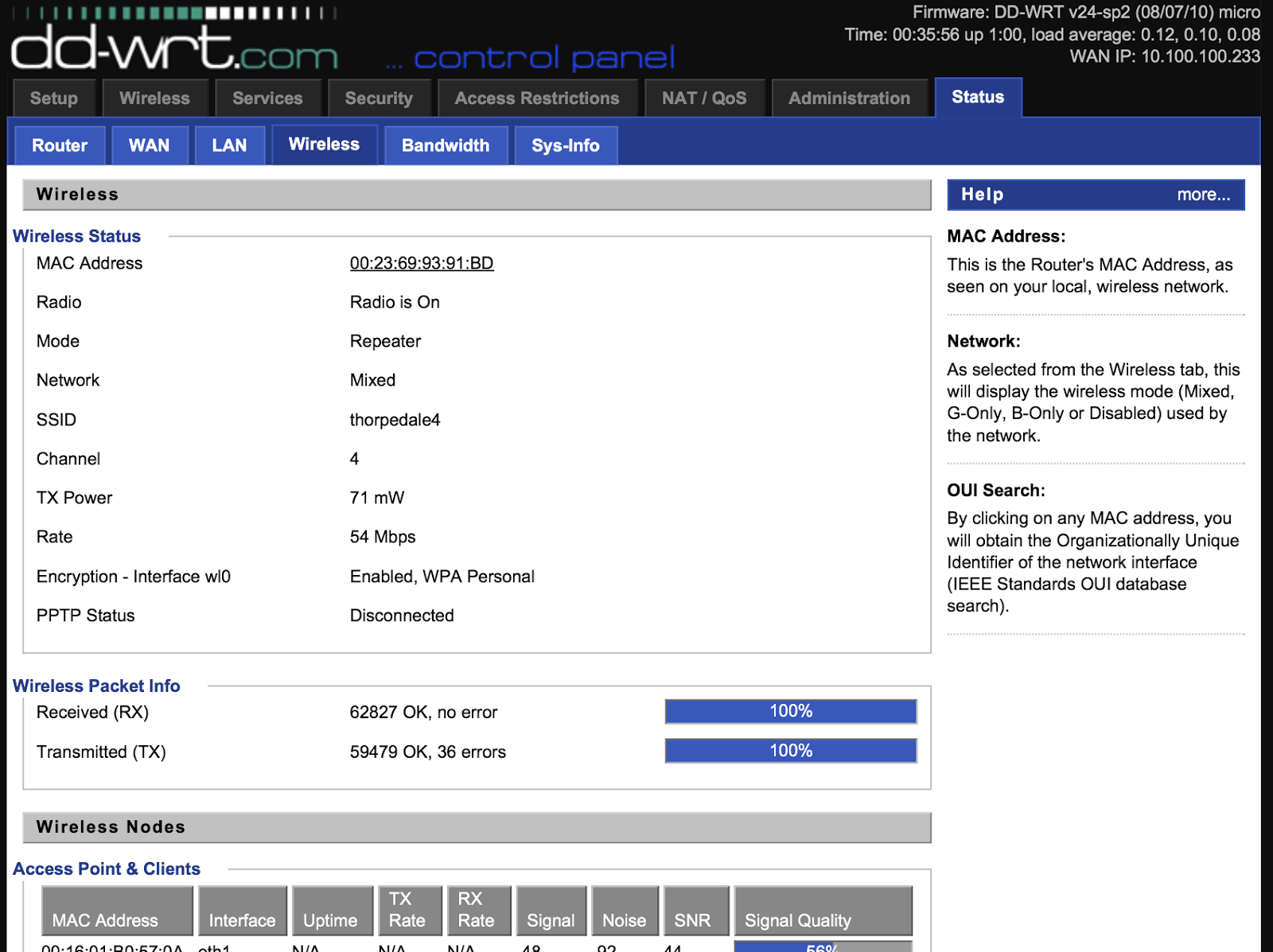
BUT, it's one more thing to go wrong and I was sure that DD-WRT could do it with a bit of tinkering. I looked at a few of the guides online and they were very convoluted with warnings about obscure settings causing trouble and so I decided to figure it out from scratch. It went surprisingly well and now I have a Linksys router that can attach to an existing WiFi access point and then NAT that connection through to another WiFi segment as well as the wired RJ45 links.
So, couple of things to point out.
  • My home WiFi's SSID is thorpedale4 and the IP range is 10.100.100.x (.8 is the router)
  • I wanted all the hosts on the other side of the Linksys to be on a 192.168.1.x network
First up - I set the Linksys to not be an Access Point but to be a client wireless device (taking baby steps; I just wanted to make sure I could attach it to the house WiFi)


This is done under wireless>basic settings>wireless mode and is set to client and then go to wireless security and make sure you've entered the necessary settings (WPA key etc)
Reboot the router and check it is connecting to the external WiFi - see above. After this make sure you can get out to the internet from a wired connection on the Linksys. At this point the Linksys will be passing back all protocols to the main router and so you'll find the laptop is on the same IP range as the main network and there is no link-isolation (no firewall between the two networks) - we're not there yet!

Next, set the wireless>basic settings>wireless mode to repeater and add in a second virtual wireless interface (this will be your new wireless segment);


Then set up the security - again, the first is for the wireless you're attaching to;


BUT, the second is for the new network you're creating. As the router is now in repeater mode the new wireless segment is on a separate IP subnet (found in the setup>basic settings tab) and by default on the 192.168.1.x segment. The same applies to the wired connections on the Linksys - job done!

Attaching to the new network is as you'd expect;


and looking at the network details shows we're not on the house's 10.100.100.x network;

In fact, trying to reach the new network from the "outer" network;


As far as I can tell there is only one downside to this method - speed; the 54G wireless is now only running around 22Mbits/sec on both segments and that's no surprise as the Linksys is having to hold up two 802.11 links (different frequencies) using only one radio.
BUT, I have a router than can happily attach to a potentially insecure wireless network and produce a new wireless segment as well as wired Ethernet with the SPI (state-full packet inspection) firewall in the way. I paid around a tenner for the router!

Thursday, August 01, 2013

PSE detection, interlaced video and VidChecker

I've been preparing some training notes on PSE (hence last week's podcast) but noticed that VidChecker's analysis of a recent BBC recording suggested there were more flash events than were apparent to the eye. Have a look at this Off air MPEG2 from BBC News, 22nd July and pay attention to the timecodes as shown in the analysis in the second screen-grab. 

It looks like I've discovered a bug in VidChecker! The mixes to and from white that seem to provoke the PSE violation are at field rate (as you'd expect from any studio vision mixer) but VidChecker, by necessity, does a frame analysis and so the magic "...no more than 20 Cd/m2" prohibition on frame-frame luminance changes (as measured on a displayed calibrated at 200 Cd/m2 for peak white) are twice as likely to be triggered.

I mentioned this to the guys at VidCheck and this was the response;

Phil

You are right that the first 3 below are fades to white and back again and should not really be picked up as flashing.  

Scott has taken a look at the file, and it appears that the problem is in the interlacing artefacts during the fades where alternate lines are lighter and darker.  He has put in a fix for the next release.

Thanks again for the file and for finding this!  Attached some docs. You may already have them

Regards

Simon

The helpful document they sent was ITU rec 1702 which has a few more pointers than the OFCOM spec I used in the podcast.