Tuesday, August 24, 2010

A year with the iPhone - what apps?

I thought I'd re-visit a post from a bit more than a year ago with what apps have stood the test of time on my iPhone. IOS 4 on the 3G was a no-no, I went back to 3.1.3 quite quickly and was pleased to have done so. Despite all the LifeHacker tips I couldn't get v.4 on a 3G to run acceptably fast. I'm looking forward to our upgrade to the 4 in a couple of months though.
  • Memory Stick - file manager & WiFi NAS utility – it’s how I’m managing my cable schedules etc
  • Dropbox is the best thing for file sync - half the reason I carry a device is for this!
  • Undercover - GPS tracker for lost/stolen iPhones - Ungainly, and without multitasking I think it is pointless. It seems like Apple are starting the include this functionality.
  • London Tube - the official one
  • Solitaire - probably the thing I used most on the Windows smartphone!
  • VNC light
  • Remote - the Apple iTunes one
  • SpawnLite - fun OpenGL demo - Meant the kids just left fingerprints all over screen all the time!
  • Wikipanion - makes Wikipedia a lot more usable on the small screen
  • Classics - a dozen books with a nice reader app Even though Apple took this app for the iPad I've not got used to reading for more than a few minutes on the iPhone's little screen.
  • Guitar Tuner - works really well – AEDGBE! Doesn't work as well as a real guitar tuner (which is always in my guitar case!)
  • Holy Bible - I like to read the scriptures and this one does it well
  • Skype
  • Independent newspaper - really free! I've started reading the paper every day again.
  • iCar Radio Lite - best radio app, I listen to Radio 4 over 3G all the time.
  • TWiT streaming app - all Leo, all the time - excellent!
Aside from these here are my home screens so you can see for yourself;


Tuesday, August 17, 2010

Some notes on monitor calibration

Root6 offers a calibration service primarily for CRT-based grade-1 broadcast monitors as many people who are serious about colour accuracy still regards a CRT as the gold standard. By default we work to the BBC standard with a white point at 80 Cd/m2 and a colour temperature of 6504K (AKA “illuminant D”) although we are aware that facilities that grade for film will set their monitors slightly dimmer (in the 60-70 Cd/m2) for better Delta-E performance.

  1. Source material – we will bring test footage on videotape as this is still the lingua franca – if you don’t have a DigiBeta or HDCam playback deck then let us know.
  2. We won’t make your monitor look ‘great’ rather we will make it correct – compliant with the standard. The whole point of accurate monitoring is to produce an honest display to shows good pictures only when the pictures are good. Remember – the person in the QC suite at the broadcaster/mastering facility will be looking at a calibrated monitor, not a ‘great’ monitor.
  3. Hardware faults – calibration won’t fix a monitor that needs a trip to a workshop. If you crank the contrast knob and the pictures ‘blooms’ (changes size slightly) then your EHT regulation is poor. There are a few other faults that get progressively worse as a tube ages and you can’t calibrate-out these faults.
  4. White levels – we often arrive in edit suites and find the whites set at twice what they should be (typ. 150 Cd/m2) because the room isn’t set up for grading and has too much ambient light. This is sub-optimal because at those light levels your eyes aren’t seeing any black detail and your monitor is likely out of its linear range and the fidelity in the whites is compromised. Remember, in grading brighter isn’t better!
  5. Black levels – ambient lighting affects black levels noticeably. Please think about the lighting in your room so that we can set accurate blacks for the same environment you’ll be working in. We’ll show you how to re-set your blacks if you need to brighten-up the room (for a client viewing, for example).
  6. LCDs, Plasma, projectors and other display types – We are often asked to match a projector to the grading CRT monitor which is fine but domestic LCDs and Plasma televisions are an order of magnitude brighter than grading levels and should be treated as client content monitors only.
  7. Broadcast LCD monitors – The colour of newer ‘grade-1’ broadcast LCD monitors is governed by the colour of the backlight and as such doesn’t vary for the first 20-30,000 hours of use and generally leave the factory set correctly. Again, we can match these to the grading CRT but metameristic differences mean that we won’t set up an LCD in isolation.
  8. Computer monitors – These are designed for displaying computer GUIs at much higher light levels than you would grade at – typically 200-300 Cd/m2 and so a correctly calibrated broadcast monitor next to an Apple Cinema display will look milky and dim. You couldn’t grade accurately off the Cinema Display that shows your FCP playback and so wanting to make your broadcast monitor match it is ultimately futile. Always treat your NLE’s playback display as content only, it isn’t colour or light-level accurate.

Saturday, July 31, 2010

Internet security - when should you pay?

People often ask me about what security software I use. I'm of the opinion that you want solutions you don't have to think too much about. OpenDNS fits that bill entirely but here are some other thoughts;
  1. Firewall - ten years ago before Windows XP and when your broadband connection was probably via a USB modem (and you had an internet-facing, routable IP address) it made a lot of sense to have a software firewall - Zone Alarm or somesuch. Since XP SP2 (when the Windows firewall is on by default) and hardware NAT routers there is no good reason to spend money on yet another firewall. Your NAT router acts as a very effective hardware firewall because any packets that aren't a direct response from outgoing connections (from one of the machines on your network) are ignored. You could quite happily run Windows (or Mac or Linux) behind a NAT router with no firewall.

  2. Web filtering software - Cybersitter etc. You may well want to filter your incoming traffic but having a piece of software on every machine is not the way to do it. By far the best solution is to use a DNS filter - every DNS lookup that your router sends out goes not to your ISP's server but to OpenDNS who (based on their database and your settings) will return null DNS entries for sites you might not want accessed. I've been using it for a year and it's excellent - nothing needs to be done to new machines as the router has the IP addresses for OpenDNS in it's settings. OpenDNS also blocks all known phishing and malware sites and since they have a worldwide userbase of tens of thousands they are more likely to block new threats before you try and go to them.

  3. Web filtering pt.2 - NoScript is an excellent plugin for Firefox that stops active content from running on pages. It's a bit of a pain when you first install it as you're constantly clicking on the settings icon and allowing a domain (BBC iPlayer isn't much use without Flash!). But after a while you get used to it an the sites you visit often where you need active content soon outnumber those that you visit occasionally (and you may not want them to run JavaScript, Flash, ActiveX etc - common vectors of infection).

  4. Antivirus - Microsoft Security Essentials sneaked out earlier this year with little fanfare but has been getting excellent crits with detection scores near the top of the test tables. Definitely better than Norton, Panda, and AVG. It integrates well with XP through Windows 7 and I found it to be very unobtrusive. It's what I'm using on all my Windows machines.
  5. Spybot etc AntiMalware - Windows now has the Malicious Software Removal tool - MRT.exe (you can run it from Start>Run whenever you like). It updates itself silently on patch Tuesday and is as effective as anything else at removing malware. It's free and unless you've deselected it from Windows update any machine running Win 2K or later has it.
So there it is - not paying for security, far from being the cheapskate option is, I think, the best policy. Have you sat down to use a machine that had a full-up Norton or McAfee install and realised how cumbersome and slow this computer (which five years ago would have been considered workstation-class) now is. The firewall is fighting the Windows firewall, the antivirus is popping up reminders to renew the subscription ('cause you only got 90 days with Dell!) and you can't access files on your server for some reason.

The dirty little secret the anti-virus industry never mention is that once your machine has been compromised they can't be sure they've rid you of whatever nastiness crawled in. Root Kits and other techniques mean it is nigh on impossible to ever trust a PC that has been virus infected. You need to reformat the hard drive and re-install Windows. It's not hard and you'll find your machines feels like new again as you will have lost the detritus that Windows picks up along the way.

Thursday, July 29, 2010

Colour calibration probes for less than a grand?

I'm often asked if the kind of colour calibration gadgets you can pick up on Tottenham Court Road are of any use in setting up monitors for film or TV grading – I’ve played around with a couple of those sub-£1k colour probes and although they are OK for getting your monitor in the ballpark for print-prep they aren’t suitable for film and TV usage for the following reasons;


  • Luminance level – Computer displays tend to sit white at 200Cd/m2 or even higher so the probe must be able to work over that range. The white level we use in TV is 80Cd/m2 and some film guys prefer 60Cd/m2 (delta-E increases a luminance goes down). This means the probe which (at best) is a ten bit (but probably eight bits) is operating over a fraction of it’s range when used for setting up a monitor for TV grading which means it’s now only a five or six bit probe. There is no way on earth it can measure better than the ½ GND that you need for calibrating for TV & Film.
  • Metamerism – Photometers (of which this is one) rely on the relative metameristic performance of the display – CRTs are different from LCDs in this respect. That’s why our £5k photometer (Phillips PM5639 in case you’re asked) says on page one of the manual “...only for CRTs, not for LCDs” – I’ve sat a CRT next to an LCD and had quite different colours on both displays and the probe says they’re the same – it’s a limitation of photometers but the Huey claims to be able to do both CRTs and LCDs – not sure how it gets around this as it’s not a calibration issue, it’s physics baby! You need a spectroradiometer to be able to accurately measure both kinds of displays and they start at £15k!
  • Colour space – computers monitors tend to be set up for RGB working and not for the colour-space we use in TV (rec 709) with a white point at 6500k.
So I think these things are worse than useless – they give you a false sense of security for no actual worth.

Friday, July 23, 2010

How to serve your Wiki off DropBox

Firstly I wanted to mention how powerful DropBox is - I've tried a few cloud-based storage solutions (Humyo, SkyDrive etc) and this is the one that works more reliably than all of the others. You install the client on your Windows/iPhone/Mac/Linux box and you have a folder that synchronizes with every other authenticated instance of that account. You always have access to your documents and the iPhone app is superb. Even if you only have a web browser you can download what you need. It sits in the background and trickles stuff up to their data centre without you realising.
A really powerful feature is that there is a public folder which if you drop files into you can right-click and get a URL you can email to someone.


Something else I find very interesting is the one-file compact Wikis that you see - the best one I've found is TiddlyWiki which is superb for small collaborative projects.

By placing the index.html file (which includes everything you need for the Wiki - style sheets, database, everything!) in your public folder and getting the URL (which you could make easier with TinyURL or stick it on your domain in a frameset).

See www.threeboys.co.uk for an example. Of course it's only editable by about four machines, but that's part of the strength of it.


www.tiddlywiki.com
www.dropbox.com

Thursday, July 22, 2010

Back from a job - a few thoughts on DVI, HDMI & audio

Having just got back from a slightly unusual build (all HDMI capture off games machines for a 24-7 HD channel on Sky) I had a few observations that might save you some head-scratching;
  • DVI extenders; I normally recommend extending DVI and HDMI over fibre; twisted pair copper isn't really up to it. It works most of the time so long as patch cords and wallboxes are avoided and you can't realistically do that in edit suites. Anyhow - on this job we discovered we needed to extend and extra DVI into a couple of the edit rooms after cables were run and we'd used up all our fibres on the edit machine's GUI displays. So - with a spare cat6 we gave it a try. The model we used had an eq tweak on the receiver with an LED that lit when the signal was tuned. Only it didn't! Turned out the lit LED meant 'sub-optimal'! Hmm - OK when I discovered!
  • HDMI vs DVI and interlaced 1080 video - the Samsung domestic panels that we were using for the time-line display wouldn't work with 1080i video over DVI, only 1080P (at whatever fancy framerate you wanted - 23.976P, 24P etc). Turns out that model only does DVI progressive. Changes the cable from the extender to feed the monitor's HDMI port and it's all good.
  • AJA k-box's unbalanced audio outputs aren't buffered. We had a set of PPMs that were loading the signal earths (but not enough to effect the accuracy of the meters) but it was enough to load the unbalanced outputs which fed the speakers - cut the screen on the XLRs behind the PPMs and it's all good.
On the subject of HDMI and DVI it should be stressed that from a signal point of view the TDMS data lanes are the same in each - you can use DVI extenders to carry HDCP and audio data which aren't part of the spec, it's only the equipment at each end that generates/won't recognise those things.

Friday, July 09, 2010

Tektronix and audio loudness measurement

I just had a rather splendid lunchtime presentation from Tek regarding the new firmware for WFM & WVR-series test sets. EBU rec 1770 has been around for some years but a couple of things have stopped it's widespread adoption.
  • It's integration time for short-period measuring is three seconds - Channel Four (who previously were the only UK broadcaster who got shirty about perceived loudness) always specified a Chromatek meter which used a four second rolling window.
  • It's long been understood that most archive material fails 1770 in it's original state but the inclusion of a silence gate mitigates this.
It seems like whole industry is tip-toeing around the dirty little secret that commercials producers mix audio with a very limited dynamic range so as to make them more punchy. It's in their interest (and the broadcasters who make their living out of them) to not embrace this. It's why my Mum complains to me about how loud the ad breaks are. The EBU should stop pretending this is about programmes, it's about commercials and the sooner they enforce loudness limits the better!
We got to have a play with the new Tek firmware and they have done an excellent job of interpreting the LUFS scale. They make it very easy for an operator to see where a programme is and if the Dolby DialNorm (dialogue) and Dynamic Range figures match what is measures.
More when I've got a copy to put into my WFM 7120.

Tuesday, June 29, 2010

Reducing electricity usage

Sarah got me one of these gadgets for Christmas and it's been a real boon. It is a clamp meter that monitors your current draw in your house's 100A feed from the street and wirelessly sends it to a monitor that lives in the kitchen. It keeps tracks of rolling averages and the best display is the one that shows instant power draw as well as a previous week's average daily consumption (in kW-hours).
Now then, at Christmas we were averaging just short of twenty kWh per day and I started on a mission to reduce this;
  • Cut the number of computers! The kitchen Mac and the Windows machine that runs MediaPortal went and a single machine (with dual DVI o/p's and dual soundcards) replaced them - it also has much better power management.
  • 'phone chargers on a timeswitch. Those wall-warts are around 50% efficient (put your hand on one even when it's not charging a 'phone).
  • All incandescent bulbs replaced with compact florescents.
  • Intelligent mains switch - this gadget powers off the TV, XBox, Wii etc when you sleep the TV. I might get a couple more for other parts of the house.
So, I've managed to reduce my consumption from 19.8kWh to 16.9kWh (as of yesterday) - that's around a tenner a month.
My next step is to replace the 50w halogens in the bathroom and kitchen with 4w LED bulbs.

Wednesday, June 16, 2010

Root6 training


I've just finished a couple of days of running four of the half-day courses I've been developing. You can get my lecture notes;

Audio 101 for runners and trainee assistants.
Video 101 for runners and trainee assistants.
QC for Television using Tektronix WFM/WVR series test set.
TCP/IP for broadcast engineers.

Monday, June 07, 2010

2010 update for Optical cabling specification for fibre‐channel SANs

Root6 has supplied many thousands of terabytes of fibre‐channel storage over the last decade and has much experience in the area of bespoke optical cabling. We are often asked to audit existing installations and the following notes are our recommendations for customers who want to provide their own cabling and not make use of our Systems Integration services.

  1. Grade of cable ‐ All current models of film and video SANs make use of multimode connection. OM3 cable is increasingly the preferred grade (50 micron laser-optimised glass as opposed to OM1 & 2’s 62.5 micron VCSEL‐optimised glass in accordance with ISO‐11801) and since current configurations are 4 gigabit (moving to 8 gigabit) more attention needs to paid to circuit loss than 1 gigabit (the standard when OM1 was introduced). Mixing OM1 and OM3 should be avoided because of the 2.5dBs of loss when going between dissimilar core sizes (62.5 vs 50 microns). In the case of an existing OM1 installation thought should be given to staying with that standard or migrating to the newer OM3.
  2. Bandwidth ‐ Whereas 1 gigabit traffic will tolerate up to 8dBs of loss we are now dealing with SANs that demand at least two octaves more bandwidth and so best practise says that we now expect no more than 3dBs of loss on a SAN circuit.
  3. Style of cable ‐ Although tight‐buffered cable is easy to install it is never optimal for long runs. For interconnection between equipment within a cabinet it is appropriate and between cabinets if run in protection – Copex etc. For inter‐area runs a loose‐tube cable is the best solution as it is an order of magnitude more robust and although has an slightly larger install‐time cost has a much lower TCO.
  4. Connectors ‐ All contemporary host‐bus adaptors and fibre‐switches terminate runs in the LC connector. If existing cables are terminated in legacy SC or ST connectors they should either be re‐terminated or re‐run as adaptors introduce signal loss. SC or ST patch panels are fine so long as run‐out cables are SC‐LC (to equipment) as appropriate.
  5. Testing – We will ascertain if circuits are suitable for proposed SAN deployment by illuminating them with a calibrated laser tester (850nM wavelength, ‐19dB(m) signal) and measuring circuit loss – these results will be provided to the customer.

Friday, June 04, 2010

Requirements for Electrical Supply for Systems Integration projects

If we are obliged to power equipment sited in a machine room and/or edit suites we ask that the customer’s project manager and electrician read and sign these notes to ensure a proper configuration for the mains supply. The difference between an optimal arrangement of mains power and one that merely satisfies the requirements of safety legislation will be the difference between a smooth-running facility and one that is bedeviled by hum on signals and corrupt data streams. Attention to detail initially will save money and result in a robust system.
  1. Circuit breakers - Our requirement is that the customer’s electrician provides a separate spur connection for each bay and all feeds are provided via a D-rated 16A MCB. We recommend the area is protected by an Earth Leakage Breaker. For the edit rooms an MCB-protected 16A mains feed terminated in a Commando connector is required. Since most equipment used in modern television production represents inductive loads C-rates breakers found in domestic and office premises will results in unnecessary supply interruptions.
  2. It is important that the customer’s electrician runs the earths for the edit rooms back to the same earth bus-bar as the mains feeds to the bays thus creating a technical supply for all production/editing equipment.
  3. The practice of tying the domestic ‘cooking’ earth to the technical earth should be avoided as a quick and cheap way of unifying the earths between the edit suites and machine room. Although this satisfies the requirement of a safety-earth it means that the technical earth is now united with the dirty earth.
  4. Be aware that new projects that start after June 2008 have to conform to 17th Edition of the IEE regs (BS7671:2008). These notes are meant as additions to legal requirements and should be included in Root6’s Scope Of Works submission.
  5. Testing- we will regard demarcation of responsibility for the machine room cabinets and edit suite desks as being at the 16A Commando connector – we will provide a standard set of tests results (earth continuity, Insulation, run-current, leakage, and flash-test) from that point for every circuit. We ask that the electrical contractor provided us with a copy of his test results as detailed in IEE.17th.ed and Part-P.

Tuesday, May 25, 2010

DVI, HDMI and Display Port

It's been more than a month since I blogged! It's not that I've been mega-busy at work rather life has been hectic with a couple of disappointments thrown in that have kept my thoughts occupied. Still - engineering goes on!

So - a few weeks ago I went to an excellent training day with Lightware Engineering who make DVI and HDMI extenders and matrices. They really are excellent chaps who know their stuff - the link (above) is to the PDF of the presentation they gave.

Here are a few notes;

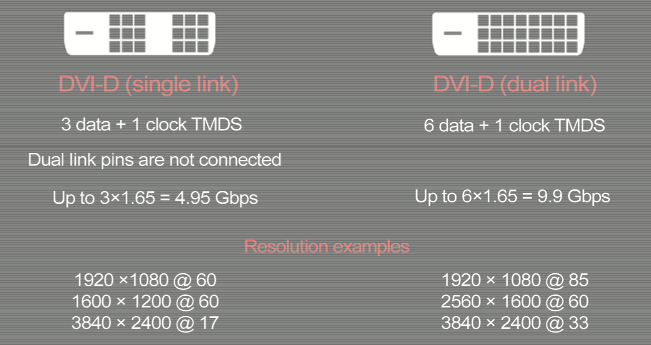
The difference between single and dual-link DVI

DVI has been around for some years now - the difference in resolution and data rates between single and dual-link is shown above. The four pins that sometimes surround the larger 'blade' pin are the R,G,B and sync signals that carry the analogue version - but this isn't supported by all graphics cards and/or monitors. Most graphics cards 'mute' the analogue pins if the DVI handshake has taken place. The difference between digital-only and analogue/digital-DVI is shown with the suffix D or I (for 'integrated').


Evolution of DVI to HDMI v1.4


Key interchange for HDCP


Display Port

I shall finish this off later!

Monday, April 19, 2010

Blackmagic Videohub & RS422

I've talked about BlackMagic's router range - the VideoHub before but never installed one of the larger 72x144 models.
They are very thin! Where you'd expect the cables to terminate at the back of the bay these have to be long enough to terminate at the front of the cabinet.


Here are a few notes relating to it - it's amazing that you can buy a 3G-capable HD-SDi router (with RS422) for around ten grand. To do the same with Probel et al would be north of £50k. However - there are a few things you lose with your budget router.

  • Remotes control - although in the past I've mentioned how the VideoHub can't do the TX/RX crossover that all 'proper' matrices do (i.e. they know how to handle controlled/controlling devices) they have introduced this in v.4.3 of the control software (that runs on a USB-attached Mac or PC - can can even re-share control over a network so you can run the same control applet on your Avid/FCP workstation). In v.4.2 you had to declare what a device was - either a 'deck' (a controlled device) or a 'workstation' (a controller). This falls down when you think about doing two-machine front panel editing between two VTs - the recorder becomes the controller and so you have to go into the labels menu and temporarily declare that VT a 'workstation'. The reverse is true if you want to run your Avid in VTR-emulate mode (when the timeline can be controller like a piece of video tape). We thought 4.3 was the answer to all our RS422-payers but it doesn't work that well - and when it gets it wrong you have to keep making and breaking the route in the hope that it gets it right. So - we're sticking with v.4.2 (BlackMagic s/ware archive in the title link).
  • Touchscreen - our customer wanted a touchscreen to control the software which works quite well - I'd recommend at least a 19" 1280x1024 res screen as a 17" is fiddly.
Of course - in a non-TX environment these things may not matter. It really is a very good deal!

Thursday, April 15, 2010

Why did late 60's/early 70's rock singers have two mics taped together?

I've been enjoying "Guitar Heroes at the BBC" on BBC4 where they compile clips from Whistle Test, Rock goes to College, TOTP etc. I've always wondered why rock singers from a period of only a few years would have two mics taped together. By the time I was paying attention in the late 70's the practice seemed to have stopped so I suppose it was a technical development that made the change.
I asked the question on Twitter and Facebook and got great rock'n'roll answers; "...so they could take it to 11", "early form of stereo recording" etc. In fact when I went back over my old BBC notes I had been told why they did it but only a few weeks out of university I don't think I understood common mode rejection!

Ronnie Van Zant of Lynyrd Skynyrd c.1973 - two mics!

So - having re-read my notes and had a trawl around the web (my word, there is some awful rot spoken by people who know very little!) here are the two reasons (and I'll list them based on the technology that fixed the problem), they both rely on the fact that the two mics are wired anti-phase to each other and the assumption is the singer sings predominately into only one of them (doesn't matter which).

1. pre-compressor/limiters you needed a way of loosing some of the induced stage and line noise - this does it.
2. pre-parametric eq - you needed a way to reject howl-round and this does it.

So - you mix the anti-phase feeds in two channels on the desk and all noise/feedback etc gets canceled and the voice (predominantly coming down one feed) remains. Interestingly another technique to gate a mic is to have either an optical detector on the mic stand or a pressure mat in front of the mic which mutes the channel when nobody is near the microphone.

Monday, April 12, 2010

My blog is blocked in UAE!


Fantastic - China as well - I'm kinda glad they don't want my kind of radical engineering ideas been seen there! Thanks to my good pal Tim Taylor (who's working out there at the moment).

Tuesday, April 06, 2010

I'm going to leave Virgin Media (and so should you)

I've been with Virgin Media since they were Blue Yonder and then NTL and have consistently upgraded as faster cable connections arrive. I like lots of bandwidth because sometimes I need to download large files quickly but I find that for Skype, iPlayer and the plethora of other bandwidth hungry apps you can never have a big enough pipe.
Several times over the last couple of weeks my connection has slowed to a crawl. This screengrab from my 'phone is typical - unusable for anything other than email or IM. Eventually I called tech support (which is often a painful affair!) to be told that I'd fallen foul of the traffic management cap. All the details are in the title link. Bear in mind I never signed up for this - they introduced it without fanfare last summer and the details are show in the table below;


So let's take the slot between 16:00 and 21:00 - if you pull more than 3.5gigs across your connection you trigger the cap and they slow you for five hours. "Hang on, who downloads three and a half gigs of an evening?" you ask - but it's not the downloads that get you. We're talking about an 18,000 second slot which (do the calculation yourself) means that if you run your connection at two megabits per sec (it's actually a tad less) you fall foul of the cap - ten percent of what you pay for (on my twenty-meg connection) will give them the excuse to slow you down.
So - in a household of teenagers it is by no means unusual for more than one person to be watching the iPlayer (Sarah and I on the TV using the Wii, the boys of their computers) - so that's 2 or 3 x 800kBits per sec, maybe a bit of Skype (around 400 kBits per sec) and add to that a download or two and you've fallen foul - and over recent nights I have every evening!
Part of the problem has been the dodgy DVB-T tuner in my PVR - I've been downloading BBC shows in HD rather than recording them!

Virgin's response is one of fairness - why should some people hog all the bandwidth? The implication is that their network (the only one that is 100% fibre-to-the-cabinets as their adverts remind us) isn't up to delivering the bandwidth we have been sold. This is bogus because when I raised this with them their response was to try and up-sell me to the fifty-meg package which has no restrictions! It's a marketing strategy. I bet when they launch their 100meg connection the fifty meg one will suddenly have limits introduced to 'maintain a fair usage model'.

Monday, March 15, 2010

Again - DRM penalises legitimate users only

Sarah works at Barnet Library on Saturdays and returned very excited this weekend as they've just introduced electronic loan of audio books and eBooks - fantastic you might think. Just download the book to your machine and then portable device and you save a visit to the library. Understandably they want DRM so that it mirrors the same service the library currently offers (you do have to return a physical book or CD after all).
So, Sarah installed the software on the media machine (which has a 10" 800x600 screen in the kitchen for iPlayer/iTunes etc and a second feed to the living room HD TV for Media Centre/Player - two sound cards mean you can be watching an HD recording in the living room and listening to/watching iPlayer in the kitchen). After she'd downloaded a book and tried to play it locally (which is entirely within the allowed behavior);


Quite why you need a hi-res screen for listening to an audio book is another matter. "No matter" I thought - I've got an old iPod kicking about, lets transfer it to that (again, OK in the EULA) and listen to it that way. Click the transfer button and you're in for an eight hour wait while it transcodes the WMA files to AAC. Also - it finds the iPod about one time in five (iTunes sees it every time) and so the chance of it working and you getting more than just a sample of chapters is remote. I did think about pulling out an old Windows Mobile 'phone but at that point I just torrented the book and it's good to go. You try and do the right thing but they make it impossible.

This all begs the question why public money has been spent on this very sub-optimal solution? If you don't want people to listen to these things then don't make them download'able - don't have an audio/eBook service. They will no doubt say that they can't make it easy as people can pirate/pass on the files. However - the OverDrive Media Console allows you to burn regular Red Book audio CDs - so they have NO trouble exposing the data un-DRM'ed! I despair. It reminded me of a time that I bought a couple of episodes of CSI from Channel Five's VOD service - they'd only play on the laptop I downloaded them on and not my media machine connected to the tele. Again - within half an hour I'd scored them off bittorrent (and in HD!)

Thursday, March 11, 2010

JVC monitor calibration software


Whilst at Channel Five recently I got to play with JVC's new monitor calibration software - it's for their DTV-series LCD panels and works using one of those little USB colourimeters (it supports several of the £150-gadget Tottenham Court Road specials). You use a DVI o/p from a PC to feed the monitor and hang the USB detector on the panel and via an RS232-USB connector the software models the monitor and uploads a 1D-LUT that makes the panel conform to a flat D6500 colour-space. Just the job for TV use.
There are a few caveats I can see;

  • The JVC monitors don't switch in a different colour matrix when you go between 601 and 709 working (i.e. SD and HD signal) - the monitor assumes you'll be wanting reliable colour at HD and any SD work is just for content. Previous posts on this here.
  • You calibrate the greys and whites using DVI (hence an RGB source) which only exacerbates my first point.
  • Those little USB gagdets are a couple of hundred quid against a proper colourimetry probe which is a few thousand and a photo-spectrometer which is many thousand. Given how sensitive your eye is (particularly in the blacks) I'm not sure I'd place a lot of faith in something you'd buy in the high street.
  • The software seems to do all it's modeling at 120Cd/m-sq - much hotter than you'd set the monitor for TV use and maybe twice as bright as if you were setting up a film grading display. This isn't as bad as HP's DreamColour range which start at 300Cd/m-sq!
Aside from those quibbles it looked quite good. I like the idea of being able to keep the LUTs for all your monitors and the fact that the software is looking to bring the display into compliance rather than "making it look good"(!)

Tuesday, March 02, 2010

Some more notes on Return Loss


After my poor attempt at an explanation yesterday here is a page from Fluke's manual - much more concise.

Monday, March 01, 2010

Cause of return loss in cat5e cable

One of our biggest suppliers asked us to test a sample of cat5e cable - we tried a couple of different RJ45 ends on the cable - a non-name one and Tyco. We ran the same 1000BaseT test on all six cores for both connector types and if you look you'll see that cores 2 & 4 consistently fail on return loss.
I initially thought it must be down to badly terminated ends but the DTX makes a distinction between return loss over the length of the cable and return loss at the remote end (how on earth it works that put is anyone's guess!) - generic RL is therefore all the reflections along the whole length of the cable that impede the transmitter's ability to send a strong signal.


Now then - it's the brown pair in every case - that suggests that the brown pair is sub spec. We didn't test to an ISO standard (because the cable isn't marked with one) so we used a generic gigabit Ethernet test which is a bit more tolerant.

I have to say I think the cable has a manufacturing fault in the brown pair.


With that in mind we stripped out some of the brown pair from core 2 (bad) and core 5 (good) and you can see the twist in the bad pair is much more variable than the twist ratio in the good pair.

So - it seems like the brown pair in cores 2 and 4 is inconsistently twisted compared to the brown in the other cores.