Sunday, May 10, 2020

Kickstarter projects; three out of four ain't bad...

Along with KickStarter there are numerous crowd-funding sites and I've ploughed a bit of money into several. As well as electronics projects I have funded a few artists to record albums and have been very pleased. 
Here are four projects I backed, three of which came out really well and one which kinda got half-way there. The thing you have to remember is that backing things on KickStarter is not like buying something - you have to fully accept that some project just won't deliver.


  • PockEthernet is a tester for ethernet and IP networks. Serious network people use a Fluke DTX-1800 (I used to have access to one) - it's now discontinued, but like the replacement DSX-series all TDRs (Time Domain Reflectometers) are expensive (a few thousand pounds) but if you want to certify an install it is expected. At the other end of the spectrum you have the £50 DC testers that just make sure there is continuity on each of the eight legs and really just allow you to have some certainty in termination polarity etc. The PockEthernet is a half-way house with some TDR capability (not sure home accurate is it) but nice record keeping. Above a little DC-tester (like a ModTap or others) it can do some IP testing; POE, DHCP, VLAN tags etc. and so for me is ideal. 


You interact with it using a BlueTooth-attached app running on 'phone or tablet computer


The measurement reports can be over many circuits (so testing a whole patch-panel at once is do'able) and you can email/save as PDF from the app.


You can even brand the reports with your logo

  • BeeLine bike navigator - I often see folks with their smart 'phone in a waterproof wallet as a bike GPS. That's great, but when I'm cycling somewhere I'm not entirely familiar with I often like to find my way but certain in the knowledge that as I get closer I can make better navigation decisions. The BeeLine is a bluetooth attached smart compass that tells you what direction to go and how far your destination is. I've been using mine for maybe eighteen months and it works really well. It is stable and accurate with good battery life.

wiggly route; it was a Sunday afternoon!


  • Pebble Smart Watch - Although the Apple Watch is undoubtedly a miracle to technology I never felt it was for me; the biggest problem is the battery life; two days at best. It also seems to need a lot of curation. Friends who use them are constantly attending to them and I only really wanted a second screen for my 'phone with good notifications, health tracking and control of media players. The Pebble does just those things really well and nothing else. The battery on mine (Pebble Time Steel variant) lasts for more than a week and when they went bust at the end of 2016 I bought a second one just in case. They charge in about an hour.

The lockdown has been great for sleep but very bad for exercise...


I always return to the same watch-face "Graphite Too" as it has everything I use and is clear.

Thankfully after Pebble went bust and got bought by FitBit a group call Rebble acquired all the source-code etc and have been supporting the watches with new firmware and online services since.
  • Oscilloscope Watch - I know what you're thinking; what a daft idea! I've written a lot about this one in the past because I did get a very janky alpha-version (3D printed case, very early build of the software etc). Still, five years on and the project is still live on Kickstarter and so we live in hope!

Thursday, March 12, 2020

Modifying Blackmagic 6G routers for quiet(er) operation!

You can't deny the value in BMD SmartVideo Hubs - they are a fraction of the price of traditional broadcast video matrices. They have appalling return-loss on the BNC inputs and their control system is very simple (although in lots of cases that's a benefit). The temptation is to stick them in desks in edit, grading and audio suites, but they are noisy! The reasons are;

  1. Cheap, low air volume fans
  2. Tiny holes in the chassis through which to try and pull enough air
  3. No control of the fans even though the ones they supply have a tach output

'scope is showing the tach o/p of one of the fans, yes, I was routing video!

Even though the cheap/noisy fans BMD fit have a tach output it clearly isn't read by the hardware as the fans run at full tilt from power-on. This one had been on and routing video for a couple of hours (with the lid on) and it's like sitting next to a vacuum cleaner.
So, quick look at RS and filtering by size, volts and then listing by highest air volume & lowest noise I got these Papst fans - they also have a tach output (I had no plan to use that) and more importantly are induction-start motors (so they will run on much lower voltages; I had a feeling I could simply control them with a potentiometer with a similar impedance to the coils).

getting them ready to fit in the same JST 1.5mm pitch headers as the stock fans, 10K pots

fitted to replace the stock fans - I had to ream-out the screw holes in the fans for the screws to fit, double-sided tape for the pots.

The other issue is the tiny holes they have in those cases for airflow. With a bit of extruded aluminium and grill material you can get a good look.

Make sure you don't put another piece of equipment directly above it!

So, proof of the pudding and all that; I ran the stock unit for a couple of hours, pulled the lid off and took a photo with my thermal camera and then did exactly the same after the modifications. The results speak for themselves; the client has these in their audio suite and game me four more to modify.

before & after - running cooler and maybe 20dBs quieter

As an aside I found driving these fans at a constant 8v produced the best results.

Friday, November 29, 2019

Rigol Ultrascope software and Windows

Ever since abandoning the faithful Tektronix 2245 oscilloscope I've been a fan of Rigol digital 'scopes; compact and a load of functionality for modest money (FFT and 1Gig samples/sec in my little DS1052E).
Rigol have been less than stellar in keeping the Windows software current and so here are some cobbled-together instruction (from http://www.milkcarton.com amongst others - but his website is often down?).

  1. Download Ultrascope for your particular series (so DS1000E in my case)
  2. Download the Windows driver (had to find this on the Way Back Machine!), Extract these two files, then go find the device in the Device Manager. Update the driver and point it to the directory where you extract the driver files.
  3. Next, download the NI-VISA Run-Time Engine (v5.0.3 as of this writing). Beware, this file weighs in at 71 MB. Install the VISA runtime with the default options (you could probably get away with just installing the USB portion, but I didn’t try it).
  4. When the NI-VISA installer finally finishes, you might be prompted to reboot. I skipped this step :-). Run the Ultrascope software, and click on Tools –> Connect to Oscilloscope. I was prompted with a list of devices, with none of it making much sense, except the first option “USB0…”


Sunday, October 06, 2019

Experiments with white light (it's complicated!)

I've often run a day's training course for broadcast engineers who want to get up to speed with calibrating monitors and projectors; typically to rec.709 but increasingly to P3 as HDR and 4K/UHD are becoming a thing.  One of the principles I've always struggled to get over is Metamerism; that inability to see/measure colours correctly if your measurement device (camera, eye) is tristimulus and your source of illumination does not have a daylight-like spectrum (so LED lights, typically).

A few month's ago I got one of Chris Wesley's excellent home-brew spectroradiometer kits; from now on referred to as the ghetto-spectro.  Read Chris's excellent documentation about how you can make really quite accurate spectrum measurements with modest parts so long as you can accurately calibrate the thing - and this is where the spectrum of Mercury comes in useful. Mercury has two peaks in the visible spectrum at 546nm and 436nm and you can guarantee that a compact fluorescent bulb will have a decent amount of mercy in it.

the ghetto-spectro pointed at the mercury containing CFL bulb on my workshop bench

the measured output showing the various peaks of different elements

the image from the diffraction grating in the iPhos

So, watch Chris's video which tells you how to calibrate to the two Hg-peaks, and pay special attention between 540 and 550nm as Terbium lurks very closely to the 546nm peak (green) of Mercury.
Terbium is at 543nm, very close to Mercury at 546nm

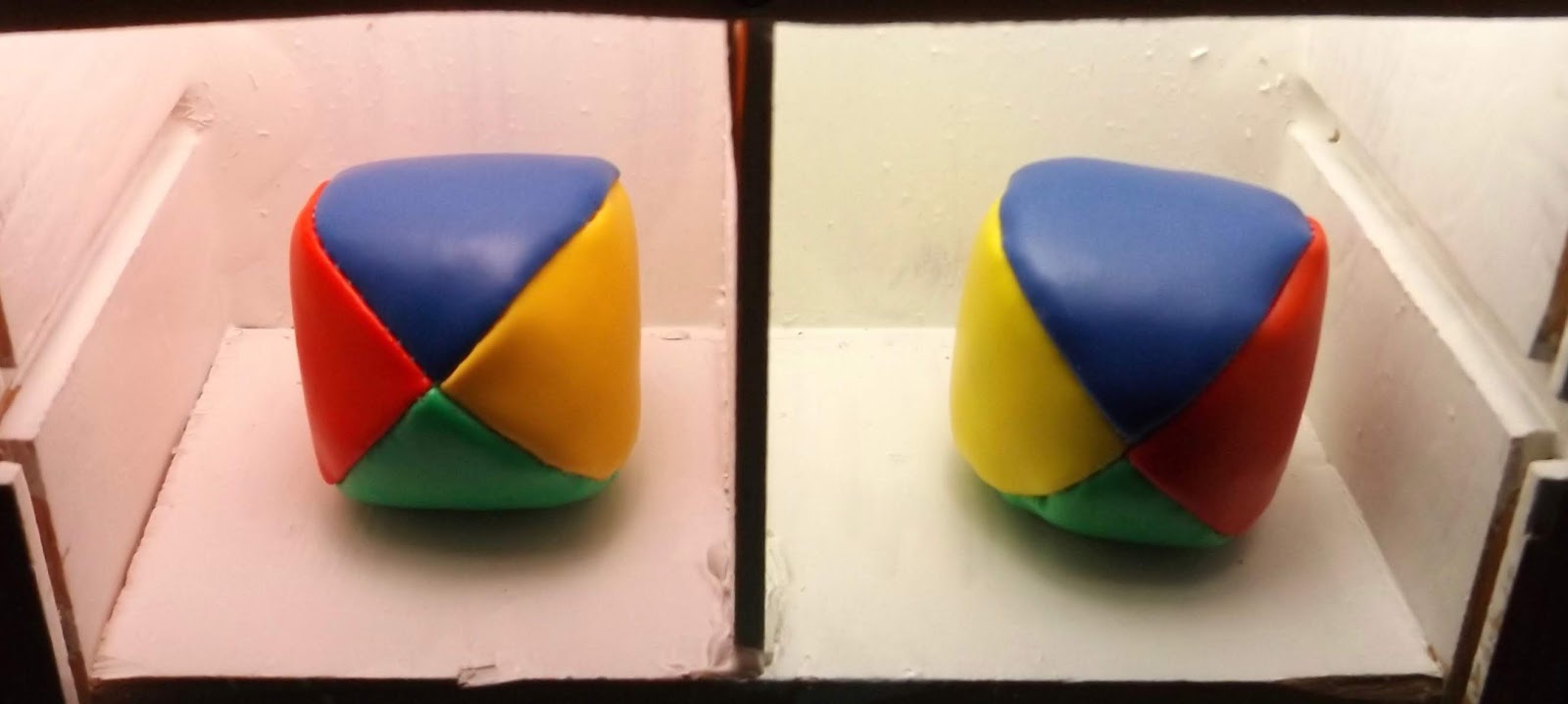
OK, now I have a calibrated spectro I can turn my attention to experiments with white light and perception. I build a box with two isolated sections, painted inside with a very reflective white primer paint. In the left-hand cavity is one of those RGB-mixer bulbs based on LED technology (and controllable from an app; very 2019!) and in the right-hand section is a broad-spectrum white light. 


Thus equipped I can now mix the RGB values in the left-hand side to produce a white light that matches the right-hand side from my perception. As you can see; the camera in my iPhone does not agree! BUT, I promise you, to my eyes the two white are a really good match. I have spent may years "racking" studio cameras (matching their colourimetry for live TV shows so that the lighting director doesn't shout at you!) and eye-matching displays (typically a good domestic TV to a grade-1 broadcast monitor) - I have a better eye for colour than most.

So, at this point I should show the spectro output for the two light sources;


the right-hand broadband white light; reasonably continuous spectrum


the RGB-mixer bulb; three clear peaks


So; I took photos using three different cameras; an iPhone 8 using the native Apple photo app, a low-end Android tablet using the Google photo app and a 2015-vintage Fuji Finepix 5600 bridge camera. All three rendered the RGB-white differently (remember , that to my eyes it's the same white as the broadband white bulb) and they also minimized the differences in the colours of the juggling thuds I used as colour references in the two box sections.

From the iPhone 8


from the Android tablet


from the Fuji Finepix


Finally I should make a note of how my perception of the colours varied;

I need to think about this a bit more to relate the spectra of the two bulbs to the likely sensitivities of the cameras; but, it does show that observer metameristic failure is a things!

Monday, September 23, 2019

What I saw at IBC2019

Eizo CG3145 “mk.2?” – Revision of the current model “Prominence” monitor - see my post from last year.

It’s exactly the same dual Panasonic IPS (LCD) display module and modulated LED backlight as the current version (and indeed the Sony X310 replacement for the X300) with the following upgrades;
  1. Quad 3G and single-link 12G inputs for current gen 4K/UHD/HDR standards. If you need to go to 18G standards (so 4K, 12 bit, RGB and 60P) it still supports HDMI 2.0 and DP. Once nicety is that it has SDi out and can convert signal standard as an active loop-through (but not converting colour space, sampling structure etc – obviously),
  2. Internal probe; a higher quality photometer than the 319X but I’ll have to test it against a “proper” probe before we make comment; they assured me ColourNavigator’s “sensor correlation” function would work as other CG-series displays. See my video.
  3. Three user-defined cages and BITC as per Sony’s 4k monitors – this has been mentioned by several facilities as reasons why they won’t leave Sony – aside from the BITC feature having been broken in the Sony displays since v.2 firmware I don’t believe grading room displays need either of these, but it’s good to have an answer (I’d say exactly the same as point 1. Above)
  4. Much nicer control via a big knob on the front.
  5. Price – will be the same as the current CG3145
  6. Availability – they reckon there will be pre-production demo examples in January and supply at start Q2.
They made some point about having improved the FPGA code in the panel for better sharpness – sounded like marketing waffle; and in truth savvy customers don’t want a monitor “sharpening up” their pictures; pixel-to-pixel is what’s needed; brutal honesty rather than the picture processing you get on a domestic TV.


Emerald KVM system from Black Box; it comes in three product skews;
https://www.blackbox.com/en-us/products/black-box-brand-products/kvm/control-room-kvm/4k-kvm-over-ip-switch
  • The basic – tops out at 2 x single-link displays (1920x1200) 
  • The “professional” – same performance but has tighter integration with their manager
  • The 4K – supports a single 4096-pixel wide display.
Points to consider;
  1. Price – the basic and professional are very akin to Amulet pricing (bear in mind Amulet Tera2 products do 4 x single link or 2 x 4K displays) – so typically £1,000 per end-point (sender and receiver); Amulet external T2 would be £1,400 (sender) + £700 (receiver). The 4K product which is what now competes with DX-H4T/DZ4 from Amulet is around twice the price (about £3,900 for sender/receiver pair). Add onto this the cost of a broker (their own 1u Linux box) AND they heavily push you to Black Box managed switches (essential if you’re using all the broker features),
  2. Encryption – AES256 with key-exchange is the clear via the broker’s database; we couldn’t sell this to anyone who is looking at a TPN audit,
  3. Bandwidth – max’es out a gigabit Ethernet (in fact you need the second NIC if you want to use two screens); remember, Amulet plays nicely with internet-type bandwidths
  4. Switch requirements – As mentioned, BlackBox manages switches preferred, but whatever you use jumbo frames and IGMP-snooping is required. Amulet plays nicely with all layer-2 ethernet switches.
Niceties;
  • Broker is better to use than Tera connection manager
  • ZC supports both PCoIP and RDP (their protocol is Windows RDP!)
  • As you’d expect from a modern KVM it is reasonably transparent, but full-screen HD video playback was (I thought) worse than Amulet (and remember Amulet tops out at 200Mbit/sec rather than the 2 x GigE that the Emerald needs)
So in fairness I don’t think there is any scenario (other than owning existing plant) where we could sell it as a better option than Amulet (or a Teradici option).


Streambox’s DolbyVision remote workflow
http://www.streambox.com/post-production

StreamBox have implemented eCMU functionality in their Chroma range which means they can take the DolbyVision metadata across the IP-SDi feed and decode the rec.709 fold-down data at the far end and display dual-6G outputs on and HDR monitor and a rec.709 display (typ. a decent TV). The powerful thing is that by having the Dolby tone-mapping algorithm with all the lift/gamma/gain tweaks in the HDR stream they can produce a pixel & colour accurate SDR version at the far end with no extra bandwidth required. Super-cool.


Canon DP-V3120 4k/UHD/HDR grading monitor
https://www.canon-europe.com/video-cameras/dp-v3120

We sold a few of the earlier gen Canon DP-V3010 4k displays and although they were good 4k displays their HDR abilities were more limited than the X300 – in fact today they would be an equivalent to a £3.5k Eizo CG319X.
The new monitor uses the same Panasonic panel & backlight as the Eizo and Sony, but in this case it is a single-layer IPS which means the blacks are probably not as good as the CG3145 and the X310. I’d have to test that when we can our hands on one.
  • 2,000Cdm-2 max light output – probably because it’s only a single layer, they’re letting all the light through. Not sure why this is a benefit as nobody (Netflix, Fox, Warners) are specifying 2,000Cdm-2 deliverables and the next bump to DolbyVision will be to 4,000Cdm-2 so this seems to be neither fish nor fowl – much like the Flanders 3,000Cdm-2 monitor.
  • Tone-mapped false colour display – this is very nice; As far as I could tell this is nerly as good as Leader’s “CineZone” display but available in the monitor.
  • Same set of inputs as the new Eizo
  • Sub £20k price tag

ColourSpaceCMS colour management and LUT building software.
https://www.lightillusion.com/colourspace.html

We sometimes sell a LightSpace license with Klein colour probes and I tend to then provide a day’s training (doing it next week at a customer's).
  • Much more modern interface – lots of people complain that LightSpace looks a bit 1990s and things like loading LUTs and talking to patch generators takes a few mouse clicks rather than being auto-detected. ColourSpace seems to address all of this. I've never found this to be an issue; if you've spent thousands on a probe and software you should really get familiar with it.
  • Profiling engine can run whilst you are manipulating LUTs – very cool; will go some way to addressing the two hours of thumb-twiddling I have to do whilst profiling a display.
  • Multiple probe support – you can be profiling two displays at a time; but with probes costing >£6k I wonder who will use this?! Monitor manufacturers at their factory, probably.
  • Price – near-free upgrade from LightSpace depending on age of license.
We never really offer LightSpace as a product by itself; always as part of a package and as part of the colourimetry training day.


Leader LV5900 – 8K test and measurement
https://www.leader.co.jp/en/event/7318
  • 8K (so quad 12G) version of the LV5600/LV7600 series we sell.
  • Price – silly money! >£50k basic

AJA Image Analyser – HD/UHD/4K/HDR test and measurement
https://www.aja.com/products/hdr-image-analyzer

They’ve been selling this for a year as a competitor to the Leader but I don’t know it’s HDR abilities.
  • Quad-12G – now can operate as a 4 x 4K machine; perhaps an OB that is sourcing Slog3 cameras and delivering both HLG and rec.709 would find this udeful?
  • Price - £16k (so cheaper than an HDR/4K optioned Leader)
Also – all the Hi5-4K+ and associated boxes now support Dolby metadata passthrough so no more hooking up the USB control to force displays to switch between rec.709/PQ/HLG. Nice.


The Bryant Unlimited cable manufacturer's meal - the highlight of my professional year!


Saturday, August 03, 2019

Calibrating the Calibrator - Colour management with Eizo CG319X

I've spent a lot of time demo'ing these monitors recently and the thing that tickles customers the most is correlating the internal sensor to an external probe.

https://youtu.be/LB6HFOBJU2c


Saturday, April 20, 2019

Electronics, disasterous career choices and good techy YouTubers...

The last few months have been a bit of an education for me; I changed jobs twice and kinda wished I hadn't - neither has been ideal. However, I wound up with six weeks with not much to do (I did a few days of freelance colour work) but I took the opportunity to finish off my home fixing bench;


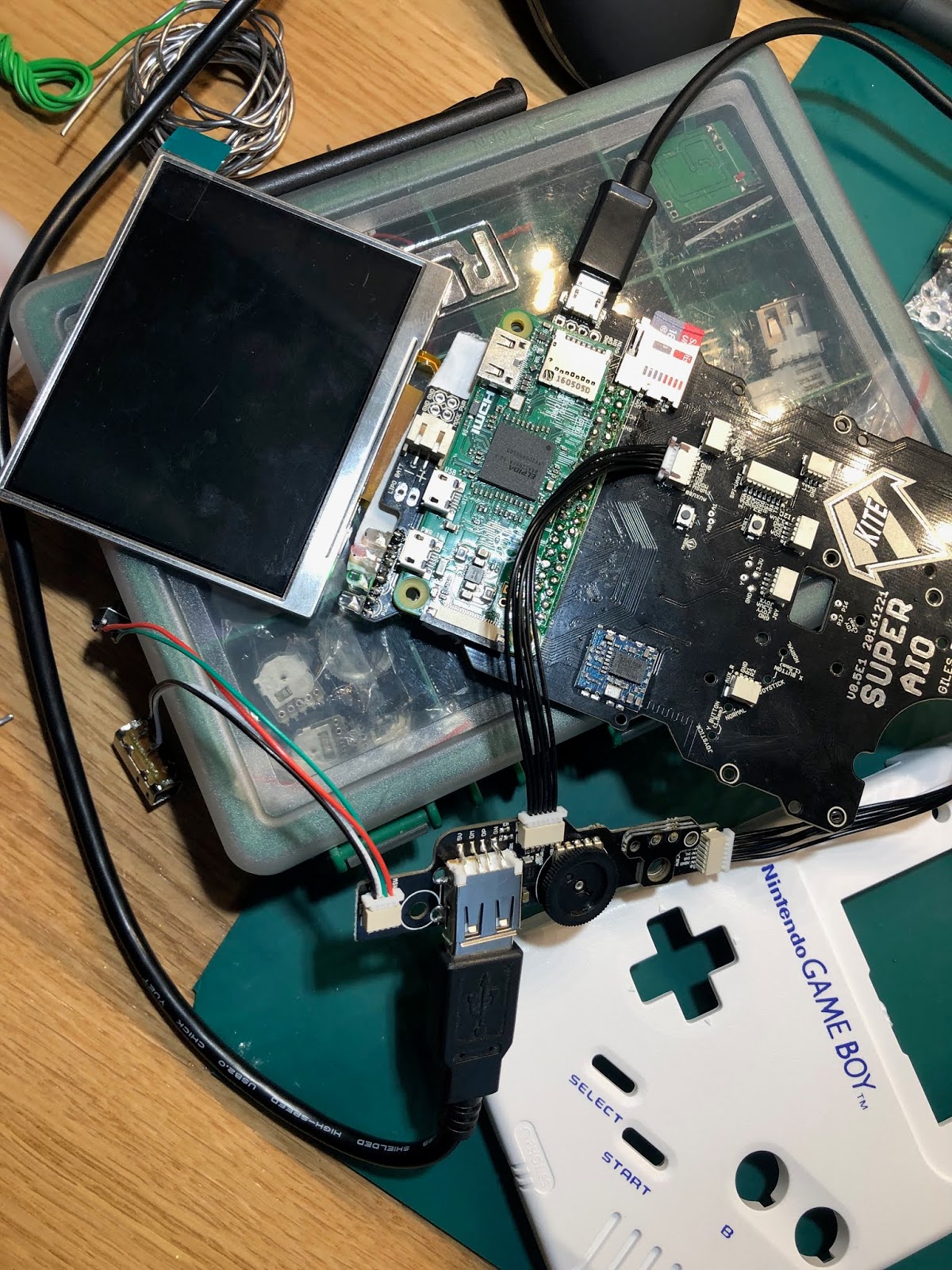
After this I resorted to my usual cathartic activity of building a hand-held games console based around a RasPi and fitted into the dead carcass of an old Gameboy/Gamegear etc. I didn't make any videos of this project (unlike the Gamegear from last year https://youtu.be/Mt1VP-AjSQU);


BUT, back to the most recent build; I was really pleased how it worked out, probably the most tidy one I've done to date. I also implemented a proper shut-down script so the power button doesn't just crash the Pi (and I monitor the LiPo's voltage to avoid the system crashing that way too).


The other thing I took to whilst off was to start learning the Python programming language - if you're looking to get back up to speed with coding Python seems to cover a lot of the principles of modern scripting languages - the thing that has blown me away the most so far is the list data type - a list can have different data types within it! Perhaps all modern languages have this, but my degree in Maths and Programming in the mid-eighties did not prepare me for such things!
Can I recommend Jamie Chan's book "Learn Python in one day and learn it well" - as someone who still has a bit of C and VB experience it has bee good for me.

I have also been catching up on my favourite electronics YouTubers;

https://www.youtube.com/user/rossmanngroup
Louis Rossman - Apple repair guy and the best example of surface-mount rework and diagnostics you'll see.

https://www.youtube.com/user/bigclivedotcom
Big Clive - more focussed on big volts and tearing down badly made power electronics!

https://www.youtube.com/user/greatscottlab
Great Scott! My kind of small project builds with something of a focus on Arduino

https://www.youtube.com/user/FFcossag
A brother broadcast engineer who fixes stuff

https://www.youtube.com/channel/UCDbWmfrwmzn1ZsGgrYRUxoA
The Post Apocalyptic Inventor - motors and generators are the emphasis of his builds

https://www.youtube.com/user/EEVblog
Dave Jones of the eevBlog is a design engineer who seems to know everything about electronics; really engaging style too.

So, not sure how 2019 is going to play out - one thing I have realised is that my plans of giving up all this broadcast engineering nonsense are perhaps closer than I thought; maybe the teaching PGCE is even closer than I thought...

Saturday, January 12, 2019

Is there an HDR mastering display that costs less than £20k? Not yet.

I was asked to take a look at the ASUS PA32U monitor - a 32" display that (when I first saw it last year) was initially an sRGB, Adobe RGB, HDR10 high-end graphics/gaming monitor. It comes in at sub £2k and so is expensive for home or office use but almost free from a film/TV perspective. Most interetsingly it could hit >1,000Cdm-2 peak white and unlike OLED displays (typ. Sony BVM-X300) it doesn't suffer ABL as more than a small percentage of the display hits peak white.

I gave the manufacturer a few pointers - essentially if it is going to have any application in film and TV it should at least support HLG and DolbyPQ. So, just before christmas a new itteration of the monitor arrived and here is a little video.

A few things to note;

  1. Terrible "blooming" near black; if it was a CRT it would be akin to bad internal reflection within the tube.
  2. The blue primary is not as good as it should be - it can't even hit 100% of rec.709
  3. Ironically, however, it does manage 84% of rec.2020 - just shows you can't get too hung up on very saturated colours,
  4. There is some sort of noise-coring going on; you should be able to disable that in the menues.
LightSpace reports; http://www.engineersbench.com/phil/docs/ASUS_PA32U/
https://youtu.be/hYCJh9ujhxw

Sunday, December 09, 2018

Compressing spoken word audio for podcasts

What a terribly lax blogger I've been over the last few months; part of that was due to a couple fo trips to Saudi to finish building a facility in Riyadh (more about that to come; did you know that protective mains earths are not mandated there?!).
Anyway - I look after a couple of podcasts (just spoken word content) and for the longest time I've been using the Conversations Network Levelator to compress the dynamic range of each clip before I import them into Audacity and then edit/normalise them before exporting as an MP3 for upload. Imagine my horror when after switching to a new (old) laptop that I installed Mojave (OS-X 10.14) onto I could no longer use The Levelator; and it's a thing - lots of folks complaining online about it, but it's abandoware so what are you going to do?

 You upgrade the OS and some software stops working...!

 People listen to podcast in noisy environments; in cars, on the bus in earbuds and in other non-ideal listening environments. So, like talk radio the best thing is to compress the signal until there is almost no dynamic range and then normalise it to less than a dB under 0dBfs. Then it's a loud and punchy as it possibly could be and it'll be usable in bad listening situations. The Levelator was brilliant at doing this, but I thought I should at least roll my sleeves up and see how good the compressor in Audacity is, and blow me down it isn't bad!


After a bit of tinkering around with the ratio and threshold I arrived at these values as being best for audio that is peaking around -10dBfs (I'm a broadcast engineer, after all!) - it produces speech that still sounds OK, but has almost no dynamic range!

In this clip the band starts at around 2'15"

Sticking this .WAV file through the compressor set up (above) produced a very usable result which I then normalised before joining it to the rest of the segments of the podcast.

It looks like there is a lot of noise, but it's the sound of a very large room and on the speakers is sounds OK.

Wednesday, July 11, 2018

Video Compression Fundamentals; a Tech Breakfast presentation


https://youtu.be/ZejjAXSXyZA

Part of the ongoing series of Tech Breakfast presentations at Jigsaw24, Golden Square.

My notes are here and I'm available for birthdays, weddings and bar mitzvahs.

Wednesday, May 16, 2018

Why I wouldn't buy a Sony BVM-X300 in 2018 (if it was my money)

For a couple of years the Sony BVM-X300 has been the 4k/HDR monitor of choice for Soho edit and grading suites. It is an OLED monitor and can (with some limits) hit 1,000 Cd/m2 peak white in it's HDR modes (which include HLG, Dolby PQ and SLog3 camera gamma).

It was the first monitor to be widely regarded as good enough for Dolby Vision mastering (and by extension Netflix deliverables). It was around the £20k mark when it launched, but by last year the price had crept up to mid-twenties and with the v2 of the monitor (which brought a second quad-SDi input and an HDMI input) which launched a year ago it now lists at £32k; but we all know nobody ever pays list for Sony...!

In recent months I've really taken to the Eizo CG3145 which (although an IPS/LCD monitor) is broadly similar in spec to the Sony, but; bear in mind the X300 suffers the following;
  1. Noise in the blacks; when I calibrate them I have to do blacks at 5% grey to get a clean reading (and my probe goes down to 0.01 Cd/m2) – the Eizo will read cleanly at 2% grey. Watch this video (hosted on my Twitter feed) - it's an X300 around 3 Cd/m2
  2. Max. 8% peak white before the orange PSU-fault LED comes on and the display starts to dim/de-saturate in HDR modes; at the recent Jigsaw24 I showed the "OLED killer" which you can get here.
  3. Two years in and several Soho X300s are now showing burn-in (particularly where the 3840-pixel UHD and 4096 pixel-4k rasters differ) 


£10k less list price and available now (the X300 is in such short supply that you can't get one in London currently) also add to the Eizo’s advantages. Integration with LightSpaceCMS (pretty much the industry standard for colour management) is very tight whereas the X300 only talks to Sony’s very clunky colour software (no LUT management, six-point calibration only). 

The Eizo easily allows LUT upload; this SLog3 (in slot 8) was imported via LightSpace.
 
ColorEdge PROMINENCE CG3145 is the first HDR monitor in the world to have its HDR and SDR reproducibility evaluated and awarded by the German Broadcast Technology Institute.

The Eizo has recently been certified as both a Dolby Vision mastering display as well as having Netflix's blessing.


One objection I've heard is that the X300 covers 85% of rec.2020 whereas the CG3145 only covers ~83%. It's the kind of objection that someone with a poor grasp of colourimetry makes. My answer to that is "MacAdam ellipses" - look at the Wikipedia article and tell me anyone can see the (Just Noticable!) differences.


At the recent HDR Summit at Dock10 in Media City, Salford we had more than ten HDR-capable displays.

Wednesday, March 14, 2018

Electrical Safety in Film & TV + 18th Edition; Tech Breakfast presentation

BS 7671 is the national standard to which all electrical installations should conform.  The 18th Edition IET Wiring Regulations contains important new information for all electrical installers and engineers.
In the next Tech Breakfast I focus on the 18th edition of the The Institution of Engineering and Technology (IET) regs, which will debut this summer & I review best practice for designing and constructing power distribution in machine rooms and remote data centres for film and TV.

Electrical safety is one thing no broadcast engineer can ignore. 


Tuesday, February 20, 2018

12G cabling - test results and a video presentation

I presented a recent Tech Breakfast at Jigsaw24, Golden Square. Here I detail the tests we've done across four cable types and how they perform at twelve gigabits/sec (as per SMPTE 2082-1).
We've recently taken on Leader as a manufacturer of test sets and they excel in several areas - namely UHD/4K/HDR and 12G physical layer measurements. 

 all the specs for SMPTE 2082-1

I got through all the details in the video (below and on YouTube) but you can snag my results here - if you go into the 12G folder you can see the screen grabs for all the eye patterns - the filename number related to the test line in the PDF.  The Powerpoint presentation is in there too; but if you watch the video I cut all the slides full-screen as appropriate.


 The cable types are;

SD05 - Belden 1855; otherwise known as "Image 360"
SD10 - Belden 1694
SD50 - Belden 1505; otherwise known as "Image 1000"
SD73 - Belden 7731 - about the most ungainly cable you can crimp a BNC onto!


Wednesday, December 06, 2017

Fibre for breakfast - keeps you regular...

I've have been a terrible blogger over the last couple of months; just super-busy at work, but I have done a couple of presentations in Jigsaw24's ongoing series of Tech Breakfasts.


All the slides are here.