Saturday, March 30, 2013

iTunes makes broken MP3 files now?!

I've always stuck with MP3 files for music because it is the only format that everything we've ever owned will play. Currently we've all got iPhones and iPods but the car machine is one of those no-name head-units that's a radio and a flash-memory player. In the past we've had an assortment of 'phones and no-brand MP3 players and so I think the choice I made back in the late nineties to start moving all my music to MP3 was valid.
People object to MP3s for one of two reasons;
  • It's not an open format like OGG Vorbis - it's notionally "owned" by Technicolor. It is so ubiquitous that I suspect they'd have problems enforcing that.
  • It's lossy, and not even the best example of a lossy codec.
As ever Wikipedia has a very comprehensive article. On the first point I think life is too short to get all religious about technology choices. In the case of documents formats - sure; send RTFs rather than DOCXs just for politeness (actually, both formats belong to Microsoft!). Not everyone has the right machine or can afford MS Office (oh, and NEVER send Open Office specific files!).

In terms of the lossy nature of MP3s I'd say that if you encode files well yourself it shouldn't matter for most people and most music. With very little effort you can get MP3s that are so close to the uncompressed data that came off the CD that you'll never know. Audiophiles (who still tolerate all the noise and 2nd order harmonics that come off vinyl - and don't get me started on the RIAA characteristic!) claim that no compression is good, but I suspect they do so for reasons of fashion or self-aggrandisement. The reason I say that is I have actually done the tests!

Back in 1999 I was involved in a project to transfer a large audio sound effects library to a server. The start of the project was to see how well compressed audio was suited to the task. Drives were small and expensive back then and so the success of the project rested one us using compression. So - we compressed several dozen bits of audio to 96, 128, 160, 192, 256kbits/sec;
  • Spoken word - properly recorded in a high end audio booth for existing TV voice-overs, male & female.
  • Music - a selection of acoustic, classical, rock etc
  • Sound effects - from the BBC library, spot effects as well as longer ones (bird song etc)
So these were blind-played to the Oasis Television audio staff (at the time a good example of "golden ears" - people who have been trained to hear audio problems) in properly built audio suites (£10k speaker systems in acoustically dead rooms). So - not amateurs making judgements on sub-£1,000 domestic rigs, but a proper blind-test using professionals.

What we discovered was that past 256kBits/sec nobody could get reliably better than 50% correct - it was as good as if they were guessing which was compressed and which was uncompressed. This seems to fly in the face of current opinion that says that even 320kBit/sec is detectable on iPod earbuds (!) - and don't forget that the LAME and Fraunhofer compressors (reckoned to be the best) have been getting better over the last decade-and-a-half (particularly with respect to VBR encoding).
Lots of people also suggest that other codecs (particularly AAC and WMV) are now better than MP3; I've never been able to hear that when I've compared like-for-like (data rate, VBR vs CBR etc) and since MP3 is so ubiquitous it seems likely that manufacturers would have spent more dollars optimising it that any of those lesser used codecs?

So - I compress my music to 192kBits/sec using the LAME VBR setting and I rarely hear an artefact. There are a few albums I did back in 1999 that I've gone back to because modern compressors are so much better and the little MP3 player I had back then could only hold a complete CD at 128kBits! The cruel irony is now that I know what I'm listening for and can (just about!) afford decent speakers my hearing response is rolling off quite markedly. Pretty soon AM radio will sound good. I've also found that when I mix live music I drive the high-end a lot more than I used to and that must be the same effect.
There is another effect that people talk about - how tired you get listening to compressed audio - the brain doesn't like artefacts that you don't encounter in nature. I think this is true, but the people who make play of it tend to be vinyl & FM radio fans - both of which are covered in very unnatural artefacts.

So - to the point of the post; I discovered that a couple of CDs encoded by iTunes over the last year wouldn't play off a USB stick in the car. I had to re-encode them on the old AltoMP3 maker software I used to use. flailing around online seems to suggest it's the way Apple sticks artwork in.

Thursday, March 28, 2013

The Engineers Bench podcast - shared storage for film & TV

Hugh and Phil are joined by Rupert Watson from root6 to talk about SANs, NASs and shared storage for film and TV. Find it on iTunes, vanilla RSS, YouTube or the show notes website.

Shared storage for film & TV - the next podcast

Hugh and Phil are joined by Rupert Watson from root6 to talk about SANs, NASs and shared storage for film and TV - see the wiki

Monday, March 25, 2013

The end of Television Centre - what's changed since I was there?


I joined the Beeb in 1988 and spent the first five years of my career in and around TV Centre. My first BBC posting was to Lime Grove studios (which was a few hundred metres behind the centre) with the occasional foray up to Studio 2 to do camera control on Newsnight. 
Although it's now twenty years since I worked for the BBC I still hold the corporation in great fondness for training me and always encouraging best practice from an engineering point of view. I don't think I could have had a better start in the industry. I honestly believe the BBC is a civilizing force and an example of just how good and truthful a broadcaster can be. They are without equal in my view.

Anyhow - just a few notes on how things have changed since 1988;

Videotape - 2", 1" and 1/2" BetaSP (just coming in) and UMatic or even VHS for offline and viewing copies. Since I worked in news some footage arrived on UMaticSP - BVU900 style.

Digital Video - when I started there was very little equipment that was digital; even less so that was run by a microprocessor. PCs were never seen as everything was built for the purpose (and cost £100k as a consequence!). Aside from D1 videotape (that was still very much being demo'ed at trade shows) you found digital video inside equipment, not used to interconnect it;
  • TBCs - Timebase Correctors for analogue videotape - typically a few lines of 4Fsc storage
  • Frame Synchronisers - used to time free-running incomming feeds into a studio
  • DVEs - typically three frames of storage that would allow you to re-size or at best 'curve' a video signal
  • Painting system - only Quantel Paintbox 7001 series at the Beeb but there were others - Spaceward Matisse was the competitor.
Audio - still mostly analogue recorded on 1/4" or 1" 24-track (Studer style). DAT was starting to come in and there was Sony F1 for sending stereo digital audio over a video channel. We also had SIS (Sound in Syncs) - a way of sending digital audio on a video signal. NICAM had just been launched (14-bit, 32Kits/sec companded to 10-bits = 728kbit/sec) - I hadn't heard of audio compression at this point!

Video Cable - at the BBC this was either PSF1/3 or PSF1/2 for long runs; oh, when we expected so little from coax!

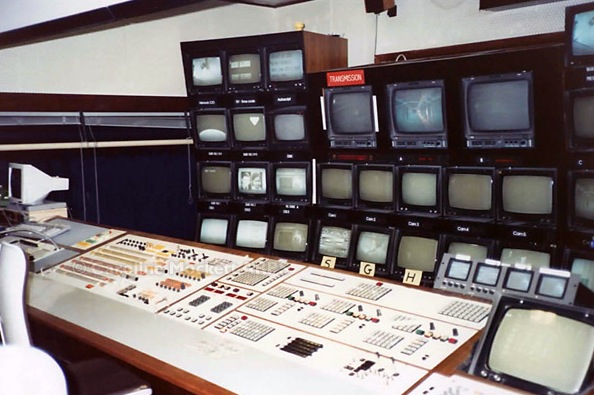
Studios - This is a picture of Studio 2 from 1988
Notice the Grass Valley GVG-1600 vision mixer - it's the one you see in Star Wars in the Death Star controlling the destruction of Alderan!
Notice the VT100 terminal at the left hand side of the desk; that was connected to the BASYS newsroom network running on six PDP-11/84s (IIRC) and controlled scripts, the AutoScript prompters and even gave us all email.
The DVE was a Quantel 5000 that occupied a whole equipment bay!

Cameras - they were all tube cameras when I started with the attendant headache calibrating them for a studio shoot and they required two engineers to control them - one for the "racks" (blacks and whites) and one for colour control (referred to in the Beeb as "knobbing" - I did that a lot!). The cameras shown here are a pair of Link 110s from my time at Line Grove. We had Link 125s in TC2 - they were all a nightmare! When I moved to Carlton in 1993 I was amazed how good the Sony BVP-7 CCD cameras were to line-up and control.

I don't have a whole load of photos from the time; we didn't have cell 'phone or digital cameras and I have a feeling it wasn't considered good manners to take photos at work. I do have a picture from 1992 from the big wall of Stage 5 (which was under construction pretty much the whole time I was in News VT maintenance in the Spur).

This wall was subsequently obscured by Stage 6 which was built in the nineties.
In summary there is no other place a trainee engineer could get experience of:
  • Studios
  • Post Production
  • Outside Broadcast
  • Telecine
  • Transmission

Trainee engineers of 1988!


Tuesday, March 19, 2013

Fixed the DVI / pin-16 hotplug dilemma

As with a lot of mod'ing or (dare I say it!) bodging solutions you need to find a nice connector or pre-made cable to base your fix on. If you look back at the problem we've been having with Media Composers switched across different Amulet heads then you'll recall it wasn't an EDID issue, rather one of Windows detecting a monitor change; Amulet does the right thing, it's Avid that's the problem.

The fix is easy; you need to tie pin-16 (hot plug detect) to Vcc (+5v on pin 14) via a 1K resistor;


The best mod'able pre-made cable that is suitable is one of these from Lindy.  Now I just need to knock up a dozen for the customer!

Sunday, March 17, 2013

AES audio on D-25 connectors

I've been working at a facility that delivers DCP masters to cinemas and the thing that we had to pay lots of attention to is the pinouts for various multi-channel audio servers and monitoring boxes, principally;

  • Dolby 650 & 750 surround processors - the gadgets that "tame" a room to make it sound like a cinema or screening environment should
  • TC Electronic TM09 multi-channel monitors; used for loudness monitoring (R128 & ITU.1770)
  • Dolby DS100 & 200 servers
  • Doremi DCP2000 servers

They are all different!
I could just list all the pinouts from the manuals but here are a couple of grabs from cable schedules that show exactly how to do it over DMP-10 cable, krone blocks etc.


Saturday, March 16, 2013

PING goes further than you think

Do you ever need a quick and free method of testing the reliable uptime of a network server? There are lots of paid for bits of software and onine services but if you have a spare Windows box this little DOS command (which you can save as a .BAT file for quick deployment) does a superb job;

cmd.exe /v:on /c "FOR /L %i in (1,0,2) do @ping -n 1 10.100.100.241  | find "Request timed out">NUL && (echo !date! !time! >> PingFail.txt) & ping -n 2 127.0.0.1>NUL"

Make sure that if you cut'n'paste it you edit out any inserted line-breaks.

Inside of our FOR loop is where we really get to the meat. We've basically got 4 steps:

  1. First we see @ping -n 1 10.100.100.241 The @ symbol says to hide the echo of the command to the screen. The switch (-n 1) says to only ping the IP once. And of course 10.100.100.241 is the address we want to ping (at home it's my media machine)
  2. Next we pipe the results of our ping into the FIND command and search for "Request timed out" to see if the ping failed. The last part of that >NUL says to dump the output from this command into NUL, because we don't really need to see it.
  3. Now we get fancy. The && says to only run this command if the previous command succeeded. In other words, if our FIND command finds the text, which means our ping failed, then we run this command. And we've enclosed this command in parenthesis contain it as a single command. We need to use the "cmd.exe /v:on /c" command at the beginning to allow for delayed environment variable expansion; that way our time & date changes each iteration. So %date% and %time% becomes !date! and !time!.
  4. And finally we're redirecting our output to a file called PingFail.txt. We use the >> operator append each new entry rather than overwrite with just >.
  5. And finally we're on to the last step. As mentioned before, the & says to run the next command no matter what has already happened. This command simply pings localhost with (-n 2) which will give us a one-second delay. The first ping happens immediately, and the second ping happens after one second. This slows down our original ping back in step 1 which would otherwise fire off like a machine gun as fast as the FOR loop can go. Lastly, we're redirecting the output with >NUL because we don't care to see it.

Sunday, February 24, 2013

The podcast has it's own domain & Wiki

Find it at http://engbench.tk/

Find it on iTunes, vanilla RSS, YouTube or the show notes website.

Saturday, February 16, 2013

Amulet's temporal dithering KEXT & fear of OS-X's console!

I've written previously about Amulet's fix for both nVidia and Radeon graphics cards doing temporal dithering under OS-X and how that spoils any KVM-over-IP system's ability to do compression. I had a good meeting with Amulet on Friday relating to a proposed customer's requirements but also got to chat to James Seward (@jamesoff on Twitter). He showed me a couple of interesting things:
  • My assumption that the current version of his Kext wasn't working under Snow Leopard was actually due to the method he was using to signal the Kext had installed correctly - the error basically says that NScolor doesn't understand the call - never fear the Console! It showed that all was well;


  • His worry that any other KVM-over-IP manufacturer could just take his Kext and use it to make OS-X displays work using their system has been circumvented by checking for the presence of Amulet hardware (that's an expensive dongle!);


Now the week after next is BVE, this time it's at the Excel Center in Docklands (goodbye Earl's Court!) and I'm doing some training tasters but all of the workstations on our stand will be extended over Amulet. I think this is one of the most significant technologies we've taken on in recent years and so come and grab me for a demo.

Tuesday, February 12, 2013

Cheap HD/SDi parts, Return Loss and the danger of short cables

Return loss is the loss of signal power resulting from the reflection caused at a mismatch with the terminating load or with a device inserted in the line. It is usually expressed as a ratio in decibels (dB); 
RL(\mathrm{dB}) = 10 \log_{10} {P_\mathrm i \over P_\mathrm r}

where RL(dB) is the return loss in dB, Pi is the incident power and Pr is the reflected power.

Return loss is related to both standing wave ratio (SWR) and reflection coefficient (Γ). Return loss is a measure of how well devices or lines are matched. A match is good if the return loss is high. A high return loss is desirable and results in a lower insertion loss. In the case of newer budget HD/SDi equipment return losses can be as bad as 12dBs (I've measure Blackmagic boxes thus) whereas the spec for 3G is 16dBs and in the case of proper broadcast manufacturers 18dBs or better is often measured (Sony, Tektronix).

I recently tested some real budget SDi parts from a reseller who is thinking of importing them from the Far East. Here are a couple of eye patterns of a 1.5G signal at the input and via the high-impedance looping output of a distribution amplifier.
If you take the first measurement as the base (it's not brilliant but that probably due to the poor signal generator) and then see what you get when the feed is connected to the DA's input and measured at the Hi-Z loop-through you see the effect of return loss - the ability of the sending equipment to drive the line impeded by reflections at the receiving piece of of equipment because of sub-optimal termination.

One thing to look out for is using short cables with budget SDi parts because the reflected portion of the signal doesn't have the chance to dissipate and interferes with the incoming signal. Replacing the short coax cable with a longer one solves the problem. This seems counter-intuitive as all engineers are painfully aware that signals get more compromised by long cables. We all carry a set of figures around in our heads; Gigabit Ethernet over cat6; 100m, 3G HD/SDi over Belden 1694; 60m, 10gig Fibre Channel over OM3; 600m etc etc. 

Matt, Wes and I were left scratching out heads with the following setup;

HD/SDi MTX, optical o/p -> 100m OS1 line -> optical->SDi converter -> SDi-HDMI converter -> TV

We were getting nothing at the TV. Checking for SDi just pre the HDMI adapter using a Tektronix WFM5200 (no eye patterns, unfortunately!) was fine, but the giveaway with sticking a signal generator just pre the HDMI converter and using the same short-length cable showed no signal at the TV. Replacing the short cable with a longer one (15cm with 1m) made it all come good. 
Clearly the Tektronix had a much better return loss on it's input and so wasn't phased by being fed with the short cable. The cheap HDMI converter was a lot more sensitive. Interestingly switching between 270MBit/s SD and 1.5GBit/s HD made no difference.

the short cable was the bogeyman!


Sunday, February 10, 2013

Ad-funded TV is dead, they just don't know it yet.

Sarah and I have recently been enjoying The Killing; Danish crime-noir with some very compelling knitwear! We started when we saw BBC4 was showing season three a few months ago so we set the PVR to record them. We thought we should probably start at season one and so we watched them on LoveFilm. They didn't have season two, but iTunes did (for around a tenner). My point is that here is a show that contains brilliant story-telling and we watch it when and where we want - on the TV, the iPad (in bed) etc, without commercials. It is what television was made for. I don't need to be loyal to whoever delivered it to me; LoveFilm is part of my ISP's package, iTunes charged me a bit and the BBC is paid for by my TV license.

House of cards on Netflix is unique in that it hasn't (and won't) be available on any over-the-air television platforms. It is big-budget TV drama with the following differences;
  • They aren't tied to 26 or 48 minute episode lengths to cope with the requirements of the network and the advertisers; the writer and director get to decide if this is a 35 minute or 1 hour and 15 min story,
  • All episodes are available at launch time and forever; how's that for giving users the choice of how they want to watch?!
  • The story needn't be cut with cliffhangers or with ad-breaks in mind.
I think in years to come this will be considered the seminal moment when all the old-media platforms who merely exist to provide a conduit to consumers were disinter-mediated.  If you think about a commercial broadcaster, what is their business model? Advert sales - and in that you have to realise that the programmes really are the loss-leader on the adverts. They don't really care if you watch Downton Abbey, well, only in that it drives you to watch the advert breaks. The BBC is of course different in that they have no commercial interest in anything other than retaining their charter which means they have to make good programmes. 
Until the last few years you had to be a big media organisation to deliver adverts into people's homes before you could afford to deliver programmes, but now that's not the case. Have you ever wondered why ITV, Channel Four and Channel Five's on demand services are so hopeless next to the BBC iPlayer? It's because the new model scares them silly. 
I think that increasingly LoveFilm, Netflix, iPlayer etc etc will be the method people choose to consume tele with only a bit of live watching for sports and news. The few pounds a month all of those on-demand services cost is tiny next to what Sky charge you directly and what ITV charge you indirectly (remember, the average family pays around £600 per anum on top of the goods they buy to pay for commercially funded television - and you have no choice over it; it's more of a tax than the TV license).

FrameRate on the TWiT network had a good discussion on the matter;


Saturday, February 09, 2013

UPnP - It was always a bad idea!

UPnP is a protocol that allows a router to listen out for requests to open ports and to make other configurations changes from a client machine WITHIN the LAN. It was popularized a decade ago by Microsoft with the original XBox. If you want to have a game that you're playing with others (who are all sat behind their own NAT routers) then the game has to have a way of opening a port on the router and mapping to the games console. That's what Universal Plug & Play achieves and once it was known that you needed it for XBox gaming no router manufacturer is going to not include it and have it set on by default. For years I've told people to disable it and go to the trouble of opening the required ports manually; Here's how you do it for XBox Live! It seems like a bit of malware on your LAN could have a field day opening up dangerous ports (think Windows filesharing etc) and all the benefit of having a NAT firewall has vanished; you're exposed to the Internet and nobody wants that! 

Anyhow - it turn out that some routers have UPnP enabled on their Internet-facing port! That's right; you send the correctly formed UDP-discovery packet at the Internet side of the router and along with being able to open ports you can query the router for lots of details about itself, allowing you to better tailor your attack for other known vulnerabilities of that specific model. HD Moore (of Metasploit fame) has had a cluster of machines probing the public Internet to see how many public-facing IP addresses had UPnP enabled and it turns out around 2% of hosts respond to WAN-borne UDP discovery packets. He repeated his scan weekly for six months and those eighty-one million routers remained reasonably constant. His blog post makes great reading and is here
In case your wondering if your router is vulnerable you can find a list of effected models here, and you'd be surprised how many big-name manufacturers are there. I suppose not many people ever bother to patch their router and so a lot of this code is probably a decade old. I encourage you to get a Linux-based router and load it up with DD-WRT or one of the other many good open-source router firmwares (I use DD-WRT but have used Tomato in the past). It goes without saying they are not vulnerable and they add so much functionality that you'll kick yourself for not using them sooner. 

Steve Gibson did an excellent Security Now! podcast on the matter last week; 


Steve has also extended his Shields Up!! router test to check for the vulnerability.

Friday, February 08, 2013

Passive low-value audio pads

I've often had to knock up audio attenuators to make music gear (which is typically +4dBu for zero level against 0dBu for broadcast) and my usual m.o. is to approximate everything around a 10k potentiometer; typically 100ohm sending impedance, 10k ohm terminating impedance and an H-network for balanced lines and a T-network for unbalanced. You can find numerous examples online.

So - all credit to my colleague Matt for saying "..no, no - let's do it properly";
So, for a variable 1.5 -> infinite pad you need Z1 and Z2 at 390 ohms and a 5K potentiometer. 

Blow me down, the 5k pots arrive with their wipers at the centre position and all six that I've made so far have been bang on 2dBs at that centre point. It pays to be precise.

Wednesday, January 30, 2013

Colour perception - a couple of notes


Colour perception is a complicated business; most people have tristimulus vision - that is we perceive colour (broadly speaking) in reds, greens and blues. Your brain does the clever stuff of filling in the intermediate colours - if you're seeing a colour between red and green (yellow) the mix of stimulation of the red and green cones in your retina give you the sensation of yellow. 
Although I do a lot of colourimetry (calibrating monitors, racking cameras etc) I was unaware that some people are tetramats (they have four sets of distinct cone cells) - they are more sensitive to the colours between red and green (and hence the opposite of men who have red/green colour blindness). Interestingly they are always women and invariably the mothers of men who are red/green colourblind. Dutch scientist HL de Vries discovered this in 1948 - here is an article in Discover magazine.
Radio 4 have an interesting series of programmes about colour perception - Russian speakers are trained by their language to discern more hues of blue than the rest of us and Homer was probably colourblind!

You could also watch the podcast Hugh & I did.

Tuesday, January 22, 2013

EDID isn't the only thing that graphics cards look at.

Avid Media Composer insists on re-starting when it sees a change of monitor. I always assumed that it was done via Windows detecting a new EDID profile but it turns out that if you unplug and re-plug the same monitor (i.e. EXACTLY the same EDID data - even s/n) then the same happens and so something deeper is at work.
Look at pin-16; Hot Plug Detect. Basically it is held low by the graphics card but pulled high when a monitor connects - this generates an interrupt in Windows which forces the card to do an EDID refresh - request a new profile and possible re-do the HDCP handshaking if needed. The interrupt is also seen by Avid and used to force a re-start of Media Composer.

Now then, Amulet (our favorite KVM-over-IP technology) spoofs all of this; it caches the EDID profile until a new client connects and when that happens it asserts the Hot Plug Detect pin as if a monitor had been connected - essentially spoofing what happens in the real world. There are various registry tweaks to for the graphics driver to ignore pin-16 but they work variably - change driver and suddenly pin-16 is being listened to again.

When I figure out a solution I'll update this post. Meantime the customer's dream of starting off a layback or capture and then handing it off to another client is still on hold....


Tuesday, January 01, 2013

Dual Internet gateways and Apple TimeCapsule

I had a splendid New Years at a friends house but as ever it became a tech support visit! He has BT provided aDSL which is a long way from the exchange and consequently very poor throughput (typ. 250kBits/sec down and maybe 100 up). He'd invested in a satellite Internet service which although fast (typ. 20mBits/sec down) has terrible latency; typ. 2000mS which makes loading webpages very slow BUT means you can stream media (even the HD samples files from GoPro).
As an aside the satellite modem is just that; it has no NAT functionality or firewall; it exposes a proper, routable IP address (in the 37.x.y.z range).
So - his question to me was could he combine the two; use the aDSL for most things but force streamed media to come via the satellite modem? He has an AppleTV under his tele and so I thought it should be easily do'able. I think I've figured out a solution using only what he has, but I came across a few interesting things on the way. There "..oh, can you have a quick look" always turn into an afternoon's fun!
So, recap of the parts on the network;
  • Current model BT aDSL2 HomeHub
  • Current model Apple TimeCapsule (the 3TByte one)
  • Netgear GigE switch
  • Sitecom DVB-S satellite modem
  • iMac, various wireless devices, AppleTV, couple of PCs, network printer

I was worried about exposing the satelite's IP address to the network; that has to go behind a firewall or NAT router and the TimeCapsule has NAT built in - great; I imagined I'd just have a network with two internet gateways and for the AppleTV I'd point it at the TimeCapsule and the iMac (which is used to download films, TV etc) have two network configurations which you swap over manually; it's very easy in OS-X.

My first problem was when you turn on NAT in TimeCapsule it assumes it is the only DHCP server on your network and it tends to answer DHCP requests faster than the BT aDSL router; bit of a problem as the BT was meant to be the default gateway. The answer is brutally simple, actually. Just leave DHCP enabled on the Airport, but restrict the available IP range to just a single IP. Then use a DHCP Reservation to bind that IP to a MAC address that doesn't actually exist. The Airport will silently refuse to respond to DHCP requests since it thinks that it is out of addresses that can be assigned.
 
 The next problem is that the BT router's ARP table is tied to it's DHCP table; if the router gets requests from an IP address that it didn't serve then it refuses to route them to the outside world. You can switch the iMac's networking from DHCP assigned to manual and enter the same network details the router provided and no traffic will flow. 
I guess both of these issues are because the gadgets are aimed at non-technical people who (if they ever get into the remote interface) don't want to be worried by DHCP, NAT etc.
So, the final solution was the allow the TimeCapsule to share the satellite modem's connection via wireless and the BT to share the aDSL via wireless and wired. The iMac and the AppleTV choose which connection they need by the wireless network they attach to.

Friday, December 28, 2012

Integrating a Blackmagic Universal VideoHub pt. 2

As mentioned in a previous post I'm integrating one of the big 288x288 VideoHub routers - 572 3G High Def video connections (mix of coax and single-mode optical) and 288 RS422 remote ports. The thing is not very deep (maybe 100mm) and only 18u high and therein lies the problem; how do you cable it neatly and in a state where re-configuring/maintaining it is possible? Each of the 96 interface cards has either eight BNCs or four duplex-LC optical connectors and there is a proprietary 4-way RS422 port in the centre of each card. 


In the left-hand image you can see we've taken the optical feeds up the right-hand side of the bay so they can come over the top of the patch panels where all of the facilities single-mode tielines (all run in loose-tube cable!) terminate - top of the right-hand picture. Many of the rooms are nearly 100m away from the CAR and so for reliable 3G performance SMPTE 297M is a must. Those pre-made single-mode patch cords are protected in Copex.

All the coax feeds got down the bay to CTPs in bays either side for all the incoming/outgoing jackfields. Nylon sock allows us to tame the coax and keep it neat.

The RS422 was the real challenge. As mentioned before they have a 1m pre-made cable that breaks out each card to 4 x 9-pin(D) connectors which we chopped off! These we ran into little 0.5u cat6 patch panels mounted on the intermediate rackstrip. In the LH picture they are the bundles running up the middle and in the right hand pic you can see the incoming feeds from the suites/VTRs/Avids etc.

This thing has been running reliably for a month now and I am staggered that BlackMagic can build and ship a 288x288 3G/RS422 matrix with fibre for sub £100k. You could make a real pigs ear of cabling one of these very easily which would limit it's utility. I think we've got it about as neat/maintainable as is possible.

Wednesday, December 19, 2012

3G SDi parts becoming commodity?


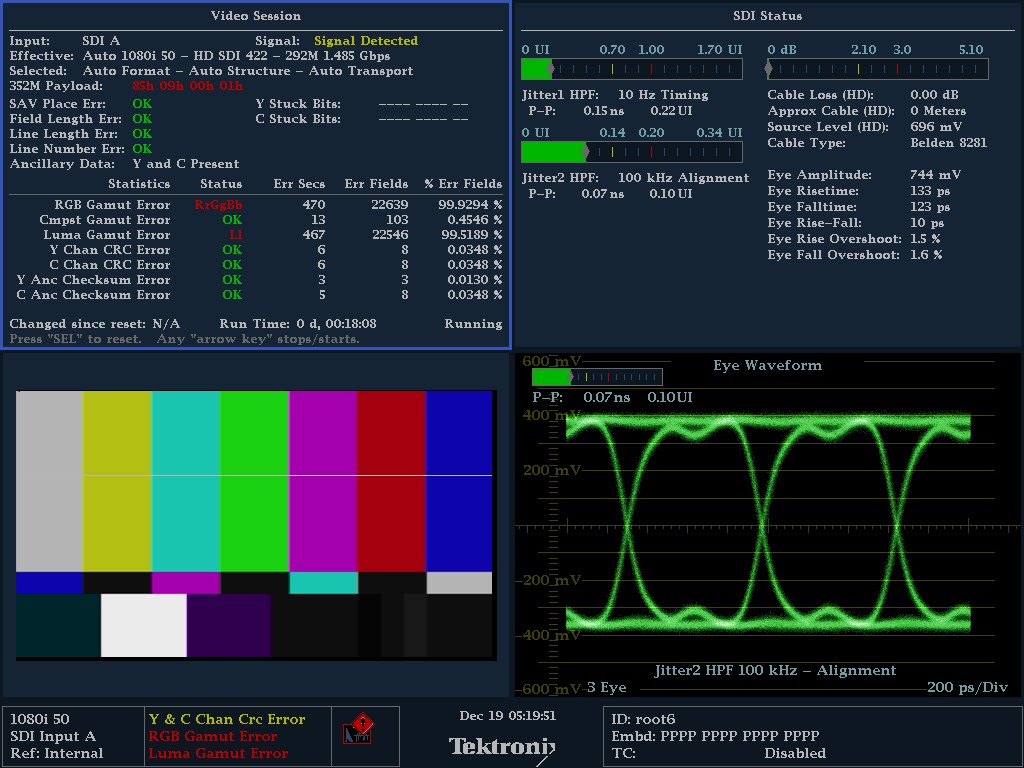
My pals at Lindy (who I buy lots of computer connectivity parts from) sent me a bunch of engineering samples of 3G-capable SDi parts; DAs, fibre transceivers etc. from one of their OEM manufacturers in the Far East. For very modestly priced pieces they were excellent. The eye-pattern (above) is the output of their re-clocking DA. Whilst talking to them about the various measurements I made (which you'd only understand if you're a broadcast engineer) I recalled Tektronix's excellent SDi physical layer webinar and pointed the guys at it. 

 http://www.tek.com/webinar/hd-and-3g-sdi-physical-layer-webinar

Friday, December 14, 2012

TCP & Networking, part 2; the protocols

I continue my conversation with Hugh going over some of the lower-level protocols that are used in IP networks. Find it on iTunes, vanilla RSS, YouTube or the show notes website.

Thursday, December 13, 2012

The Engineer's Bench podcast - TCP & Networking 101

Gone are the days when every cable carried a synchronous video stream. Contemporary engineering staff have to be aware of packetized networks and how they impact the modern facility. This part 1 (of a two-parter) covers the fundamentals of the protocols and practises that drive all internet-derived networks. Find it on iTunes, vanilla RSS, YouTube or the show notes website.