Showing posts with label video. Show all posts

Friday, December 31, 2021

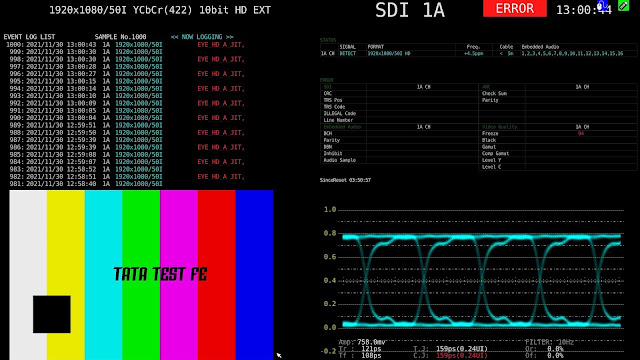
SDi physical layer measurement for 3G and 12G; a video presentation.

In the last couple of months I've had to do both training and fault-finding for SDi physical layer measurements. Below is a cut-down video of the half-day training; just so you can get feel for my training style.


I've also been working for a sports broadcaster tracing a problem they have with their incoming OB lines (all via a telco's private cloud J2K SDi route) - the problem was more fundamental than you'd think, but I got to the bottom of it.

I'm very pleased to have a Leader LV5490 with the physical layer measurement option; I can just rock-up at a clients and within minutes be able to give them proper eye measurements with jitter (both 10Hz wander and 10/100KHz-filtered readings). 


Thursday, March 12, 2020

Modifying Blackmagic 6G routers for quiet(er) operation!

You can't deny the value in BMD SmartVideo Hubs - they are a fraction of the price of traditional broadcast video matrices. They have appalling return-loss on the BNC inputs and their control system is very simple (although in lots of cases that's a benefit). The temptation is to stick them in desks in edit, grading and audio suites, but they are noisy! The reasons are;

  1. Cheap, low air volume fans
  2. Tiny holes in the chassis through which to try and pull enough air
  3. No control of the fans even though the ones they supply have a tach output

'scope is showing the tach o/p of one of the fans, yes, I was routing video!

Even though the cheap/noisy fans BMD fit have a tach output it clearly isn't read by the hardware as the fans run at full tilt from power-on. This one had been on and routing video for a couple of hours (with the lid on) and it's like sitting next to a vacuum cleaner.
So, quick look at RS and filtering by size, volts and then listing by highest air volume & lowest noise I got these Papst fans - they also have a tach output (I had no plan to use that) and more importantly are induction-start motors (so they will run on much lower voltages; I had a feeling I could simply control them with a potentiometer with a similar impedance to the coils).

getting them ready to fit in the same JST 1.5mm pitch headers as the stock fans, 10K pots

fitted to replace the stock fans - I had to ream-out the screw holes in the fans for the screws to fit, double-sided tape for the pots.

The other issue is the tiny holes they have in those cases for airflow. With a bit of extruded aluminium and grill material you can get a good look.

Make sure you don't put another piece of equipment directly above it!

So, proof of the pudding and all that; I ran the stock unit for a couple of hours, pulled the lid off and took a photo with my thermal camera and then did exactly the same after the modifications. The results speak for themselves; the client has these in their audio suite and game me four more to modify.

before & after - running cooler and maybe 20dBs quieter

As an aside I found driving these fans at a constant 8v produced the best results.

Wednesday, July 11, 2018

Video Compression Fundamentals; a Tech Breakfast presentation


https://youtu.be/ZejjAXSXyZA

Part of the ongoing series of Tech Breakfast presentations at Jigsaw24, Golden Square.

My notes are here and I'm available for birthdays, weddings and bar mitzvahs.

Tuesday, February 20, 2018

12G cabling - test results and a video presentation

I presented a recent Tech Breakfast at Jigsaw24, Golden Square. Here I detail the tests we've done across four cable types and how they perform at twelve gigabits/sec (as per SMPTE 2082-1).
We've recently taken on Leader as a manufacturer of test sets and they excel in several areas - namely UHD/4K/HDR and 12G physical layer measurements. 

 all the specs for SMPTE 2082-1

I got through all the details in the video (below and on YouTube) but you can snag my results here - if you go into the 12G folder you can see the screen grabs for all the eye patterns - the filename number related to the test line in the PDF.  The Powerpoint presentation is in there too; but if you watch the video I cut all the slides full-screen as appropriate.


 The cable types are;

SD05 - Belden 1855; otherwise known as "Image 360"
SD10 - Belden 1694
SD50 - Belden 1505; otherwise known as "Image 1000"
SD73 - Belden 7731 - about the most ungainly cable you can crimp a BNC onto!


Wednesday, October 05, 2016

HDMI, HDCP and SDi out from Bluray players

It's been a few years since the master HDCP key escaped into the wild and so it seems that particular content protection system is fundamentally wounded (if not dead!) but reputable manufacturers still respect the HDCP flag (even if no encryption is present) and the MPAA are still issuing device keys to manufacturers and volume keys to content producers.
So - I have been installing some Oppo Bluray players (nice, high end machines) and they support HDCP rather too aggressively; on a non-compliant display you don't even get the boot screen or any menus! So - an SDi converter is out of the question. 
The usual trick is to use one of these cheap'n'cheerful HDMI splitters which present a device key to terminate the signal but then send it to two outputs having done the decryption. 


Works perfectly with Backmagic HDMI->SDi converters with the exception of the audio; the Blackmagic knows nothings about DTS+ or DolbyDigital (or any of their variants) - it only understands the basic PCM stereo part of the bitstream and so that's what you get in the SDi stream.

However - in the case of these Oppo 103D players they have decoders on board and present the de-compressed audio out of the back as good old analogue feeds;

In these rooms I've fed them to the analogue inputs of the Tektronix WVR8200 test set and hence by selecting a different audio input you can toggle the TC Electronix ClarityX controller between 7.1 from the Avid and surround sound from the Oppo.

Tuesday, July 26, 2016

Fuji IS-Mini software for colour space conversion

For patch generation and LUT testing the Fuji IS-mini is hard to beat for sub-£1k. LightSpace will drive it for profiling monitors and since it has both HD/SDi and HDMI outputs it is very useful all the way to 1080 lines at 60P.

The software that comes with it is kinda utilitarian but can speak to multiple IS-minis over either USB or ethernet. So you can load LUTs to several units from a single computer and it will even listen to the commands from a Tangent Wave control panel and you have a very canny little grading system (all be with no memory!) - but for live colour correction it is used everywhere from HDR cameras feeding BT.1886 productions to folks who need to correct for unusual cameras in an otherwise standard OB environment.


Having said all that it isn't a patch (pardon!) on LightSpace but they have just released an unlocked beta that feature colour space conversion LUTs which might be of interest to general colour-tinkerers.

From Fuji's site;

The rapid adoption of 4K Rec2020 and the development of HDR has necessitated an increased need for colour space conversions, such as color gamut, various LOG curves and numerous other standards. As requests for products to handle this have increased, FUJIFILM has begun to develop a system for IS-mini users that will allow greater flexibility with colour spaces.

And the obligatory bullet points;
  • Convert the content of Rec709 to Rec2020. 
  • Convert the image data of SLog3 / SGamut shooting to HDR ST2084 / Rec2020. 
  • Convert Legal range to Full range 
  • Convert the image data of the various cameras to SLog3 / Rec2020. etc... 

Grab it here.

Wednesday, June 01, 2016

The damage 100m of good-quality coax does to a 1080i signal.

I've posted measurements of the degredation that cables does to video signals before; see here, but I was grabbing a couple of screen caps for an industry colleague and here they are.


Friday, May 27, 2016

Boland's new hi-brite 7" camera/on-set monitor

It seems to be a thing for small on-set/camera monitors that they should have a hi-bright mode when being used in non-edit environments. The Boland BVB7a is an excellent little monitor and can be powered from the camera's 12v battery feed as well as coming with a DC PSU. It can take SDi (single or dual-link) as well as HDMI and composite (yes!). I shot a little video of me profiling it's colour capabilities.

Wednesday, May 04, 2016

BM UHD/4k converters - some gotchas

https://www.blackmagicdesign.com/products/miniconverters/techspecs/W-CONM-17

I've used a few of these guys recently - Blackmagic's quad HD/SDi input to HDMI 2.0 output for taking the UHD / 4k (either tile or 2SI standard) and making something that will display on a 4k domestic TV.

They seem to work quite well, but here are a few things that I had to get around;

  1. Firmware - I had two identical ones and I initially tested both with Quad-SDi out of Avids at UHD (3840x2160 at 25 & 30P) - all good. But when I started a 4k project (4096x2160 at 24P) only one worked - the other showed nothing on it's HDMI output. Eventually discovered only one of them had current (v.7 as of May 2016) firmware!
  2. Power cycle if colour space wrong - both have periodically decided they are going to mistranslate Y, Cb, Cr -> R, G, B - power cycling fixing it; hopefully the next firmware update will stop this?
  3. Four signals are always interpreted as UHD; if the Avid is running an HD project the four SDi feeds out of the back are all identical and the converter has no way of knowing it's not quad-link. The Tektronix 8200-series and the Canon VP3010 monitor both have to be told (and I set presets for just this) but the BM converter needs to see three or fewer signals to realise it's only a 1920x1080 raster. In the case of this job setting up two macros on the video router (one to route all four, one to send a non-used input to i/p's B, C, & D of the BM).
  4. Glad I'm rocking a MacBook Pro! I would not have been able to update the firmware otherwise as I've yet to move on from Windows 7 - and the workshop PC is still 32-bit Windows 7!

Saturday, April 02, 2016

The Engineer's Bench Podcast - tops tips for video

Next in our tips series - broadcast video.
Go to the website for a PDF of the notes.

https://youtu.be/18QR4E1yzKI


Find it on iTunes, vanilla RSS, YouTube or the show notes website.

Friday, February 19, 2016

Free Tektronix UHD/4k info posters

Get 'em here & here!


Thursday, February 11, 2016

Shooting & editing HDR via Avid using CLog gamma

We've got BVE2016 coming up and one of the things Root6 will be showing is an HDR workflow via Media Composer using Canon monitors.
HDR is still a bit of a crap-shoot as far as standardisation is concerned with the BBC/NHK system, Dolby Vision, Sony's SLog3 and Canon's camera-native CLog. The principle of using an alternate gamma so that you concentrate the bit-depth where you want the extra range is well established;


The hope is that all of these manufacturers will coalesce around ST.2084 which (amongst other things) defines how you handle the specular highlights; those very bright parts of the picture which give a real addition to the look of the pictures. These are typically defined to be >500 Cd/m2 which is MUCH brighter than broadcast white! The idea is that the last bit of dynamic range (10th bit - all values above 512) represent the highlights and everything up to 50% is akin to the usual video dynamic range. You calibrate the monitor such that 50% is set at 100Cd/m2 and just hope that the colourimetry of the highlights tracks RGB-wise!

So - Root6's own Dave Skeggs and I set off around Soho and London Bridge to capture some night time and daytime footage. We were using a Canon C300 mk.2 set to UHD (3840 x 2160) at 25P (no interlaced fields at UHD and no high framerates at that resolution unfortunately). We set the colour space to an optimistic Rec.2020 and gamma to Clog. In that mode the camera shoots 410mBit/s XAVC codec MXF files.
We've been using Media Composer v 8.5 on an HP Z840 workstation & the new Avid/BlackMagic DNXio video hardware; we had to update the firmware to get it to generate quad-link SDi. Although HDMI works it is nobbled down to eight-bit and so would not be suitable for this test. I would put a link to the video but none of the video sharing sites support HDR and neither does the screen of your tablet/laptop/TV! I took all the monitor photos with my Fuji bridge-camera in a very bright office; you'll have to take my word for it!

Notice the headlights of the taxi - you can see details inside the light!


exactly the same frame; notice the dark details in the trees against the night-sky.

 Of course on Media Composer's GUI display you get the CLog gamma rendered as if it was Rec.709 and so it looks very washed out and lacking in detail


You can have Avid flatten the gamma of source clips so that it looks OK on the GUI - that doesn't affect sequences that the clip mas been used in.

 
Quite a large range of alternate gamma and colour spaces

 It shows up in the bin-view which is useful

 
So now clicking the source window and setting the monitor to regular HD gamma (BT. 1886 fact fans) shows you what the same material shot on a "regular" camera would look like; very little detail in the blacks and none in the whites.
 
 Root6's own DOP; Dave "is that in focus?" Skeggs

I'd forgotten how limited a normal video-camera's dynamic range was. The Canon monitors top out the specular highlights at 400Cd/m2 which is somewhat less than a Sony BVM-X300 (1,000 Cd/m2!) but for €10k less than the Sony (and losing only a stop-and-a-half of specular highlights) the Canon 30" UHD/4k IPS panel represents superb value. I was a bit disappointed that the camera tops out at 29.97P at >2k resolution so I couldn't see how nice fluid video motion looked at high res; everything has a jerky film-look to it.
Steve Shaw at Light Illusion has a very good article exploring some of the fundamentals of HDR.

Saturday, December 19, 2015

Colourists are the last people who should have a say on monitors!

I was recently in a decent grading room - Dolby PRM 4220 monitor and I was demo'ing a Boland BVB25 OLED display. The demo unit had come back from a try-out at another customer's and I hadn't had a chance to check it's calibration (Rec.709, illuminant-D yada yada...) and so I grabbed the colour probe kit and calibrated it whilst chatting to the engineer and colourist. Once done I looped it off the Dolby to see how they compared and they were quite different! The Dolby was sat-up, over-saturated and a bit red-in-the-whites. The conversation went;

Colourist:"It doesn't match my Dolby",
Me:"…you just watched me calibrate the monitor for Rec.709",
Colourist:"It's wrong",
Me: "Is the Dolby set for Rec.709?",
Colourist: "No, I feel that when I export Quicktimes for customer approval how I have the monitor set now matches what they see better"
 I also have the same convesation about black levels endlessly. An online editor had a go at me because I'd left his monitor "too crushed in the blacks" - here is a frame from his timeline;


It is a continuous battle to persuade people that monitor calibration is NEVER a matter of opinion, rather it is defined by measurable technical standards and when I calibrate a display it is correct. Your material may well not look how you want it, but don't corrupt your monitoring pathway to make your project look good.
Often I'll ask the colourist what standard they want the monitor calibrated for; it's rare that they know what I'm talking about, but they'll often venture an opinion that their display is currently "too cool" or something (quite how they know without a reference I'm not sure?).
I suppose a lot of this is down to the fact that colourists are people who have to be very confident in their ability and are paid handsomely for what they do. However, they have to realise that their mojo doen't extend to how their monitors are set up. When I demo a monitor my heart sinks when someone says "we'd better let the colourist have their say" - monitoring is not about creative magic, it's about compliance.
This December I've calibrated over thirty customer broadcast displays; I've been there/seen that more than you!

Thursday, December 10, 2015

4k and UHD cabling and signal standards

I've had to dig into signal transport for 4k/UHD over the last week or so. Essentially I have a test-signal generator (SRI Visualizer TG100) running at a maximum raster of 4096x2160 at a maximum of 25 progressive frames/sec (and only 4:2:2 colour sampling; Y, Cr, Cb) with a 6G single-link output (so really 4 x 1.5G links) and HDMI 1.4 (so the same raster as the SDi). The monitors are the 24" and 30" Canon IPS 4k native monitors.
The Canon monitors will take quad-link HD/SDi and (in the case of the 24") HDMI. So, feeding the SRI single-link into a Blackmagic 4k multiplex (to produce quad-link) and then into the Canon produces four quads in the wrong colour-space!


 For an insight into what the multiplex is doing it's worth looking at the two standards for quad-link SDi. Put aside if it's 4 x 1.5G or 4 x 3G (that allows an increase to 50 or 60P OR 4:4:4 colour). But, in this case we're de-mux'ing a 6G to 4 x 1.5G signals. 

The original 4k-over-four-BNCs standard


The more recent standard; each link looks like an HD version

Clearly the converter is producing 2SI but the Canon expects SD quad-link. In fact the guys at Canon tell me they have a firmware update early in 2016 to address this. The other error is that the Canon has mistaken the 4:2:2 video as RGB - but it has at least got the raster correct.
So, what to do? Well, by throwing in another converter and taking the HDMI out of the SRI means the BM mux will get an older SD quad-link input;


This produced what we need; clearly HDMI has not concept of mutliplexed pixels and so we're now fully in SD quad-link;

tugging BNC no.4 shows the monitor is now in quad mode

The monitor gets it all right

The other thing that you have to pay attention to in "True 4k" displays (for the film snobs!) is that feeding 3840x2160 signal into a 4096x2160 monitor and letting the monitor scale-up to fill the line risks killing your resolution;
The aliasing should only the present in the top-most block, the other alias frequencies you can see here are due to my iPhone's camera!

Some very strange aliasing when a 3840-pixel line is mapped to 4096 pixels

As ever with display devices, pixel-pixel (native resolution) is always preferred
Thursday, October 29, 2015

UHD-TV test material; how I'm going to demo monitors

After all the monkeying around with the Canon monitors last week I decided I need a decent variety of clips to show off UHD displays to the best of their ability. For some reason customers are not satisfied with just seeing test signals?!
So - although I have the TG-100 for uncompressed 4k test signals (the Visualiser really shows all you need to know!) and I can show:
  • Resolution
  • Colour Space
  • Temporal performance
  • Dynamic Range
So, I went looking for some well shot UHD footage at the TV 4k raster of 3840x2160 (I know, all you DCI-snobs, "true" (sic) 4k is 4096x2160). The Harmonics site has some nice short uncompressed YUV-planar format videos; http://www.harmonicinc.com/resources/videos/4k-video-clip-center#4k-clip-center - But don't expect your laptop to be able to play these guys! At 12GBits-1 they are monsters and so for ease of use you may want to compress them down to a more manageable 500MBits-1 (or so) using GLYUVPlay which can be found at Henryk Richter's site. In video coding research, standalone implementation and testing of video codecs often involves the use of raw YUV streams. Since these streams can be parsed and generated by very simple means, raw YUV files are very common in video codec standardization and development. 

I have made the H.264 variants and you can find them on my Google Drive folder.

Thursday, October 22, 2015

Canon's 4k Native IPS television monitors

I had an excellent half day with Canon's UK imaging display guys to look at their DP-V series 4k native displays. To my shame I had assumed that they would be like the HP Dreamcolor or Eizo ColorEdge series monitors which are advertised as being suitable for film and TV work but as I've often said; "..an SDi BNC and a preset called Rec.709 does not a broadcast monitor make"!
In the case of those two manufacturers they assume that taking their print-prep graphics display and making it SDi capable is all that's needed; forget proper RGB linearity and a controlled white-point. In the case of the HP they still advertise it at 250Cd/m2 for white (four times what it should be - you can't grade with that) and every time I've had an Eizo to play with I've found the same. Even employing a LUT to tame something like that is a bad idea as having to take 250Cd/m2 down to a more sensible 80Cd/m2 means you've lost two stops (12dBs, two significant bits) of dynamic range; not what anyone wants.
So - native 4k displays using LED-backlit IPS-LCD and not OLED. Every display technology suffers issues and although I think the poor inherent RGB tracking of OLEDs is entirely addressable in a LUT (which is why I love the Boland BVB25 for colour-accurate TV work) OLEDs are noisy once you get very close to black thus limiting their dynamic range (fine for 10-bit TV work; but for 16-bit HDR film imagery, not so much - yet!). Canon has consequently chosen IPS-style LCDs (with a level-modulated LED backlight). The LED backlight is the same technology as that used in the Dolby PRM-4220 grading monitor which is how they achieve the high dynamic range with a possibility of >1000Cd/m2 for specular highlights in HDR 16-bit video. I got to see the originators of this technology, Brightside, back in 2005
So, proof of the pudding etc - I profiled the 24" edit suite variant and it was very close to the Rec.709 spec (the fact that I left LightSpace set for a 2.2 gamma whilst the monitor has a true BT.1886 gamma for HD rasters may be to blame). With 4k source material the results look great.

 I started at 2k to see how it did

 At 4k I can only manage 25 FPS at best!

Zooming in on the frequency grating shows aliasing, but only on the camera pics, I couldn't photograph it with my 10Mpix camera without catching aliases in the camera's OTF.

Getting closer gets a bit better, but to the eye the resolution is astounding
 
The Sarnoff ladies at true-4K


I profiled the display at 17-points so 5,000 measurements take around two hours with the Klein
 
Looks pretty good for greyscale performance, and I suspect if I set LightSpace's gamma correctly it would be better

The coloured dots are rec.709 and the big cube is the gamut of the display; it covers the colour space nicely.


Wednesday, July 22, 2015

Typical edit suite monitor calibration; some traps for young players

I spent the morning in a very typical Soho edit room with a JVC DT-V24-series LED-backlit LCD as the "front of house" monitor and an LG LED-backlit LCD as the client display.
It's quite easy to get the JVC looking right - BBC style 6504k for Rec.709; I've waffled on about this a lot in the past, but I had some new encounters (due in some small part to the new version of ChromaSurf; the software I use with the Klein K10A probe).
  • The Klien is a fast photometer, able to make a reading in around a second; this has huge implications for LUT building and it's why when using LightSpaceCMS you can profile a 17-point LUT in less than two hours. Older probes that can take ten seconds when coupled with something like SpectraCAL (which does not have a proper colour-engine, it essentially halves the difference every time is sees a bad colour match) might have your waiting more than a day for the same LUT profile. Being such a fast probe means that in the current release of their software you can do a 32-sample read of very low (i.e. noisey) blacks and get a reasonable figure. 
  • Just because you can read down at sub 1Cd/m2 doesn't mean you should! With LCDs when you get to sub 5% black you actually see more of the colour of the backlight leaking around those little thin-film transistor pixels. This is why I tend to calibrate black level ("Bias" in Sony-speak) around 15% to make sure I'm getting a real read from the pixels.
  • Even if a domestic display claims to have a Rec.709 mode don't believe the hype; this is the abuse I had to land on the display to get this one to match the JVC and for the Klein to be happy.