Thursday, February 24, 2011

Ever need to slow down ethernet?

I've had a few occasions when I've had to force gigabit down to 100BaseT or even 100 down to 10BaseT. My preferred method is to force the NIC down to the appropriate speed but if you aren't using Windows (OS-X, Linux or an embedded device) then a hardware solution is needed.


  • Distance - 100BaseT only goes 100m over cat5e but 10BaseT goes 300m; If you find yourself in that situation then an old 10BaseT hub at the far end does the job.
  • Equipment reports 100BaseT but is only reliable at 10BaseT; my Squeezebox network MP3 player is running a hacked OS and works a lot more reliably at 10BaseT. I achieved this by swapping the green/white and orange cores in the network cable. This degrades the common-mode rejection performance of the cable and means the ethernet switch ramps the circuit down to 10BaseT.
  • Gigabit too fast? Just make off a cable with the blue and brown pairs excluded. Gigabit needs all four pairs and if the switch only sees the Green and Orange pairs it will assume 100BaseT.

Thursday, February 17, 2011

My Presentations at BVE 2011

I've been representin' at the Broadcast Video Expo show in Earls Court. I'll blog about some of the things I've seen at the show later this week but in the meantime here are the slides from my three seminars;

These are all tasters for the training days I run at root6.

Friday, February 04, 2011

Rise times in HD TriSyncs

To my shame I haven't blogged for a month! We are starting to pick up at work with projects on the go and the BVE trade show at Earls Court in just over a week (I'm presenting each day - will post my slides next week).


These are two traces from two separate TriSync generators - The blue trace represents a correct waveform and as every superhero will realise you're looking at the line timing pulse. Here is the diagram from rec-709 (the spec for HD video);


It clearly shows that rise time is to be equal between the start, middle and end of the line-sync pulse. The rep from the manufacturer of the green pulse insisted that his waveform was a lot sharper - but given the ringing on it I think they just aren't filtering it properly to comply with the rise time spec - seen here (again from rec-709) as being 4 clock cycles +/- 1.5


Thanks to an unnamed ex-colleague(!) for engaging me in this conversation! The link in the title is to the summary document PDF of rec-709.

Tuesday, January 04, 2011

Hopes for 2011

  1. Teradici PCoIP starts working with Snow Leopard - Apple broke USB HIDs in 10.6 and so standard USB cards (which the Teradici HBA looks like to the OS) are not recognised (as they were in Leopard and are in XP, Win7 & any Linux).
  2. Someone launches a USB DVB-T2 adaptor - seriously, I want to upgrade my PVR to FreeviewHD!
  3. The industry starts to pick up; at some point effort for the BBC move to Salford and the Olympics have to trickle down to London-based SIs
  4. The Dolby PRM-4020 monitor starts to ship in the UK - see here.
  5. UK broadcasters start to take HD seriously before getting all excited about 3D
  6. UK broadcasters start to treat SD channels with some technical quality before getting too excited about HD!
  7. 3D in the cinema dies on the vine - the number of folks choosing to pay for it when they have a choice dropped off consistently throughout 2010 and so presumably at some point it will become economically nonviable.
  8. The root6 tech podcast eventually takes off (watch this space!).

Monday, December 20, 2010

Monitoring in 5.1


Nice article that Colin Birch (@InformedSauce on Twitter) mentioned this morning - I PDF'ed it as the online reader that Broadcast Engineering World use is clumsy. Click the link in the title of this entry.

Wednesday, December 15, 2010

Rio / Sonic Blue / Dell Digital audio receiver


I picked up these on eBay for a fiver a go! They are tiny little Linux boxes that stream audio from a nominated PC on your network. The original Rio/Dell software is very 2002 and although adequate offers no integration with iTunes or Windows Media Player. When you power the box it shouts out a BootP request (that's an old protocol I haven't had to deal with since Phillips/Thompson routers of the mid-90s!) and that starts the download process of a tarball that has the Linux kernel to run the box. Once that's loaded it grabs an IP address via DHCP (from the same client software that serviced the BootP request - I guess not many people had home-routers when this was a product!) and you can then stream your MP3s to it. It has a nice display, IR remote and the audio output quality is good.
However, since it's demise it's become a target for home-brewers and hackers and there is a new kernel that makes it look like a Squeeze Player - the standard that Logitech have used for all of their home entertainment products. This makes it quite an interesting gadget as a network music/streamed radio player and it didn't take me very long to get it working with my Windows 7 media center. Using Logitech's server mean it integrates brilliantly with iTunes and you get access to all the BBC's iPlayer and streamed radio.


Once you've got Squeezebox running you can use it to stream to WinAmp, your iPhone or even another instance of iTunes (rather perversely!).

So, here are the bits you need;
Rio's v. 1.04beta which was the last release. It's the only one that works with Windows 7 and it doesn't have all the instabilities previous releases had with 10 vs 100BaseT ethernet (this was the early noughties after all!).
SlimRIO is the tar-ball with the new kernel to make the box behave like a Logitech Squeeze player.
Squeezebox is the server that makes it all work nicely.
Finally you'll probably need a copy of the LAME encoder so that the server can transcode AAC, RealMedia etc into MP3 streams for live radio - lame.exe - it needs to go in;
\Program Files\Squeezebox\server\bin

Thursday, November 25, 2010

Video and high-speed networks - article in Broadcast Engineering Magazine


What an up-market magazine Broadcast Engineering is! Well, when they publish my stuff.
You can snag a PDF of the print version from my DropBox; BroadcastEngineering_Article_Nov2010.pdf

Thursday, November 18, 2010

You know you're getting old when.....

OB Trucks you built are knocking about on the 2nd hand market!


They've also used the photos I took back in 2001! The same thing happened when I took a load of pictures of the same truck being lifted in to Fame Academy in 2002. Loads of people used these images and I never got as much as a thank you.

Wednesday, November 10, 2010

High Dynamic Range video

We all know about high dynamic range (HDR) imagery due, in part, to the examples you can find on Flickr. This image I nicked from Wikipedia shows how three bracketed shots are combined into a composite image where you have all the details in both the blacks and whites that couldn't be captured in a single image.


So how could you achieve this with moving images? Have an ultra high frame rate camera where you can capture three frames sequentially with a rotating set of ND filters? Maybe, but the focus and effect are somewhat spoiled by rapid moving parts of the image. The guys at Soviet Montage have a system where they use a beam-splitter to feed the same image into two 5D Mk2s (one of which has 24dBs of attenuation - that's four stops for non-video people!).

HDR Video Demonstration Using Two Canon 5D mark II's from Soviet Montage on Vimeo.

I think it looks very engaging. Kind of like a moving old-master. For my money this is much more engaging than 3D on TV with none of the problems that 3D at home have.

Thursday, October 28, 2010

Most memorable gigs I've ever been to

  • Level 42, Birmingham Dome, 1983
  • Bruce Springsteen and the E-Street Band, Wembley Stadium June 1985
  • Billy Bragg, Wolverhampton Civic Hall, May 1986
  • Eden Burning, Brixton Academy, August 1994
  • Kevin Prosch, The Forum, April 1996
  • The Vigilantes of Love, The Borderline, June 1999
  • Counting Crows, Wembley Arena, September 2003
  • Julie Lee, The Borderline, August 2005
  • All Star United, The Half Moon, Putney, November 2007
  • Martin Joseph, Union Chapel, September 2008

Wednesday, October 13, 2010

Babbage's Analytical Engine

In December 1837, the British mathematician Charles Babbage published a paper describing a mechanical computer that is now known as the Analytical Engine. Anyone intimate with the details of electronic computers will instantly recognize the components of Babbage's machine. Although Babbage was designing with brass and iron, his Engine has a central processing unit (which he called the mill) and a large amount of expandable memory (which he called the store). The operation of the Engine is controlled by program stored on punched cards, and punched cards can also be used to input data.
John Graham Cummings is trying to get together the money and team necessary to actually build an Analytical Engine - aside from it being the coolest Steam Punk project ever it will give a real insight into how computation is independent of physical arrangements (we won't always be running our computers on silicon) AND it is possible for someone to be literally a century ahead of the curve. Remember - this machine was Turing-complete and so can be considered in the same category as modern computers.
As an aside the Science Museum made a Difference Engine in the early nineties using only materials and techniques that would have been available to Babbage and it worked well. The difference engine is not a Turing-machine, it was used to automate the production of printed log tables but is equally as impressive.
If you want to hear John talking about the project then he is on this week's TwiT and is jolly interesting.

Monday, October 11, 2010

Replacing the DVD drive in an XBox360

Microsoft realised after the original XBox that folks would find ways around the games' DRM and so in the case of the 360 they make it as hard as possible to use anything other than the stock optical drive that came with the machine. Every motherboard and DVD drive pair each have half of an AES key pair and so if you install another drive it'll play video DVDs but not games. They hoped this would stop people sticking in non-stock drives that could (for example) read home-burned disks. However, the hacking scene around XBox is extensive and so in pretty short-order there were hacker tools to read the drive's key and then flash it into a replacement drive.
Microsoft got wise to this pretty quickly and the summer 2008 update to XBox requires not only the key halves to work together but the drive ID strings to match. So - if you had a machine with an Hitachi drive and replaced it with a BenQ drive (for example), even if you extracted the key from the Hitachi and re-flashed the BenQ the XBox's OS would now query the drive ID and stop it working if that came back wrong.
Hackers are clever people and since v4.5 of Firmware Toolbox it's been possible to include the old drive's ID in the firmware for the new drive. This is what they refer to as 'spoofing'. It turns out that the drive ID is just that - a string that has no bearing on the drive's operation. So - your BenQ drive can now report it's an Hitachi 79 with this key and the XBox is happy.
Well, it's spy vs spy and the rumor is that the next update to XBox will include routines to test the ballistics and responses of the DVD drive to ensure it's the model it claims it is...!

So - if you have an XBox with a DVD drive that is on the way out (and it's almost always the laser) then you have three options which may/may not work;
  1. Open the machine, remove the DVD drive, open it and clean the lens with some IPA or some such. Seems to work for lots of people.
  2. Buy an identical model DVD drive on eBay (there are plenty of all four kinds for sale sub £20 from broken machines or around £30 for brand new ones). Then swap the controller cards between the drives. This means you have the old electronics but new mechanics/optics.
  3. Extract your old drive and using the right tools read-out the key and drive IDs, save them and then write them into a replacement drive (which can be another brand and model). This is potentially the most risky as anyone who has flashed firmware into any device will tell you. Browsing the forums reveals many folks complaining about having bricked their newly acquired drives. Also - if the XBox detects what you've done you'll be kicked off XBox-Live (both your machine and your account).
Anyway, if you're any kind of engineer and have any experience opening up equipment the first two are trivial. If you choose the third way (Mr Blair!) then it's worth giving some guidelines.
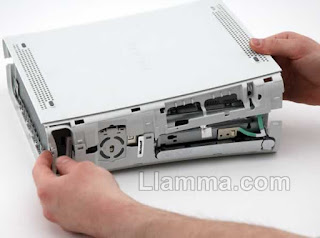
Whichever way you proceed you'll need to open the thing up and it's mostly held together with fragile plastic clips, and so here is the best tear-down instructions I have found.
Also remember - the XBox DVD drives have a standard SATA connector but a proprietary power connector. For all these tests I left the drive in the XBox (which powered the drive) and I used a long SATA cable to go to the eSATA port on the back of the PC. Now then - the XBox has a class-two (double-insulated) design and so the internal metalwork is floating at some undefined DC voltage. I suggest an earthing lead from the XBox's internal chassis to the PC's metalwork.

Extracting that precious key from the broken DVD drive
  1. Connect the "Original/Broken DVD drive" to your PC via SATA or USB-SATA adaptor.
  2. Place the DVD drive into MODE B with SLAX - SLAX is a live Linux CD that allows you to issue SATA commands directly. A good tutorial is here
  3. Please Note: Once you have the drive in MODE B you will notice it will take 3 presses on the eject button to close the drive.
  4. With the Original/Broken drive now in MODE B restart your PC and make sure that the new drive has been identified by Windows. Once the new hardware has been found and installed it will be shown in the my computer/explorer area on your PC as a additional DVD drive.
  5. Insert a DVD Movie or an XBOX 360 game into the "Original/Broken DVD drive". Even if the laser is nearly dead it may read a DVD movie just fine so try it.
  6. Open Firmware Toolbox (at least v. 4.5.1.6) and choose 'Tools -> Direct Drive Dump (GDR ONLY)
  7. On the next screen choose 'RAW DUMP' and save the file as "original.bin". If you have problems with 'RAW DUMP' try 'CLASSIC DUMP', eg. c:/xbox360/hitachi0047/606HG324277-may2006/original.bin
  8. Make sure you can identify the backup firmware in future by placing it in a directory that matches the serial number which is located on the sticker of the DVD drive. This will make it much easier to identify in the future.
Replacement Xbox 360 DVD Drive
  1. Connect the replacement DVD drive to your PC via SATA connection.
  2. Place the DVD drive into MODE B with SLAX
  3. Please Note: Once you have the drive in MODE B you will notice it will take 3 presses on the eject button to close the drive.
  4. With the replacement drive now in MODE B restart your PC and make sure that the new drive has been identified by Windows. Once the new hardware has been found and installed it will be shown in the my computer/explorer area on your PC as a additional DVD drive.
  5. Insert a DVD Movie or an XBOX 360 game into the Replacement DVD drive.
  6. Open Firmware Toolbox and choose 'Tools -> Direct Drive Dump (GDR ONLY)
  7. On the next screen choose 'RAW DUMP' and save the file as "original.bin". If you have problems with 'RAW DUMP' try 'CLASSIC DUMP'. eg. c:/xbox360/hitachi0046/606HG324240-may2006/original.bin
  8. Make sure you can identify the backup firmware in future by placing it in a directory that matches the serial number which is located on the sticker of the DVD drive. This will make it much easier to identify in the future.
  9. When the firmware is backed up it will ask you if you want to open it. Choose"yes". Now select "Tools->Spoof Firmware" from the Firmware Toolbox 4.5 menus.
  10. Choose the version that you would like the fw to report back as. Leave all other options as they are.
  11. Please note: - Spoofing a drive as itself has the effect of UNSPOOFING it
  12. Now Click "APPLY SPOOF"
  13. Choose "Tools->Smart Hack Patcher", a window warning will appear, choose OK.
  14. Choose the output file name, I suggest calling it "final.bin" and save it at the same location as the original. The ruleset option should be automatically selected for you so leave it alone. eg. c:/xbox360/hitachi0046/606HG324240-may2006/final.bin
  15. Push the "Generate File" button, if everything goes fine the file will be generated almost instantly
  16. Once the file has been generated it will ask you if you want to open it. Choose "Yes". The Main Window will show the generated file (final.bin). You will notice that the spoofed information is shown in bold.
Original/Broken Firmware Key
  1. Open the old original/broken DVD drive firmware which you backed up in step 1. Choose the Browse for file button "..." to load the original/broken DVD firmware.
  2. With the old broken DVD firmware now loaded you will notice the "Key Information @" area in the center of the 360 Firmware Toolbox application.
  3. Highlight the entire key and copy it by right clicking your mouse and selecting copy or press Ctrl + C so you can paste it into our new replacement drive.
  4. Open the replacement DVD drive firmware named "final.bin" which you created in step 2. Choose the Browse for file button "..." to load the firmware.
  5. Paste the Key into the "Key Information
  6. Click on "Replace Key" and it will update the firmware with the new key you have just pasted.
Check Firmware Differences

Before flashing the drive I suggest re-opening the old firmware from step 1. Then open the final.bin firmware you just created in step 3 and make sure keys and other information match just to be safe. If you're happy that your keys etc match then move onto flashing the drive.
  1. Choose "Tools->Direct Drive Flash->Differential Flash Patch". Make sure the DVD drive you want to flash is selected
  2. Click the "Read Drive and Detect Differences" button, after a few seconds the sectors list below the button should be populated.
  3. It will now ask you if you would like to keep the keys from the drive.. Choose 'No'.
  4. Click the "Start Flashing" button and choose the flash mode.. I suggest using the 0047 flasher for 47 drives etc etc..
  5. After a few seconds the flashing is complete.
Replace the DVD drive into the XBox and test - you don't need to re-build the case and re-attach the hard drive.


Resources;
SLAX Linux live CD
Firmware Toolbox

Thursday, October 07, 2010

The end of universal benefits?

I watched Mr Cameron's speech yesterday with some interest. I had thought for a while that child benefit for all was strange (although Sarah and I have come to depend on it over the last few years) and I'm surprised higher rate tax payers have received it for as long as they have. They should have avoided the debacle over the aggregated salary issue, but there you go.
Anyway - it got me wondering about other universal benefits which could (presumably) be cut for those folks who make too much (or contribute to the system too much?!);
  • Healthcare - why should people who make enough to pay 40% of it back into the system expect to receive free hospital treatment?
  • Education - This is an area where a gradual erosion of support for teachers and head-teacher's rights to run their schools they way they want to has caused a defacto segregation. Those who can afford it and value education end up paying for it. Presumably by means-testing state-provided education you could free up loads of money.
All of this breaks the fundamental aspect of the welfare state that says we're all in this together - you contribute as you can and you're provided for as you have a need. For this reason the government shouldn't be looking for ways to take low-earning workers out of the tax system. The danger of building a welfare state where some provide (and are still told they need to 'shoulder their part of the cuts') and some take is that eventually the providers wind up voting for government that stops spending their taxes on things that don't benefit them - as in the US.
It may not be the case that cutting one universal benefit will lead to the others becoming means tested but the UK may have crossed the Rubicon.

Thursday, September 16, 2010

Even leaving Virgin Media was painful!

I got my Talk Talk line run in yesterday and now have a nice aDSL2 connection and new 'phone line. I've ranted about Virgin in the past, but in a nutshell they are expensive (because I don't use the TV service), unreliable (it's gone down for days at a time) and their tech support is awful.
So - I called them to discontinue and start the number-port process and got the following torrent of lies!
  1. "You won't get more than two megabits per second out of Talk Talk" - well I ran SpeedTest.net several times yesterday and averages 22mBits/sec - faster than my Virgin cable.
  2. "We can arrange for you to never have to talk to a foreigner again" - honestly, they said this before I'd told them how poor I thought their tech support was. This is implied racism; I don't mind talking to someone from India (they tend to be more polite and better informed than someone from Blighty - that's just because they're probably a graduate on decent money in India and not a minimum wage worker in a UK call centre).
  3. "Talk Talk won't let you bring a number with you" - well they were kind of right here - the dirty little secret Virgin don't tell you is that they don't have number-porting agreements with other service providers (unlike the rest of the industry who follow OfCom's recommendations) - so you can take a number to Virgin but never away from them.

So - I'm pleased to be rid of them and their trail of lies and broken promises! Take some time to read my other entries on them before you sign up to an expensive, unreliable service.

Wednesday, September 15, 2010

Things at IBC 2010 that tickled my fancy

Dolby PRM-4020 Monitor - five years ago I went to see a demo of a monitor by Brightside Technology and was amazed to see such dynamic range on an LCD display. However - to get that degree of black detail they had to drive the whites at many hundreds of Cd/m2 which pretty much knocked it out of the water as a grading display. Given that most TV graders like to run their monitor at 80Cd/m2 and film guys even colder at typ. 60Cd/m2 it is a miracle that Dolby (who acquired the technology) have managed to tame it and without sacrificing dynamic range. I sat watching film & video cameras sourced material on this for maybe half an hour and was blown away how good it looked. However - as I often say it isn't about how 'good' it looks, rather how faithful it is to standards. In the case of film it's the only monitor you can buy that conforms to the P3 colour space (as specified in the DCI specs). 709 (for HD tele) is a subset and when it's being fed with video I couldn't find fault. Although the source the same LG domestic panels as other manufacturers they have the advantage of the whole modulated LED panel/correction matrix that allows them to 'zero' each monitor at the factory so that inconsistencies in the backlight and panel are got rid of. They also have a funky calibration procedure that involved covering the monitor's front with a (supplied) blanket and the software then drives all parts of the backlight and an internal set of sensors measures the illumination so track any changes in the LEDs. This means the panel should be good for 50,000 hours (unlike the 10,000 for others).
This is a very high-end product that will only be bought by people who have £30k to spend (the kind of folks to used to buy BVM-D series CRTs) - let's hope some of the innovations make it into the sub £10k broadcast LCD panels that declare themselves as 'grade-1'!

Evertz - router and monitoring technology, XLink is a system that now lives in the backplane of Quartz (they're keeping the brand) routers and exposes all of the inputs for upstream use in the their facilities monitoring multi-display products. Very cool - it means you can deploy big panels in your MCR / switching centre and have them driven directly off the matrix without having to sacrifice any i/o on the router itself.

Omneon - Media Asset Server etc

Tuesday, August 24, 2010

A year with the iPhone - what apps?

I thought I'd re-visit a post from a bit more than a year ago with what apps have stood the test of time on my iPhone. IOS 4 on the 3G was a no-no, I went back to 3.1.3 quite quickly and was pleased to have done so. Despite all the LifeHacker tips I couldn't get v.4 on a 3G to run acceptably fast. I'm looking forward to our upgrade to the 4 in a couple of months though.
  • Memory Stick - file manager & WiFi NAS utility – it’s how I’m managing my cable schedules etc
  • Dropbox is the best thing for file sync - half the reason I carry a device is for this!
  • Undercover - GPS tracker for lost/stolen iPhones - Ungainly, and without multitasking I think it is pointless. It seems like Apple are starting the include this functionality.
  • London Tube - the official one
  • Solitaire - probably the thing I used most on the Windows smartphone!
  • VNC light
  • Remote - the Apple iTunes one
  • SpawnLite - fun OpenGL demo - Meant the kids just left fingerprints all over screen all the time!
  • Wikipanion - makes Wikipedia a lot more usable on the small screen
  • Classics - a dozen books with a nice reader app Even though Apple took this app for the iPad I've not got used to reading for more than a few minutes on the iPhone's little screen.
  • Guitar Tuner - works really well – AEDGBE! Doesn't work as well as a real guitar tuner (which is always in my guitar case!)
  • Holy Bible - I like to read the scriptures and this one does it well
  • Skype
  • Independent newspaper - really free! I've started reading the paper every day again.
  • iCar Radio Lite - best radio app, I listen to Radio 4 over 3G all the time.
  • TWiT streaming app - all Leo, all the time - excellent!
Aside from these here are my home screens so you can see for yourself;


Tuesday, August 17, 2010

Some notes on monitor calibration

Root6 offers a calibration service primarily for CRT-based grade-1 broadcast monitors as many people who are serious about colour accuracy still regards a CRT as the gold standard. By default we work to the BBC standard with a white point at 80 Cd/m2 and a colour temperature of 6504K (AKA “illuminant D”) although we are aware that facilities that grade for film will set their monitors slightly dimmer (in the 60-70 Cd/m2) for better Delta-E performance.

  1. Source material – we will bring test footage on videotape as this is still the lingua franca – if you don’t have a DigiBeta or HDCam playback deck then let us know.
  2. We won’t make your monitor look ‘great’ rather we will make it correct – compliant with the standard. The whole point of accurate monitoring is to produce an honest display to shows good pictures only when the pictures are good. Remember – the person in the QC suite at the broadcaster/mastering facility will be looking at a calibrated monitor, not a ‘great’ monitor.
  3. Hardware faults – calibration won’t fix a monitor that needs a trip to a workshop. If you crank the contrast knob and the pictures ‘blooms’ (changes size slightly) then your EHT regulation is poor. There are a few other faults that get progressively worse as a tube ages and you can’t calibrate-out these faults.
  4. White levels – we often arrive in edit suites and find the whites set at twice what they should be (typ. 150 Cd/m2) because the room isn’t set up for grading and has too much ambient light. This is sub-optimal because at those light levels your eyes aren’t seeing any black detail and your monitor is likely out of its linear range and the fidelity in the whites is compromised. Remember, in grading brighter isn’t better!
  5. Black levels – ambient lighting affects black levels noticeably. Please think about the lighting in your room so that we can set accurate blacks for the same environment you’ll be working in. We’ll show you how to re-set your blacks if you need to brighten-up the room (for a client viewing, for example).
  6. LCDs, Plasma, projectors and other display types – We are often asked to match a projector to the grading CRT monitor which is fine but domestic LCDs and Plasma televisions are an order of magnitude brighter than grading levels and should be treated as client content monitors only.
  7. Broadcast LCD monitors – The colour of newer ‘grade-1’ broadcast LCD monitors is governed by the colour of the backlight and as such doesn’t vary for the first 20-30,000 hours of use and generally leave the factory set correctly. Again, we can match these to the grading CRT but metameristic differences mean that we won’t set up an LCD in isolation.
  8. Computer monitors – These are designed for displaying computer GUIs at much higher light levels than you would grade at – typically 200-300 Cd/m2 and so a correctly calibrated broadcast monitor next to an Apple Cinema display will look milky and dim. You couldn’t grade accurately off the Cinema Display that shows your FCP playback and so wanting to make your broadcast monitor match it is ultimately futile. Always treat your NLE’s playback display as content only, it isn’t colour or light-level accurate.

Saturday, July 31, 2010

Internet security - when should you pay?

People often ask me about what security software I use. I'm of the opinion that you want solutions you don't have to think too much about. OpenDNS fits that bill entirely but here are some other thoughts;
  1. Firewall - ten years ago before Windows XP and when your broadband connection was probably via a USB modem (and you had an internet-facing, routable IP address) it made a lot of sense to have a software firewall - Zone Alarm or somesuch. Since XP SP2 (when the Windows firewall is on by default) and hardware NAT routers there is no good reason to spend money on yet another firewall. Your NAT router acts as a very effective hardware firewall because any packets that aren't a direct response from outgoing connections (from one of the machines on your network) are ignored. You could quite happily run Windows (or Mac or Linux) behind a NAT router with no firewall.

  2. Web filtering software - Cybersitter etc. You may well want to filter your incoming traffic but having a piece of software on every machine is not the way to do it. By far the best solution is to use a DNS filter - every DNS lookup that your router sends out goes not to your ISP's server but to OpenDNS who (based on their database and your settings) will return null DNS entries for sites you might not want accessed. I've been using it for a year and it's excellent - nothing needs to be done to new machines as the router has the IP addresses for OpenDNS in it's settings. OpenDNS also blocks all known phishing and malware sites and since they have a worldwide userbase of tens of thousands they are more likely to block new threats before you try and go to them.

  3. Web filtering pt.2 - NoScript is an excellent plugin for Firefox that stops active content from running on pages. It's a bit of a pain when you first install it as you're constantly clicking on the settings icon and allowing a domain (BBC iPlayer isn't much use without Flash!). But after a while you get used to it an the sites you visit often where you need active content soon outnumber those that you visit occasionally (and you may not want them to run JavaScript, Flash, ActiveX etc - common vectors of infection).

  4. Antivirus - Microsoft Security Essentials sneaked out earlier this year with little fanfare but has been getting excellent crits with detection scores near the top of the test tables. Definitely better than Norton, Panda, and AVG. It integrates well with XP through Windows 7 and I found it to be very unobtrusive. It's what I'm using on all my Windows machines.
  5. Spybot etc AntiMalware - Windows now has the Malicious Software Removal tool - MRT.exe (you can run it from Start>Run whenever you like). It updates itself silently on patch Tuesday and is as effective as anything else at removing malware. It's free and unless you've deselected it from Windows update any machine running Win 2K or later has it.
So there it is - not paying for security, far from being the cheapskate option is, I think, the best policy. Have you sat down to use a machine that had a full-up Norton or McAfee install and realised how cumbersome and slow this computer (which five years ago would have been considered workstation-class) now is. The firewall is fighting the Windows firewall, the antivirus is popping up reminders to renew the subscription ('cause you only got 90 days with Dell!) and you can't access files on your server for some reason.

The dirty little secret the anti-virus industry never mention is that once your machine has been compromised they can't be sure they've rid you of whatever nastiness crawled in. Root Kits and other techniques mean it is nigh on impossible to ever trust a PC that has been virus infected. You need to reformat the hard drive and re-install Windows. It's not hard and you'll find your machines feels like new again as you will have lost the detritus that Windows picks up along the way.

Thursday, July 29, 2010

Colour calibration probes for less than a grand?

I'm often asked if the kind of colour calibration gadgets you can pick up on Tottenham Court Road are of any use in setting up monitors for film or TV grading – I’ve played around with a couple of those sub-£1k colour probes and although they are OK for getting your monitor in the ballpark for print-prep they aren’t suitable for film and TV usage for the following reasons;


  • Luminance level – Computer displays tend to sit white at 200Cd/m2 or even higher so the probe must be able to work over that range. The white level we use in TV is 80Cd/m2 and some film guys prefer 60Cd/m2 (delta-E increases a luminance goes down). This means the probe which (at best) is a ten bit (but probably eight bits) is operating over a fraction of it’s range when used for setting up a monitor for TV grading which means it’s now only a five or six bit probe. There is no way on earth it can measure better than the ½ GND that you need for calibrating for TV & Film.
  • Metamerism – Photometers (of which this is one) rely on the relative metameristic performance of the display – CRTs are different from LCDs in this respect. That’s why our £5k photometer (Phillips PM5639 in case you’re asked) says on page one of the manual “...only for CRTs, not for LCDs” – I’ve sat a CRT next to an LCD and had quite different colours on both displays and the probe says they’re the same – it’s a limitation of photometers but the Huey claims to be able to do both CRTs and LCDs – not sure how it gets around this as it’s not a calibration issue, it’s physics baby! You need a spectroradiometer to be able to accurately measure both kinds of displays and they start at £15k!
  • Colour space – computers monitors tend to be set up for RGB working and not for the colour-space we use in TV (rec 709) with a white point at 6500k.
So I think these things are worse than useless – they give you a false sense of security for no actual worth.