Wednesday, September 26, 2012

How to do RS422 properly on the big Blackmagic Universal Videohub?

A job we're working on at the moment needs a big 288x288 HD/SDi and RS422 router. Budget means that the Black Magic is the only one that can be considered and it's hard to argue with sub £100k - Probel, Quartz-Everts etc would all cost four times that amount and so we're trying to figure out how to cable this one nicely.
The issue is going to be with the RS422; video will dress nicely on the cable tray down each side of the cabinet but the remotes are presented on a proprietry connector in the centre of each card. The only way of connecting to this is via a pre-made breakout cable that in only a metre long. So, after a lot of thinking and measuring we've come up with a solution.
 So far I've not been able to locate this connector - anyone have any thoughts?!
 Chopped breakout cable to see what the colour code of the cores is.


Nice 1/2u high cat7 jackfield which we'll use (need a dozen of them) to run down the intermediate rackstrip at the rear of the matrix to allow proper RS422 breakout.


The colour code we've settled on for this router when it's being cabled on cat6.


Tuesday, September 25, 2012

Avocent HMX-series KVM-over-IP, a few notes

Although I'm a fan of Amulet Hotkey for sending 2 x DVI, USB & audio i/o over ethernet networks (and even slow connections; works over a domestic internet connection) we did fit an Avocent HMX system on a recent job. 
Unlike the Amulet where you can do remote admin of both the transmitters and the receivers (referred to as Zero Clients) over a web interface with Avocent you have to use a serial connection (see my post about RS232 for making a null-modem cable!) with a slightly unusual comms setup.

The clever thing is that if you want to connect to a transmitter (the gadget that sits behind the server or workstation) you have to do it via a receiver that is logged onto that transmitter over the KVM-network. I suppose this allows you to administrate a very distant workstation's sender from where you are.
So - RS232 port (male, therefor a DTE, therefor a null-modem cable required) and you can see what you might not be getting any video from the remote computer.
What I discovered is that unless the EDID (or DDC if you're doing it over SVGA) profile matches the resolution of the sending machine you get no video! What is the point of that - the only reason to pass an EDID or DDC profile is to allow the graphics card to tell the system what resolution is being expect.
Anyhow - fixed that by logging onto the machine locally.

By the way - is there a decent PuTTY-like app for OS-X. Good job I keep Windows on my MacBook Pro for situations like this.

Wednesday, September 19, 2012

Fifteen years of HD displays in one morning!

I had to visit a new client to calibrate four different display devices and it struck me that they represented the gamut(!) of HD displays since the mid-90s. They didn't have an OLED display for me, but a Sony BVM-D24, a VuTrix Pro-24, an AutoCue G-series and a JVC D-ILA 2k projector.

The CIE 1931 chromaticity chart shows the extents of human vision with the RGB primaries mapped onto a pair of X-Y primaries that represent the colour content only and says nothing about the illumination of a colour. In the centre of the triangle is an "equal mix" of red, green and blue which is the very definition of white light. The various standards for the white-point used in different territories and applications is shown as a curved line. In TV pretty much the whole world now regards 6500k (actually, 6504k - had to be updated in the seventies when physicists realised they'd got Planck's constant wrong!). When I test myself I can only just discern the difference between 6500 and 6600k colour temperature.
Anyhow, metamerism aside (and that's another blog post!) you can't use the same probe to calibrate different display technologies. My venerable old CRT probe is no good for LCDs and vice versa (and that's before you consider plasma and OLED displays). That's why the £200 Huey-type probes you can buy on Tottenham Court Road are worse than useless.

  • Sony BVM-D24 - Old faithful, the HD display we've all been using forever. I'm starting to notice that the '24s I see now are in the autumn of their tube's lives. They are still the gold-standard for colour and unless the EHT is wrong or the tube is really knackered it's a nice and easy to job to get a D24 correct in the blacks and the whites and generally they track splendidly. As ever they look best when the white point is set below 100Cd/m2
  • VuTrix Pro-24 - These could be could be considered first generation broadcast LCDs as they are rear-illuminated with fluorescent strips. This particular one had to be really wound out from it's factory defaults to get it even near standard. They also have no sensible way of setting the colour in dark areas of the picture ("bias" on a Sony monitor). These have poor off-axis black performance as well.
  • AutoCue G-series - This was a new monitor, the G-series are their best ones with LED backlit LCD panel and a really nice look. Easy to get it looking correct from a colour point of view and it's factory preset was pretty darn close to illuminant-D. They must have some sort of fancy dichroic glass on the front because the off-axis performance is pretty good.
  • JVC D-ILA projector - because I don't have a spectral-radiometer (a wide band colour analyser), only photometers (colour probes that rely on having the same metameristic failure as the the device being analysed) I have to eye-match projectors to a know calibrated LCD or CRT. This is the bit of the job I like the best. Since I spent a decent amount of the nineties racking studios cameras I'm used to colour matching. I don't have a good colour memory (I'm always surprised how milky D6500 white is compared to what I've remembered).

Once I've got the probe happy with the light coming from the front of each display I do an eye-match as a final tweak. BBC test-card F is perfect for this as it has lots of grey-scale and real pictures. It's always nice to give Carole an outing; she's the person who's been on TV the most in the whole world, ever!

You can see here the monitor on the floor is a bit redder in the whites than the projector; since I'd got the monitor correct I eye-matched the projector as best I could; but it's always a struggle because different display technologies just look different because they make colour in different way.

Friday, September 14, 2012

What I spotted at IBC 2012

I had a couple of days in Amsterdam at IBC (the TV industry's European trade show); I talked to lots of people and had a splendid night out with Bryant Broadcast (my main cable supplier) at the Braziliaans grill restaurant.

Anyway; the only thing that really grabbed my attention was the updated NewTek Tricaster - the model 8000. The really clever additions are;

  • Automation; mixer tasks can be grouped into macros
  • Control of outboard routers (essentially expanding the number of HD/SDi inputs)
  • Eight re-entrant MEs
  • A motion tracker (yes, in a studio vision switcher!)
  • Hot-spots that the talent can activate by their actions - think the weatherman being able to reach out and "pull" in his next map.
  • Up to four status monitors
  • A bunch of social media exports ("send that clip to Facebook now!)

Watch the video (Kiki features, as ever!)


Saturday, September 01, 2012

Engineer's Bench - new podcast "Custom Hardware 1: Electronics and Arduino"

Hugh and Phil talk about the need for custom made boxes and panels. They talk about the metalwork as well as circuit details used and wind up with a review of the Arduino platform

Find it on iTunes, vanilla RSS, YouTube or the show notes website.

Tuesday, August 28, 2012

Thursday, August 23, 2012

RS232 - fifty years old!

It was 1962 that the first draft of the RS232 standard for serial communications was published. 
I used to have a good side-line in making null-modem RS232 cables for my colleague who were often confused by why you even need a cross-over cable. The thing to remember about RS232C is that it was only ever intended as a means of connecting dumb terminals (think VT100) to modems.
The EIA RS232C (1969) standard defines two types of equipment:
  • DCE - Data Communicating Equipment; typically a modem.
  • DTE - Data Terminal Equipment; typically a dumb-terminal or PC (in the last thirty years!)
Only one style of connector is defined - the 25-pin D-type (no 9-pins or RJ45s!) and the sex of the connector reflects DTE or DCE (male for DTE, female for DCE) - that's it; everything else is a departure from the standard. So, the original intention was:

terminal <-> modem <- phone or leased line -> modem <-> mainframe

or, put another way:

DTE <-RS232-> DCE <- phone or leased line -> DCE <-RS232-> DTE

And that's it - it wasn't intended for management ports on disk arrays or ethernet switches, just modem/computer connectivity. Once you've grasped that fact you get an understanding of what some of the pins (used to be!) used for and why you need null-modem adapters/cables sometimes.

DTE (P.C.) <-RS232-> null modem cable/adapter <-RS232-> DTE

So it's probably worth looking at the pinouts for RS232, 


There's an awful lot in there! All the signalling lines that allow the modem to tell the terminal that it's picked up the 'phone line and detected a carrier or is getting a ring signal (RI - ring indicator) are all largely historic now, but have to still be paid attention to in some circumstances. What the standard assumes is a 25-core cable, all pins wired pin-pin with a female end at the DTE (to connect to the terminal's male connector) and a male end at the DCE. Notice that the transmit pin on the DTE end connects to the receive pin on the DCE end (Tx - Rx) and vice versa. The same is true of all the handshaking pins (RTS; request to send - CTS; clear to send).
So, if you need to connect a DTE to a DTE (PC to PC or PC to anything else that regards itself as a DTE - has a male connector) you need a cable that does the cross-over for you, a null-modem cable.
At this point it's worth talking about handshaking; if you have a modem talking over a slow line (and in the 1960s that would have been 110 baud; some people can type faster than that!) you need a mechanism of first ensuring the link is up (DSR; Data Set Ready and DTR; Data Terminal Ready) and then the flow of data is controlled (RTS; Ready to Send, CTS; Clear to Send). BUT, spin forward thirty years and you're using RS232 for PC-PC or other management functionality and the flow control needs to be either 'spoofed' by the cross-over cable OR it's probably being done by the software using one of several RS232 flow-control protocols. The most common if these is XON/XOFF and uses two special character to pause and resume transmission;

If you look in your Windows device manager for a port's settings you can see;


 So with all this in mind here are the pinouts for a null-modem cable; in fact there are two you can make - a three-wire (use a piece of FST - useful if all you've got is an audio tieline!) or a six-wire (which takes the hardware handshaking pins through) - send it down a cat5 line! In the case of the three-wire the handshaking lines are looped back on their equivalents at each end so that hardware flow control never stops the link.
So the final thing is probably to give the pinouts for a 9-pin -> 9-pin (which would by definition be female to female) null modem cable for RS232C DTE-DTE cable;

Wednesday, August 22, 2012

Blackmagic's new digital 'cinema' camera

In the same way that the Red One seemed to break the mold of digital cinematography three years ago the interesting development at the moment is the Blackmagic camera shown at NAB this year. It has a 2.5k sensor and supposedly 13-stops of range (that's 78dBs if you're a video person!). Anyhow - I look forward to hearing from anyone who has used it in a non-Blackmagic funded film!
So - here is an article (admittedly from BM) that has some sample footage; 12-bit RAW DNG files (they are logarithmic - that's how you capture 13-stops of dynamic range in only 12-bits!). I downloaded a sequence and had a crack at grading a frame to what I thought looked nice (colourist friends may well disagree!);

The untouched frame;

What I think looks nice;

and some detail to see how much resolution is there;

Monday, August 20, 2012

Avid Knowledge Base XMON Cable Specifications

When building a custom XMON cable what guidelines should be followed? Here are the general specifications for the XMON cable. Note that 24m is the maximum recommended cable run. Beyond this distance some signal degradation may be noticeable (especially talkback and headphone quality). 

  • Belden 9505 equivalent cable, 24 gauge, with sets of 5 twisted pairs. 
  • Stranded tinned copper conductor 
  • Twisted pairs - Only 5 pairs of cables are used: Signal pairs are 1 & 9, 2 & 10, 5 & 13, 6 & 14, 8 & 15
  • Cores cabled under Aluminum/Mylar foil 
  • Connectors are 15-pin D(m) 
I always resort to using the pre-made Avid cable as I have NEVER got this to work as a homebrew!

Sunday, August 19, 2012

Imre Lakatos and a definition of pseudoscience

I did several philosophy of science courses on my degree and although everybody knows about Sir Karl Popper and Thomas Kuhn less people know about Lakatos; He had a lot to say about pseudoscience - things that look a bit like science (to gain respectability for their ideas?) but fundamentally differ from real scientific theories.

According to the demarcation criterion of pseudoscience originally proposed by Lakatos, a theory is pseudoscientific if it fails to make any novel predictions of previously unknown phenomena, in contrast with scientific theories, which predict novel fact(s).  Progressive scientific theories are those which have their novel facts confirmed and degenerate scientific theories are those whose predictions of novel facts are refuted. Lakatos's own key examples of pseudoscience were Ptolemaic astronomy, Immanuel Velikovsky's planetary cosmogony, Freudian psychoanalysis, 20th century Soviet Marxism, Lysenko's biology, Niels Bohr's Quantum Mechanics post-1924, astrology, psychiatry, sociology, neoclassical economics, and Darwin's theory.

There is a very good article on the LSE's website including a recording from the early seventies where he explains the difference between science and pseudoscience.

Monday, August 06, 2012

Beyerdynamic DT-250 series headsets

I'm just prep'ing a few Beyerdynamic DT250 headsets for a customer - football club we work with a lot! Their commentary guys love these headsets and the quality/comfort is hard to beat for either pitch-side or commentary booth use. They come with a proprietary connector and being German it's all beautifully manufactured.
This customer sometimes uses these with portable Glensound ISDN codecs (reporter-type mobile packs) and sometimes with Yamaha audio mixers and so they need both the 5-pin XLR option and the 3-pin XLR/1/4" stereo jack cable. Since removing the rigged cable requires a screwdriver and is fiddly I normally ship these with the 5-pin cable and make up a breakout;

Alternatively you can order the two different cable options, if you can get your colleagues in Sales to pay attention!

Thursday, July 12, 2012

Camera targets and optical transfer function

Last week at the MET in Sydenham involved a lot of information relating to camera/recordings suitable for CCTV evidence in court. Part of this involves resolution and how that gets faithfully reproduced. 
The standard resolution chart pre-HD was the EIA 1956 chart;

Pointing a camera at this so that it fills the frame (yes, it's 4x3!) you then have graded scales of resolution. The idea is that if you had alternating white/black stripes how many could you have horizontally across the frame and still resolve the stripes? In the case of a good SD camera->monitor about 500 lines of TV resolution are possible. In HD it's 1,500 at best.

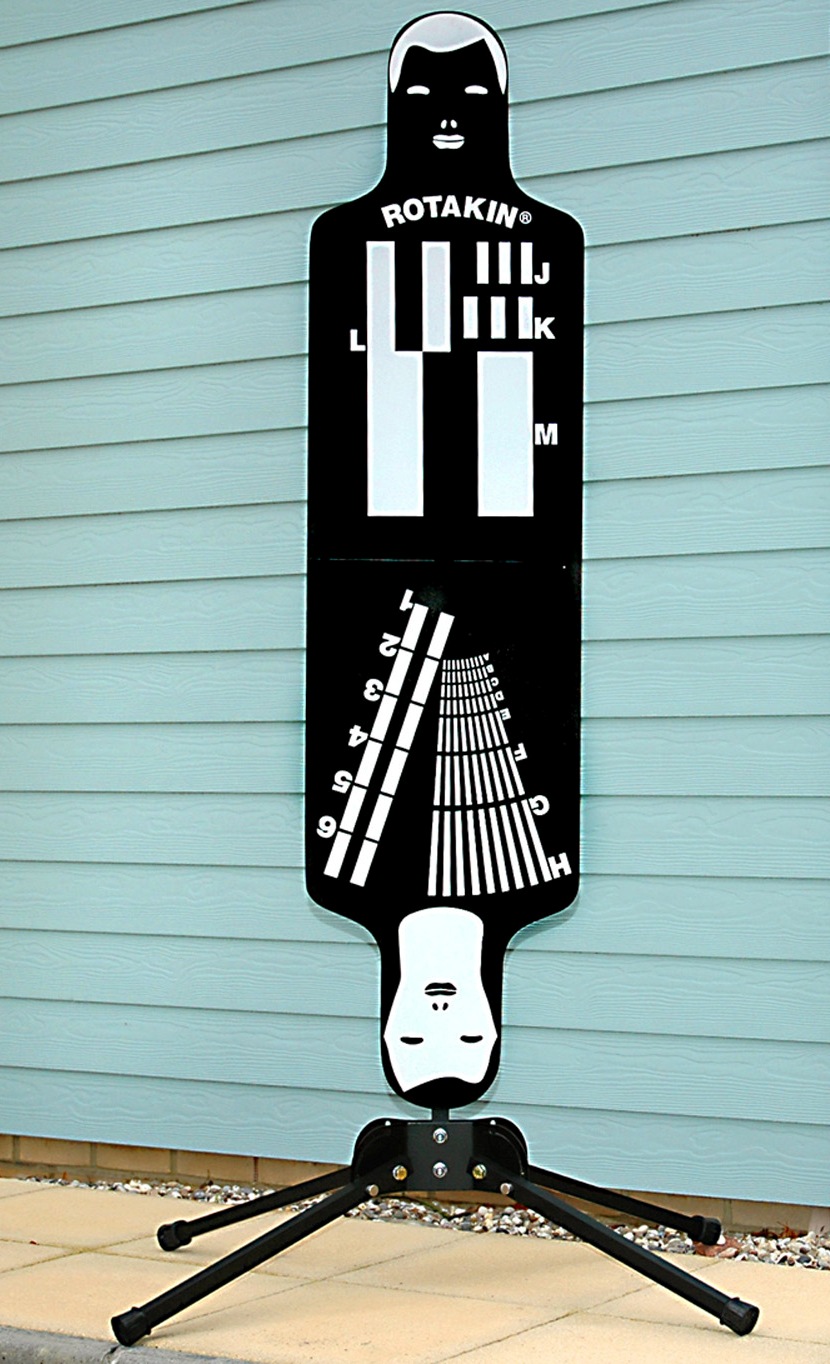
The security industry has its own testing standard. The Rotakin target was developed by HOSDB (Home Office Scientific Development Branch) as a means of auditing the efficiency of a CCTV system. It consists of a human silhouette target 1.6m in height. When the target fills the screen vertically it is said to be 100%R.
The target has various gratings for ensuring the modulation transfer function of the system allows footage to have the required resolution so that video material will stand up in court.
As well as lens, sensor, encoding/compression system the other factor that will affect how well each resolution grating is reproduced is lighting.
The requirement for identification is that the subject more than fills the frame (i.e. 120% R).At 100% R the A-grating should be discernible which implies the system has 500TVL resolution.

Wednesday, July 04, 2012

Electrical Network Frequency analysis

I've been running a training course at the Metropolitan Police's Video and Audio Forensic facility in Sydenham. I've been able to chat to some of the technical forensic guys and one thing has blown me away - Electrical Network Frequency analysis

The whole of the UK mainland is on an electrical power-grid; as generators run up and connect to the grid they have to be at the same frequency and phase-locked to the 50hz AC supply of the rest of the country (or there would be sparks!). Now although the mains supply is pretty accurate at 50hz load variations cause momentary changes that are reflected across the whole country; typically less than 0.2hz either way - mains can be (at any moment) 49.8 through to 50.2hz, but even over short integration periods it is darn close to fifty. I couldn't find any info for the UK, but here are some traces taken from the mains supply in Romania in 1998, three towns, separated by 800Km. 


Notice how the waveforms track each other precisely. It turns out that the pseudo-random sequence is very identifiable after the event. For this reason the MET have been sampling it for the last five years. They know exactly what the mains in mainland UK was doing at any point since 2007. It also turns out that induced mains hum is present in most audio recordings; either through pick-up in the power supply or from the hum of lightbulbs etc. You have to work hard to make an audio recording that doesn't have this watermark down there in the noise. 
They've even discovered they can extract it from the regular flicker of lights on video-recordings. This means that you have a forensic tool for checking the record date and time on evidence. 

There is a Wikipedia page on the subject and they've challenged me to send them some samples of speech recordings I've made over the years to see if they can time-match them.

Sunday, June 24, 2012

Podcast - Contemporary Display Standards

Hugh and Phil take a look at display standards starting with HD/SDi and working through analogue VGA through to DisplayPort.
Hugh talks about some of the work he's been doing with Skillset certifying University TV and Media courses.
Find it on iTunes, vanilla RSS, YouTube or the show notes website.

Friday, June 22, 2012

Broadcast Engineers of a certain age - enjoy!

I'm prep'ing a BVW-75P for training (yes - some people still want to know how to fix VTRs!); here are some pictures.

Friday, June 15, 2012

Secure DNS - what's a home-user to do?!

I find DNS a very interesting (how often do you hear that?!). When I was doing my degree in the mid-80s there was no such thing and you routinely updated you hosts file every few weeks from a master file stored at Sheffield University Computer Science dept. However - my faculty was very IP-aware (even then) and so we were running an early BIND server when I graduated and so I was at least aware of DNS before it became a big deal on the Internet.

DNS is an inherently insecure protocol for the following reasons;
  • It runs over UDP/IP and so doesn't require the 3-way TCP handshake - it's easy to spoof IPs
  • It's unencrypted
  • It doesn't require any kind of authentication and so man-in-the-middle attacks are possible
  • Problems with the protocol itself (i.e. independent of implementation) allow things like DNS cache poisoning (read up about the Kaminsky vulnerability from a couple of years ago).
I've used OpenDNS for several years and it's an excellent service that offers so much more than my ISP's DNS servers. Those guys have recently launched DNSCrypt which is a secure client for Mac or Windows that allow DNS look-up that avoids all the problems above.

Wednesday, June 13, 2012

HP xw6200 workstation and Windows 7

The HP xw6200 is a brilliant dual-3.6Ghz Xeon workstation that is the baby brother of the xw8200 which was Avid's workstation of choice for a couple of years until the Z800 came out in 2010. It's still a powerhouse and re-furb places like Tier-1 knocks them out for a bit more than £100. Given how pokey they are and how well build HP made them (you got quality when you paid >£2k for a PC in 2010!) I often recommend them to friends.

Anyhow - couple of gotchas;
  • Make sure you re-set the BIOS to disable the onboard SATA RAID controller or when you install Windows 7 SP1 you re-boot and get a corrupt boot partition and have to start all over again!
  • The graphics card is an nVidia Quadro4 400NVS - a quad-monitor CAD/NLE display adaptor that has no Windows 7 driver!

Still, an excellent deal if you're willing to put in the time to sort it out.

Monday, May 28, 2012

Temporal Dithering; good for colour depth, bad for extending!

I've become quite a fan of products based on Teradici - an on-the-fly compression system that allows dual-DVI w/peripherals to be extended over ethernet. It works very well and you can't tell you're not looking at something that's been packetised and extended over a network. Howver, a fly in this ointment is the current gen ATI graphics drivers on OS-X. They use a technique called Temporal Dithering;
Temporal dithering is a technique employed by some graphics cards to simulate colors that they cannot natively display by rapidly changing the colors of pixels, tricking the eye into seeing “in-between” colors. During PCoIP remote sessions, temporal dithering can cause extremely high bandwidth utilization because the rapidly changing pixels force the PCoIP protocol to constantly deliver large screen updates to the remote desktop.
The upshot of this is that when you have nothing going on screen - no mouse movement etc (where you'd expect to see no data traveling on the network) you get;

And the effect on screen is compression artifacts and a sluggish mouse pointer. The guys at Amulet Hotkey are looking into it for us, but it might be a deal-breaker.

Flailing around the web revealed someone at Disney who has produced tweaks to X's configuration file for use under Linux; unfortunately this doesn't work in OS-X as the dithering is done by the driver. However, just for reference (or the lulz!)

xorg.cong

Section "Screen"
    Identifier "Screen0"
    Device "Videocard0"

    Monitor        "Monitor0"
    DefaultDepth    24
    Option        "CIOverlay" "On"

    Option        "CursorShadow" "Off"
    Option        "NvAgp" "3"
    Option        "TwinView" "1"
    Option        "SecondMonitorHorizSync" "21.0-140.0"
    Option        "SecondMonitorVertRefresh" "47.0-72.0"
    Option        "TwinViewOrientation" "LeftOf"
    Option        "MetaModes" "1280x1024_72,1280x1024_72; 1280x1024_60,1280x1024_60; 1024x768_72,1024x768_72"
    Option        "TwinViewXineramaInfoOrder" "DFP"
#RandR    Option        "RandRRotation" "true"   # Requires xorg 6.8.1+
#NoEDID    Option        "UseEDIDFreqs" "FALSE"
#NoEDID    Option        "UseEDIDDpi" "FALSE"
#NoEDID    Option        "ModeValidation" "NoEdidMaxPClkCheck"
#ExactMODE    Option          "ExactModeTimingsDVI" "On"
    Option        "DPI" "85x85"
    Option        "AllowGLXWithComposite" "true"
    Option        "DisableGLXRootClipping" "true"
    Option        "AddARGBGLXVisuals" "true"
    Option        "AllowSHMPixmaps" "true"
#FALSE    Option        "Dac8Bit" "true" # forced spatial dithering instead of temporal for teradici performance
#FALSE        Option        "RegistryDwords" "DitherAlgo8=3;DitherAlgo6=3"


# Other possible options. Enable at your own risk
#    Option        "RenderAccel" "On"
#    Option        "Overlay" "On"
#    Option        "SWCursor" "On"
#       Option          "TwinViewXineramaInfoOrder" "DFP-1,CRT-0"
#       Option        "ConnectedMonitor" "DFP-0,CRT-1"
# This can be used to clarify orientation
#    Option        "TwinViewOrientation" "DFP-1 LeftOf CRT-0"
#    Option        "IgnoreDisplayDevices" "CRT"

    Subsection "Display"
        Depth        24
        Modes        "1280x1024_72"
    EndSubsection
EndSection

Friday, May 18, 2012

Why IT practises are bad for broadcast installs

I'm in the middle of a big build where (in common with lots of film and TV facility builds) we're a subsidiary to the IT department and so have space in their comms room rather than have our own MCR. There are quite a few standard practices in building IT installs that don't map nicely onto the optimal configurations for TV builds;

1. Air conditioning - I go on about this endlessly but having done this many times I have a few observations about why under-floor hot-cold isle comms room cooling isn't suitable for TV equipment (and in fact it's not really suitable for IT builds!). Nobody in IT server-room construction has ever been able to answer me any of the objections below other than this is standard practice.
  • Cold air is heavier than hot - why try and fight nature by pushing cold air upwards rather than dropping it down the front of the cabinets?
  • Raised floors leak - cable entry holes into the room and once tiles have been lifted and dropped a lot of cold air is spilling out reducing the pressure in the cold isles.
  • Lots of additional brush-covers for cable entry into the cabinets
  • Dust is forced out of the floor void (and into the equipment!).
2. Patch panel layout - I shudder when I see structured cabling panels where the eight tie-lines to a room just present sequentially with no thought to how they'll be used. It's just lazy and means no attention has been paid until an engineer is patching up. It also means bays are very untidy from the start and you see super-wide bays with cable-management down each side. Things needn't be that messy from the start.  This is a real comms room;


3. "Flood wiring" of cabinets - This one relates to the previous point, but by avoiding thinking about the room and over-spending on 'flood wiring' you see 24-port panels at the top of EVERY CABINET going back to the haystack above.

4. Power specifications - Despite every bit of equipment having a switch mode supply (and hence being an inductive load) every MCB in most mains rooms are C-rated and double the required capacity (C32s for the 16A circuits etc.) - I'm sure using correctly rated D-breakers would be better from a safety and reliability point of view. Again - it's about not taking responsibility early on; keep our options open!

All of these are a function of the fact that the clever part of IT installs is in the switches and servers. The cabling is generic (one cat6 is much like any other) and so there is little compulsion to do it as nicely as it can be.  My heart sinks when I start a job and the first thing the customer's PM says is "...this is off the back of the comms room build"! 

This is the way I like to leave things;


Friday, May 11, 2012

HD/SDi over fibre and SMPTE 297M (2006)

I've recently installed an NVision 8144 router at a large facility and some of the output cards are for fibre - dual LCs on each SFP with 3G video conforming to SMPTE 297M (SDi over single mode fibre). Very nice. Over the last couple of years I've put in a load of the little Black Magic fibre transceivers and although they perform admirably (only had to replace one due to it being roughly handled by an OB rigger!) but I couldn't quite bring myself to believe that the mighty Blackmagic would conform to the same spec! They really are built to budget (and excellent for it). However, I had a situation where my choice was to buy the Miranda fibre receivers (at a grand a piece) OR use the half dozen BMs I already had. To my surprise the Blackmagics worked just fine. Maybe SMPTE compliance does mean something, in the case of fibre I assumed manufacturers would juts vary too much, but I suppose SDi over copper is universal, so why not over glass as well?